This English version of the course material has been machine translated from the Finnish original and may contain errors. If something is unclear, check the Finnish version of this page.
Week 6
The deadline for the exercises below is Monday 7.12. at 23:59
You can get help with the exercises on the course Discord channel and on campus in the help sessions (paja) in BK107:
- Mon 16–19
- Tue 13–16
- Thu 16–19
- Fri 13–16
You can join the course Discord channel with the command /join course TKT20006 - Ohjelmistotuotanto - ohtu
The topics of the week 6 lecture belong to the week 5 multiple choice quizzes, whose deadline is Sunday 6.12. at 23:59:00.
The exercises are related to the chapter Design patterns of Part 4 of the material, which covers software design. Exercise 7 continues the course’s series of [AI] exercises.
Typos or unclear instructions in the exercises?
Suggest a fix by editing this file on GitHub.
Course feedback
In addition to the usual feedback collected at the end, the course uses so-called continuous feedback: you can give anonymous feedback to the course staff at any time at https://norppa.helsinki.fi/targets/112400522/feedback
Problems with uv?
Some instructions can be found here
Submitting the exercises
The exercises are submitted to GitHub and by marking the completed exercises in the submission app https://study.cs.helsinki.fi/stats/courses/ohtu-2026 on the “my submission” tab.
This week’s exercises are submitted to the submission repository you have already used in previous weeks, inside the directory viikko6.
See more detailed instructions on the submission repositories here.
The ticks in the exercise checkboxes are saved in your browser’s local storage.
1. Calculator and command objects
NOTE if you have used a containerised Poetry environment, this exercise will be challenging, since the application has a graphical user interface. Google e.g. with the search terms linux docker gui apps if you want to get the exercise done in a container.
NOTE2 in this exercise it may be enough to have Python on your machine. You do not necessarily need uv at all. See Fix 1 a bit further down
In the directory viikko6/laskin of the course repository there is an implementation of a simple calculator. The calculator has a graphical user interface implemented with the Tkinter library.
Copy the project to your submission repository, inside the directory viikko6.
If needed, first read the Tkinter tutorial in the material of the course Ohjelmistotekniikka. Another option is to study the code with the help of AI, see the hint below.
Hint: using AI in this exercise
AI is an excellent tool for getting familiar with code you have not seen before (see the AI material). It is especially useful if the code uses libraries you do not know beforehand.
You can ask about the code directly in VS Code in Copilot’s Ask mode (if you cannot find the mode in the menu, see this). In the question you can refer to a file, e.g. explain how #file:kayttoliittyma.py works, or you can select part of the code in the editor, in which case the selected code is attached to the question automatically. In my own experiment I selected part of the application’s user interface code (lines 12–28 of the file kayttoliittyma.py) and asked Copilot to explain it:

The explanation continues quite well, although the Finnish is not quite optimal in every respect:

The code has a class StringVar whose behaviour is a bit obscure. Let us ask for clarification:

The lambda in the code is confusing. Is it needed at all? Let us ask for clarification on that:

The code now feels clearer, and once again we learned something new thanks to AI!
Install the project’s dependencies with the command uv sync and start the calculator in the virtual environment with the command python src/index.py.
Running the command should open a window with the calculator’s user interface.
If you run into the error message
ModuleNotFoundError: No module named 'tkinter', the reason may be that your machine does not have Tkinter, which is normally installed along with Python.Fix 1:
- Try whether the application works with your machine’s Python “directly”, i.e. without the virtual environment, with the command
python src/index.pyorpython3 src/index.pywithout being in the virtual environment. If it works, that is enough.Fix 2:
If you use Ubuntu/Linux, the problem may be solved by installing with the command
sudo apt-get install python3-tkFor Mac users, one way to solve the problem is the command
brew install python-tk@3.13, assuming brew is in use. In the installation, use the same version number as the Python you are using.After installing the package
python-tkyou should delete the virtual environment, i.e. the file .venv, and runuv syncagain.
At the moment the application can be used to do additions and subtractions, and to reset the calculator’s value. For undoing a calculation, a button “Kumoa” (Undo) has already been added, but for now it does nothing. The core logic of the application is in the class Kayttoliittyma. At the moment the code has a somewhat nasty if mess:
def _suorita_komento(self, komento):
    arvo = 0

    try:
        arvo = int(self._syote_kentta.get())
    except Exception:
        pass

    if komento == Komento.SUMMA:
        self._sovelluslogiikka.plus(arvo)
    elif komento == Komento.EROTUS:
        self._sovelluslogiikka.miinus(arvo)
    elif komento == Komento.NOLLAUS:
        self._sovelluslogiikka.nollaa()
    elif komento == Komento.KUMOA:
        pass

    self._kumoa_painike["state"] = constants.NORMAL

    if self._sovelluslogiikka.arvo() == 0:
        self._nollaus_painike["state"] = constants.DISABLED
    else:
        self._nollaus_painike["state"] = constants.NORMAL

    self._syote_kentta.delete(0, constants.END)
    self._arvo_var.set(self._sovelluslogiikka.arvo())
Refactor the code so that the method _suorita_komento does not contain a long if mess. Use the design pattern command introduced in part 4 of the course material.
In this exercise you do not yet need to implement the functionality of the undo command!
Refactored, the class Kayttoliittyma may look e.g. like this:
class Komento(Enum):
    SUMMA = 1
    EROTUS = 2
    NOLLAUS = 3
    KUMOA = 4


class Kayttoliittyma:
    def __init__(self, sovelluslogiikka, root):
        self._sovelluslogiikka = sovelluslogiikka
        self._root = root

        # store the commands in a dictionary, i.e. a dict
        self._komennot = {
            Komento.SUMMA: Summa(sovelluslogiikka, self._lue_syote),
            Komento.EROTUS: Erotus(sovelluslogiikka, self._lue_syote),
            Komento.NOLLAUS: Nollaus(sovelluslogiikka, self._lue_syote),
            Komento.KUMOA: Kumoa(sovelluslogiikka, self._lue_syote) # maybe not needed here...
        }

    # ...

    def _lue_syote(self):
        return self._syote_kentta.get()

    def _suorita_komento(self, komento):
        # get the right command from the dict
        komento_olio = self._komennot[komento]
        komento_olio.suorita()
        self._kumoa_painike["state"] = constants.NORMAL

        if self._sovelluslogiikka.arvo() == 0:
            self._nollaus_painike["state"] = constants.DISABLED
        else:
            self._nollaus_painike["state"] = constants.NORMAL

        self._syote_kentta.delete(0, constants.END)
        self._arvo_var.set(self._sovelluslogiikka.arvo())
So the commands now have a method suorita and they get, through the constructor, a Sovelluslogiikka object and a function that can be called to read the input.
2. Undoing commands
Implement the undo operation in the calculator as well.
The idea is to implement a method kumoa in each command object.
So the command object has to remember what the value of the result was before the command was executed, so that it can restore the calculator to the state before the execution.
When the undo button is pressed, the method kumoa of the most recently executed command object is executed.
It is enough that the program remembers the previous result, i.e. the undo operation does not need to work two or more times in a row. Then again, implementing that functionality would not be very hard either if the previous results were stored e.g. in a list.
Optional bonus exercise
Extend your program so that it allows an arbitrary number of consecutive undos.
So if you have e.g. calculated the sum 1 + 2 + 3 + 4 + 5 (with the result 15), pressing the button kumoa repeatedly takes the calculator to a state where the result is first 10, then 6, 3, 2, 1 and finally 0.
For example, the following more complex sequence of operations must also work correctly: Sum 10, Difference 6, Difference 2, Undo (undoes the command Difference 2), Sum 4, Undo (undoes the command Sum 4), Undo (undoes the command Difference 6), Undo (undoes the command Sum 10)
3. Query language for NHL statistics, part 1
In the directory viikko6/query-language of the course repository there is yet another version of the familiar program for viewing NHL statistics.
Copy the project to your submission repository, inside the directory viikko6.
While doing this exercise, the Gutenberg reader of the lecture material can be one source of inspiration. You should study the example in any case if the strategy design pattern is not familiar to you.
This time we are interested in making somewhat more complex “queries” on the player data, e.g. list all players of the team PHI who have at least 5 goals and at least 20 assists.
The code already has some ready-made machinery to get you started. The query above can be run as follows:
def main():
    url = "https://studies.cs.helsinki.fi/nhlstats/2024-25/players.txt"
    reader = PlayerReader(url)
    stats = Statistics(reader)

    matcher = And(
        HasAtLeast(5, "goals"),
        HasAtLeast(20, "assists"),
        PlaysIn("PHI")
    )

    for player in stats.matches(matcher):
        print(player)
The class Statistics has a method matches, which returns a list of the players for whom the method test of the object given as a parameter returns True.
Get familiar with the structure of the program.
- Note how the method
testof the classHasAtLeastuses the function getattr to get the value of the attribute given as a parameter - Another notable feature is the variable-length parameter list used in the constructor of the class
And, recognisable by the*prefix. With this syntax,*matcherscontains a list of the arguments given to the constructor
Hint: using AI in this exercise
If getattr or some other part of the code is unclear, select it in the editor and ask AI to explain how the code works (see the AI material). In my own experiment I selected the class HasAtLeast in the file matchers.py and asked how it works:
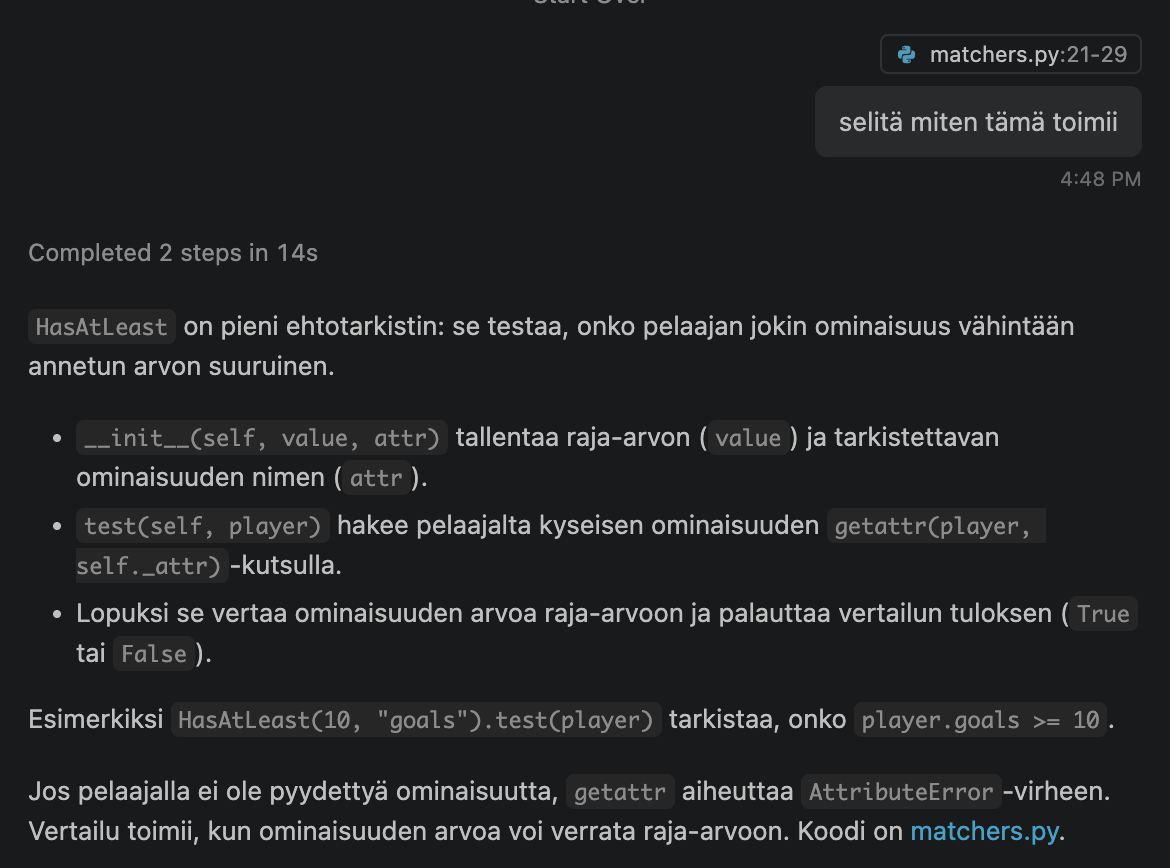
The explanation is clear and includes a concrete example: HasAtLeast(10, "goals").test(player) means the same as player.goals >= 10. It is also worth asking follow-up questions, e.g. why the getattr function is used instead of making a separate class for each attribute.
Implement classes with a test method that allow you to do the following operations:
All (true for all players)
Not (negation of the condition given as a parameter)
HasFewerThan (negation of the HasAtLeast command, i.e. e.g. has fewer than 10 goals)
The condition All, which is true for all players, is not very interesting yet for this exercise, but it is used in the fourth exercise.
You can check that your implementation works by making the query:
matcher = And(
    Not(HasAtLeast(2, "goals")),
    PlaysIn("NYR")
)
Make sure that the result is the players of the team NYR who do not have at least two goals, i.e. those who have scored 0 or 1 goals:
Gabe Perreault       NYR          0  + 0  = 0
Zac Jones            NYR          1  + 10 = 11
Connor Mackey        NYR          0  + 0  = 0
Brennan Othmann      NYR          0  + 2  = 2
Chad Ruhwedel        NYR          0  + 1  = 1
Matthew Robertson    NYR          0  + 0  = 0
All the example outputs use the statistics of the season 2024-25. The season used can be selected in the URL of the statistics, which in the code template is https://studies.cs.helsinki.fi/nhlstats/2024-25/players.txt
Make sure that the query
matcher = And(
    HasFewerThan(2, "goals"),
    PlaysIn("NYR")
)
returns exactly the same list.
The condition All should return all players.
Make sure that the code
filtered_with_all = stats.matches(All())
print(len(filtered_with_all))
prints 899
4. Query language for NHL statistics, part 2
Implement a class Or with a test method, which is true if at least one of the conditions it gets as parameters is true.
Make sure that the query
matcher = Or(
    HasAtLeast(45, "goals"),
    HasAtLeast(70, "assists")
)
returns those who have at least 45 goals or 70 assists, i.e. the following list
Mitch Marner         TOR          27 + 75 = 102
Connor McDavid       EDM          26 + 74 = 100
William Nylander     TOR          45 + 39 = 84
Nathan MacKinnon     COL          32 + 84 = 116
Leon Draisaitl       EDM          52 + 54 = 106
Nikita Kucherov      TBL          37 + 84 = 121
Make sure that the query
matcher = And(
    HasAtLeast(70, "points"),
    Or(
        PlaysIn("COL"),
        PlaysIn("FLA"),
        PlaysIn("BOS")
    )
)
returns everyone with at least 70 points who plays in one of the teams COL, FLA or BOS, i.e. the list:
David Pastrnak       BOS          43 + 63 = 106
Sam Reinhart         FLA          39 + 42 = 81
Nathan MacKinnon     COL          32 + 84 = 116
Cale Makar           COL          30 + 62 = 92
Aleksander Barkov    FLA          20 + 51 = 71
Structurally, the queries are based on the decorator design pattern, similarly to the example decorated stack in part 4 of the material. The And and Or queries are also built in the spirit of another design pattern, composite: they are objects implementing the Matcher interface that themselves contain many Matcher objects. Their user, however, knows nothing about the internal structure.
5. Improved query language, part 1
The problem with the query language built with Matcher objects is that building queries is tedious, since a new object has to be created for every part of the query. Another downside is that the code using the queries has a direct dependency on the Matcher objects it uses.
In the spirit of the stack builder introduced in part 4 of the material, make a query builder that you can use to create Matcher objects.
The builder can work e.g. as follows.
First a query that returns every player:
def main():
    url = "https://studies.cs.helsinki.fi//nhlstats/2024-25/players.txt"
    reader = PlayerReader(url)
    stats = Statistics(reader)

    query = QueryBuilder()
    matcher = query.build()

    for player in stats.matches(matcher):
        print(player)
In this query you can, and should, use the All matcher from the previous exercise.
Next a query that prints the players whose team is NYR:
def main():
    url = "https://studies.cs.helsinki.fi//nhlstats/2024-25/players.txt"
    reader = PlayerReader(url)
    stats = Statistics(reader)

    query = QueryBuilder()

    matcher = query.plays_in("NYR").build()

    for player in stats.matches(matcher):
        print(player)
Next a query that prints the players whose team is NYR and who have at least 10 but fewer than 20 goals:
def main():
    url = "https://studies.cs.helsinki.fi//nhlstats/2024-25/players.txt"
    reader = PlayerReader(url)
    stats = Statistics(reader)

    query = QueryBuilder()

    matcher = query.plays_in("NYR").has_at_least(10, "goals").has_fewer_than(20, "goals").build()

    for player in stats.matches(matcher):
        print(player)
The list of players is the following:
Alexis Lafrenière    NYR          17 + 28 = 45
Jonny Brodzinski     NYR          12 + 7  = 19
Adam Fox             NYR          10 + 51 = 61
So conditions chained one after another work on an “and” basis.
Make sure that your solution works with the query of the previous example.
In this exercise it is enough that the query builder can form conditions combined on an and basis.
Long chains of method calls, e.g.
matcher = query.plays_in("NYR").has_at_least(10, "goals").has_fewer_than(20, "goals").build()
are somewhat unpleasant to read if they are written on a single line. It is common to split them on a “one call per line” basis:
   matcher = (
      query
      .plays_in("NYR")
      .has_at_least(10, "goals")
      .has_fewer_than(20, "goals")
      .build()
    )
Unfortunately, in this case Python requires the use of “extra” parentheses.
6. Improved query language, part 2
Let us extend the query builder so that it can also be used to form queries combined with an or condition.
A query containing an or condition can be formed e.g. as follows:
matcher = (
  query
    .one_of(
      query.plays_in("PHI")
          .has_at_least(10, "assists")
          .has_fewer_than(10, "goals"),
      query.plays_in("EDM")
          .has_at_least(50, "points")
    )
    .build()
)
The list of players should be:
Egor Zamula          PHI          3  + 12 = 15
Connor McDavid       EDM          26 + 74 = 100
Evan Bouchard        EDM          14 + 53 = 67
Rasmus Ristolainen   PHI          4  + 15 = 19
Nick Seeler          PHI          3  + 17 = 20
Leon Draisaitl       EDM          52 + 54 = 106
Cam York             PHI          4  + 13 = 17
Jamie Drysdale       PHI          7  + 13 = 20
Travis Sanheim       PHI          8  + 22 = 30
Make sure that your solution works with the query of the previous example.
7. Plan first, then implement [AI]
Note: the OpenCode versions of the exercises have not been tested as thoroughly as the Copilot versions. If you find errors or unclear parts in the instructions, please report them, see Typos or unclear instructions in the exercises?
Note: if you run out of CurreChat tokens, you can get more by sending a message to matti.luukkainen@helsinki.fi or to the user mluukkai on Discord.
By default, OpenCode runs commands and edits files without asking for permission. Before you start, make sure that command approval is enabled, i.e. that the file opencode.json containing the setting is either in the project directory or in one of its parent directories, e.g. in the root of your submission repository
Before doing the exercise, read the week 6 section Plan first of the material AI in software engineering.
Thanks to the query builder, forming queries is now more pleasant than before. However, the queries are still Python code. Let us extend the program so that a query can also be given as a string:
matcher = parse("team = NYR and goals >= 10 and goals < 20")

for player in stats.matches(matcher):
    print(player)
The result must be the same as in the example of exercise 5:
Alexis Lafrenière    NYR          17 + 28 = 45
Jonny Brodzinski     NYR          12 + 7  = 19
Adam Fox             NYR          10 + 51 = 61
The query language has the following conditions:
team = XXXi.e. the player plays in the team XXX<attribuutti> >= <luku>i.e. the player has at least the given number of e.g. goals<attribuutti> < <luku>i.e. the player has fewer than the given number
Conditions can be combined with the words and and or, and and binds more tightly than or. So the example query of exercise 6 would have the form:
matcher = parse("team = PHI and assists >= 10 and goals < 10 or team = EDM and points >= 50")
and its result is the same as in the example of exercise 6.
Let us do the implementation with the help of an agent, but this time let us plan first.
Make sure that the code of exercises 1-6 has been committed
Open the directory viikko6/query-language in VS Code as its own workspaceStart OpenCode in the directory viikko6/query-language and create an instructions file for the project if needed
Select Plan as the mode in Copilot’s Chat view (if Plan is missing from the menu, see this)Switch with the Tab key to the Plan agent, which does not change code, and give it the task. In the request, state at least the following constraints:
- the implementation must use the existing
QueryBuilderclass, and the logic of the matcher classes must not be reimplemented - unit tests must be written for the implementation
- the implementation must be split into small steps, each of which can be verified to work separately
Read the plan made by the agent carefully. If you do not understand something in the plan, ask the agent for a concrete example.
Ask the agent to change the plan at least once. If you think the plan is good as it is, you can e.g. ask the agent to add a not operation to the query language or to justify one of the decisions in its plan
When you are satisfied with the plan, start the implementation: switch to the Build agent and ask it to implement the plan, e.g. “Implement the plan”
When the agent is done, make sure that both example queries above produce the correct result
Finally, go through the finished code and the tests written by the agent. Ask the agent to explain how the code works, so that you get at least a reasonably good understanding of it.
Write a report on your experiences into a file plan.md stored in the directory viikko6
In the report, tell
- What did the agent’s first plan look like, and what was changed in it?
- Did the agent follow the plan in the implementation phase?
- Was the code produced by the agent understandable and clearly structured?
- Did you learn something new in the exercise?
Submitting the exercises
Push all the exercises you have done (except those that say the exercise is not submitted anywhere) to your submission repository on GitHub, and mark the exercises you have done in the submission app https://study.cs.helsinki.fi/stats/courses/ohtu-2026