This English version of the course material has been machine translated from the Finnish original and may contain errors. If something is unclear, check the Finnish version of this page.
Part 2

This week’s topic is software requirements engineering, especially from the point of view of agile methods. We also take a brief look at product management, both at the level of the whole project and during a sprint.
Typos in the material
Suggest a fix by editing this file on GitHub.
Course feedback
In addition to the usual feedback collected at the end, the course uses so-called continuous feedback: you can give anonymous feedback to the course staff at any time at https://norppa.helsinki.fi/targets/112400522/feedback
Requirements engineering
Perhaps the most central problem in the software development process is defining the customer’s requirements for the software to be built.
Software requirements are thought to fall into two categories. Functional requirements mean everything that can be done with the software, that is, the functionality the software offers. The other category is non-functional requirements: the “quality requirements” that concern the software as a whole (such as usability and security) and the constraints set by the environment in which the software operates.
Finding out, documenting and managing requirements is called requirements engineering. Regardless of the process model used, requirements engineering must at least start before the software is designed and implemented.
In the waterfall model, requirements engineering is done in its entirety before the software is designed and implemented. In iterative and agile software development, requirements engineering happens a little at a time as the functionality of the software grows.
Phases of requirements engineering
The nature of requirements engineering varies a lot depending on the software being developed, the developing organisation and the development process used. In any case, the end user, the customer or a representative of the customer must take an active part in the process.
Requirements engineering is usually divided into a few activities:
- requirements elicitation
- requirements analysis
- requirements validation
- requirements documentation
- requirements management
Most often these activities overlap, and requirements engineering proceeds in a spiral, becoming more precise along the way: first some of the requirements are elicited, analysed and documented. The process continues until the desired amount of requirements has been documented at the required level of detail.
Methods for requirements elicitation
At the start of requirements engineering, it is a good idea to identify the stakeholders of the system, that is, the parties that deal with the system directly or indirectly. These naturally include the intended end users of the software and the representatives of the ordering company who have decision-making power, and also, when needed, representatives of the parties responsible for the information systems that the software being specified integrates with.
Once the stakeholders have been identified, “all possible means” are used to dig out the requirements, for example:
- interviewing representatives of the stakeholders
- holding brainstorming sessions between the customer and the development team
After the initial discussions, the development team can structure the elicitation together with representatives of the stakeholders. Often the team thinks about what different user roles the application has, and comes up with typical usage scenarios for each user role.
It is also worth making user interface sketches and paper prototypes of the application. By examining and walking through scenarios and prototypes, the customer can further refine their view of the requirements.
Nowadays, instead of a paper prototype, AI can be used to quickly build a clickable prototype that looks like it works. Making such a “vibe-coded” prototype often takes only hours, and the customer can try out the idea almost as if it were a real application, which brings misunderstandings about the requirements to light even before the real implementation starts. The prototype should still be seen as a disposable tool for finding out requirements, and it is not necessarily wise to use it as such as the basis of the implementation, see Vibe coding vs. controlled agentic software development.
If the application being developed is meant to replace an existing system, requirements can also be found out by observing how end users work. This method is called ethnography.
If the new application is meant to replace an existing work process, for example a room booking system, it is often useful to also examine the work process itself and try to think of ways to streamline it. It is often not sensible to replicate an old, perhaps clumsy, work process as such in the new application.
More structured methods have also been developed for requirements elicitation. What they have in common is that requirements are not asked for directly as features, but are derived from the need that is the reason for building the software in the first place.
Jobs to be done thinking (JTBD) asks what “job” the user is trying to get done and why, instead of asking directly what features they want. According to Clayton Christensen, who popularised the idea, a customer “hires” a product to do some job. In the best-known example, a fast-food chain tried to increase its milkshake sales by asking customers what kind of milkshake they would like, but the changes made according to their wishes did not increase sales. When the chain then found out what job the milkshake was really hired to do, it turned out that a large share of the milkshakes were bought in the morning for a long commute: the milkshake kept hunger at bay and made a boring drive more pleasant. The milkshake’s competitors were therefore not other chains’ milkshakes but bananas, bagels and doughnuts, and this led to completely different ideas for improvement. You can read more on the topic, e.g., on the Christensen Institute’s website.
JTBD thinking has also given rise to the job story, proposed as an alternative to the user story (Alan Klement: Designing Features Using Job Stories). Instead of a user role, it describes the situation in which the need arises, and the user’s motivation: When situation, I want to motivation, so I can expected outcome. For example: when I’m on the bus on my way to a lecture, I want to see the day’s deadlines at a glance, so I know whether I have time to submit my exercises before the lecture. Describing the situation tells developers more than a user role does, e.g., that the application is used on a phone and quickly.
Impact mapping is a method developed by Gojko Adzic that starts from a business goal and proceeds through it to the actors and the desired changes in their behaviour. Only at the end are features considered that could bring the changes about. The result is a tree-like diagram with four levels:
- why: a measurable business goal
- who: actors whose behaviour affects whether the goal is reached
- how: the desired changes in the actors’ behaviour (impact)
- what: features (deliverables) that could bring the changes about
The goal of an online store could be, for example, to increase the share of repeat purchases by 20 percent a year. One of the actors is the regular customer, and the desired change is that they reorder the same products effortlessly. Features could include reordering from the order history and a reminder when a previously bought product is probably running out. Another actor could be customer service, whose desired change is that problems get solved faster so that the customer does not switch to a competitor. This could be supported, e.g., by showing the customer’s order history to the customer service agent and approving a return with a single button.
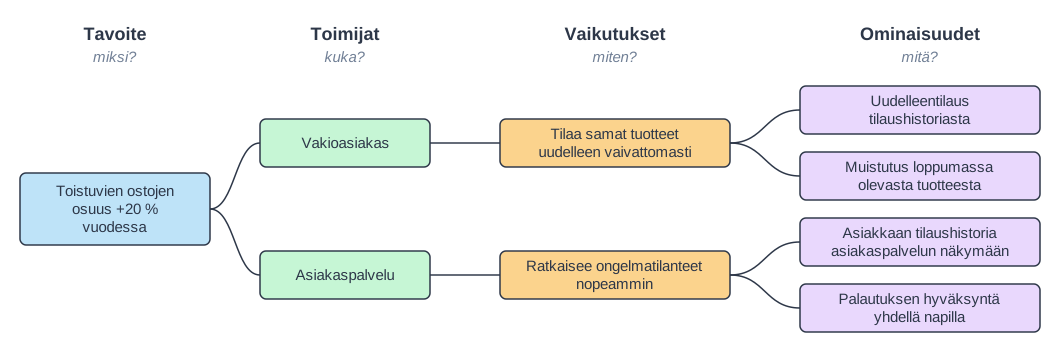
The features on the map are assumptions about what will bring about the desired change. The map thus helps with prioritisation: the features believed to have the greatest impact on the goal are implemented first, and the results are measured. A feature that has no path to any goal is a good candidate for removal. The idea is close to Lean startup, discussed later, and to the opportunity solution tree of product discovery. Instructions for drawing maps can be found on the impactmapping.org website.
Both methods help ensure that the requirements serve a real need and are not just wishes for features.
Analysing, documenting, validating and managing requirements
In addition to gathering requirements, the requirements need to be analysed. Do the requirements contradict each other, and are they comprehensive enough, that is, do they take all possible usage scenarios into account? It is also essential to make sure that meeting the requirements is possible in the first place and economically sensible.
It is often also good to make sure that a requirement is verifiable, that is, that it is possible to tell from the finished system whether the system meets the requirement. For example, the requirement the system is easy to use is not a good one, because ease of use is hard to test. Even usability requirements can be defined in a verifiable way, though, e.g., a new user can place an order without instructions in under two minutes.
The elicited requirements must also be documented in one form or another. Before starting to code, a developer needs a “spec”, that is, a description of how the application or a part of it should work. Testing also requires a description of how the program under test is supposed to work.
Especially when the waterfall model is used, the requirements document is an essential part of the contract between the customer and the developers of the software. The price of the application is based on the functionality described in the requirements specification, and if the customer changes their mind, this may lead to extra costs.
It is also essential to validate the requirements, that is, to make sure that the gathered and documented requirements really correspond to the customer’s view, and that they describe a system the customer feels they need.
The requirements must also be managed in one way or another, especially if they change in the middle of the development process. Management means, for example, recording new requirements that occur to the customer, modifying requirements that have already been recorded, prioritising requirements, etc.
The nature of the requirements engineering process, that is, how requirements are gathered, analysed, documented, validated and managed, therefore varies a lot depending on the nature of the software project. We will return to some areas of requirements engineering in more detail later.
Functional requirements
As mentioned, requirements fall into two categories, functional and non-functional requirements.
Functional requirements describe what can be done with the system, that is, what functions it offers from the point of view of the user (or other systems).
For example, the functional requirements of an online store could be the following:
- a customer can register as a user of the online store
- a registered customer can add a product to the shopping cart
- after a successful credit card payment, the customer receives an email confirming the purchase
- a customer who has logged in to the system can see their own purchase history
- an administrator can add new products to the store’s inventory
- a supplier can update the price information of products in the system
- the day’s purchases are synchronised to the analytics system
Functional requirements can be documented, e.g., as “feature lists”, as is done on the course Ohjelmistotekniikka (Software Development Methods). UML use cases were once in fashion, and they were also used in earlier versions of the Ohjelmistotekniikka course. In agile methods, requirements are often documented as user stories, which we will look at in more detail shortly.
Regardless of how functional requirements are documented, it is quite common for requirements to be expressed in a form that describes a single usage scenario of the system for some user role.
For example, a supplier can update the price information of products in the system describes a piece of the system’s functionality for users who have the role supplier.
Non-functional requirements
The other category of requirements, non-functional requirements, is divided into two areas: quality requirements and constraints.
Quality requirements (quality attributes) are factors that guide and restrict the functionality of the whole system, e.g.
- usability: what the user experience of the application is like
- accessibility: whether the application’s functionality is usable for everyone, e.g., for visually impaired people or people with physical disabilities
- security: who has access to the system and the data it handles
- performance: how quickly the application responds to different user inputs
- scalability: whether the application stays responsive, that is, fast enough, as the user load or the amount of data handled grows
- stability: whether the system recovers from different error situations
Not all quality requirements are directly visible to the user of the system; such requirements include, for example
- extensibility: whether it is easy to add functionality to the application in the future
- testability: whether the correctness of the application can easily be verified during further development
There are a great number of different categories of quality requirements; e.g., Wikipedia lists a large number of them. In industry, quality requirements are often structured using the quality model of the ISO/IEC 25010 standard. Its version updated in 2023 divides software quality into nine main characteristics: functional suitability, performance efficiency, compatibility, interaction capability (previously usability), reliability, security, maintainability, flexibility (previously portability) and safety.
Constraints include, among other things
- implementation technology: which programming languages and libraries the application is implemented with, and which databases are used
- usage environment: whether the application is used in a browser or is a desktop or mobile application
- integration with other systems: whether, e.g., a user account of some external service is used for logging in, or data offered by some open APIs
- compliance with laws and standards, for example
- the EU General Data Protection Regulation (GDPR) on the processing of personal data
- the European Accessibility Act, according to which, among others, online stores and other digital consumer services must be accessible (page in Finnish) from 28 June 2025
- the EU Cyber Resilience Act, which sets security requirements for products that contain software. The obligations come into force in stages in 2026–2027.
- the EU AI Act, which sets requirements especially for high-risk AI systems
Unlike functional requirements, which often describe “individual features” of the system (e.g., a product can be added to the shopping cart), non-functional requirements usually concern the whole system and affect how the basic structure of the system, that is, its architecture, must be designed. For example, if you want to build an online store that scales to millions of users, it must be built in a completely different way from the ground up than an online store that can have at most a couple of dozen simultaneous users. If quality requirements change radically as development proceeds, making the changes can sometimes be difficult and require a bigger overhaul of the principles on which the whole application is built.
Requirements engineering in the era of the waterfall model
The nature of requirements engineering has varied greatly over time.
In the spirit of the waterfall model, requirements engineering was considered a separate phase of the development process that had to be completed in its entirety before design started. The idea was that design should not affect the requirements, and correspondingly the requirements must not restrict design unnecessarily.
Experts emphasised that the requirements documentation must be comprehensive and consistent. It was therefore considered absolutely essential to gather and document all of the customer’s requirements right at the start. There were even approaches in which the requirements were to be expressed in a formal, that is, mathematical, language instead of natural language, so that, e.g., proving their consistency would be possible.
For a long time it was taken for granted that if a mistake is made in the specification phase and noticed only later during development, for example only when the application is tested, making the change is many times more expensive than right at the start. The logical conclusion was to make requirements engineering a very heavy and carefully done phase. And because requirements engineering and development were done by different people, everything had to be documented in great detail.
The belief that fixing errors gets more expensive over time has since been questioned: the figures supporting it are largely based on data from the 1970s and 80s, and, for example, in a study by Menzies et al. (2017) covering 171 projects, fixing errors found late was not systematically more expensive.
Waterfall-style requirements engineering is difficult…
As already noted in Part 1, the ideal that requirements engineering can be separated entirely into its own, carefully executed phase has turned out to be a utopia.
There are several reasons why changes in the requirements are almost inevitable. The operating environment of organisations that use software changes rapidly. What is relevant today is not necessarily relevant 3 months from now. Customers cannot express their needs exhaustively in advance, and even if a customer were able to specify everything in advance, their opinion will very likely change once they see the end result.
Another source of problems is that despite careful requirements engineering, software developers do not manage to interpret the recorded requirements the way the customer or end user who stated them meant. If there is no direct communication between developers and users, misunderstandings are very likely.
Neither is it possible or sensible to separate requirements engineering completely from design. Design helps to understand the problem domain more deeply, and that in turn often generates changes to the requirements.
Software is increasingly built on top of ready-made components, e.g., open source libraries or SaaS (Software as a Service) services on the web, and this too must be taken into account in requirements engineering.
If design and implementation-level matters are taken into account in requirements engineering, formulating and prioritising the requirements is also easier: this way it is possible to estimate, at least in some way, the cost of implementing the requirements.
Without taking design and implementation into account, there is a risk that the customer wants a requirement in a form that multiplies the cost of implementation compared to a slightly differently formulated requirement that would in principle be just as good from the customer’s point of view.
Requirements engineering in iterative and agile software development
The approach of iterative and agile software development in the 2000s is to integrate all the phases of software development. Software projects of course still start with requirements engineering, but the initial requirements specification only gives a direction, and it has not necessarily been done in detail beyond the needs of the first few iterations.
In the spirit of agile requirements engineering, the customer (the Product Owner when Scrum is used) prioritises the requirements so that each iteration implements the requirements that bring the customer as much business value as possible. The developers estimate the amount of work needed to implement the requirements and decide how many requirements they can take into each iteration.
During each iteration, specification, design, programming and testing are done to the extent needed. Requirements engineering, too, therefore becomes more precise as the project proceeds. Each iteration is meant to produce finished new functionality for the application being developed. The output of each iteration in turn serves as input for specifying the requirements of the next iteration.
Growing the software iteratively and incrementally, piece by piece, makes it possible to put the application into production, that is, into use by real users, even before the application is finished.
This has many benefits: the application can start producing monetary value even before the development project ends, and feedback from real users makes it possible to still refine the direction of requirements engineering and further development of the application.
The overarching theme of agile software development and its requirements engineering is thus to produce maximal value for the customer in every possible way.
Experimental requirements engineering: Lean startup
The book The Lean startup, published by Eric Ries in 2011, describes/formalises a systematic way of eliciting requirements in especially uncertain contexts, such as startup companies.
The model is based on repeating a three-part build-measure-learn cycle:
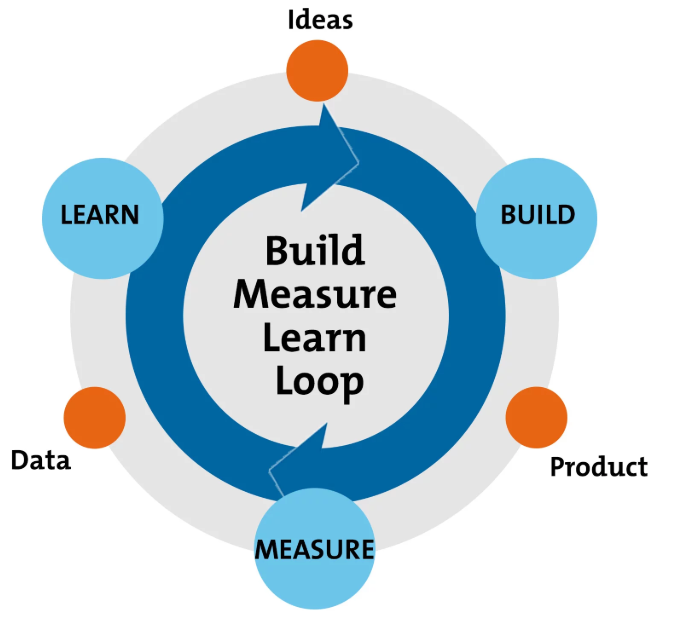
For example, when building internet services or mobile applications, there is no certainty whatsoever about the users’ needs, that is, the requirements of the system; one can only make assumptions about what people would want to use. In the beginning, the system does not even have customers or users whose opinion could be asked.
The principle is to start from some idea of what users want and to make a hypothesis of how customers would behave if the system/functionality/set of features in question had been implemented.
After this, a so-called minimum viable product (MVP) that implements the feature is quickly built. There is no single, universally accepted definition of a minimum viable product, but, e.g., Wikipedia says the following
A minimum viable product (MVP) is a product with just enough features to satisfy early customers and provide feedback for future product development.
An MVP is thus a kind of minimalist implementation of the software or of some new feature of it, motivated by the need to collect user feedback. An MVP is not yet built according to the best practices of software development in every respect, and its features are often limited, containing only as much functionality as is minimally needed to measure the hypothesis.
AI agents have made building prototypes and MVPs considerably faster. So-called vibe coding is well suited to disposable experiments, but if the MVP becomes a permanent part of the product, a more controlled approach is needed, see Vibe coding vs. controlled agentic software development.
The MVP is implemented as quickly as possible and put into production for real users. After this, it is measured how users behave with respect to the new functionality implemented by the MVP. If the product is, for example, an internet service, it can be measured how many people find the service’s front page, register as users, log in to the system, are still logging in a week after registering, etc.
If the MVP concerns some new feature implemented in the system, A/B testing is often used: the new feature is released only to some of the users, while the rest continue using the old feature. A new feature tested with an MVP could be, e.g., a new kind of recommendation algorithm for an online store, and the experimental setup makes it possible to measure whether the feature under test produces more purchases than the previous version of the system.
A/B testing does not suit every situation, though. Drawing reliable conclusions requires a large enough number of users, a metric agreed in advance and a statistical evaluation of the results of the experiment. With a small number of users, differences may be due to pure chance. Technically, A/B testing is usually implemented with feature flags, which we will return to in Part 3.
The behaviour of users measured from the real system is thus compared to the hypothesis set at the start, and in this way it is possible to learn whether the implemented requirements were desirable with respect to the use of the system, that is, whether the features are used, whether they bring in more paying customers, whether they make users more engaged with the application, whether they make users buy more, etc.
If the idea under test turns out to be useful, a more robust implementation of the functionality replaces the MVP in the application. If, on the other hand, the implemented idea did not turn out to be good, it is possible to return to the previous version of the system and continue the build-measure-learn cycle by making a hypothesis about some other idea.
The purpose of the Lean startup method is thus to learn systematically and as quickly as possible what customers want, so the method can be thought of as a kind of requirements analysis and validation method.
Despite its name, the Lean startup method is used especially heavily in large companies that produce internet services, such as Meta, Google, Netflix and Amazon. Experimental product development is also in active use in the games industry. Experiments run in production also raise ethical questions, however: the goal of experiments must not be to optimise user interface solutions that mislead users, so-called dark patterns (page in Finnish), and the EU Digital Services Act (DSA) in fact prohibits their use on online platforms.
Product discovery
The idea of Lean startup has since broadened into the more general practice of product discovery. Lean startup describes the cycle of testing a single idea, whereas product discovery makes investigating ideas a continuous part of the team’s work. The team keeps finding out what is worth building while it implements features that have already been chosen. This is called dual-track development:
- the discovery track finds out what is worth building: users are interviewed, prototypes are tested and small experiments are run
- the delivery track implements the chosen ideas at production quality, e.g., in Scrum sprints
This way, the product backlog receives ideas for which there is already some evidence of value. Discovery is not a separate phase of the project or the work of a separate team; the same people do both. For example, the Product Owner, the team’s user interface designer and one of the developers can interview customers every week.
Discovery is often structured with Teresa Torres’s opportunity solution tree. The tree has four levels, which can be illustrated with the online store example used in connection with impact mapping:
- desired outcome: the share of repeat purchases grows
- opportunities: user needs and problems found in interviews, e.g., “I forget to order coffee filters before they run out” or “putting together the same shopping cart every time is tedious”
- solutions: ideas that could address the need, e.g., a reminder message or reordering from the order history
- experiments: ways of testing the assumptions behind a solution before the solution is built, e.g., showing a clickable prototype to five customers or sending a reminder message by hand to a small group of customers
The structure resembles impact mapping, but the focus is on users’ needs: solutions are not considered before the need has been identified together with real users. It is also worth coming up with several alternative solutions to the same need and comparing them, instead of implementing the first idea that comes to mind.
The idea is related to product thinking, discussed in Part 1: backlog items are hypotheses about what produces value for users, not requirements known in advance.
Product discovery also affects what kind of responsibility the team is given. Marty Cagan distinguishes between feature teams and product teams (Product vs. Feature Teams). A feature team is given a feature that has already been decided on to implement, e.g., “add a reorder button to the order history”. A product team, on the other hand, is given a problem to solve, e.g., “increase the share of repeat purchases”, and it is also responsible for making sure that the chosen solution really works. If reordering does not increase purchases, the feature team’s work is still done, but the product team’s is not. A product team thus does product discovery itself instead of implementing requirements that others have specified for it. For the same reason, many organisations are moving from fixed-term projects to permanent product teams that develop and maintain the same product for a long time.
Note that Cagan’s feature team is a different thing from the feature team presented in Part 5 in connection with LeSS, which means a team that implements whole pieces of functionality that produce value for the customer, instead of layers of the architecture.
Requirements engineering and project planning in an agile process model
Next, let’s go through a common way of managing requirements and planning a project in an agile software project.
The approach is based on applying certain practices of Scrum and eXtreme Programming (XP). It draws on many books and blog posts, among others Henrik Kniberg: Scrum and XP from the trenches, James Shore: Art of Agile development and Jeff Sutherland et al.: A Scrum book, all available online, as well as Mike Cohn’s excellent books Agile Estimation and Planning and User stories applied.
User story
The most important tool of agile requirements engineering is the user story. The Finnish term käyttäjätarina is sometimes used for the same thing, but the translation is not fully established, so the Finnish version of this material uses the English term.
A user story describes functionality that will be valuable to either user or purchaser of software. User stories are composed of three aspects:
- A written description of the story, used for planning and reminder
- Conversations about the story to serve to flesh the details of the story
- Tests that convey and document details and that will be used to determine that the story is complete
User stories thus describe functionality that is valuable from the end user’s point of view. To achieve this, stories are written in language the customer can understand.
According to items 1 and 2 of the definition, a user story is a high-level textual description and a promise/reminder that the precise description of the functionality must be worked out with the customer.
The following could be descriptions (written description) of user stories for an online store application:
- a customer can add a product to the shopping cart
- a customer can remove a product from the shopping cart
- a customer can pay for the products in the shopping cart by credit card
A user story is thus not a traditional requirements specification that expresses the requirements of the functionality exhaustively; a user story is rather a “placeholder” for a requirement, that is, a reminder and a promise that the requirements of the functionality will be worked out at a sufficient level before the user story is implemented.
The third item of the definition says that a story includes Tests that convey and document details and that will be used to determine that the story is complete. A story should thus also have a set of tests or criteria based on which the story can be considered implemented.
How the acceptance criteria of user stories are expressed varies a great deal. In the best case, they are tests that can be run automatically. They can also be a list of scenarios recorded in some way along with the story. It is fairly common, however, that they are not recorded at all, and instead the Product Owner, a customer representative or someone responsible for quality assurance accepts the story as done by manually testing the corresponding functionality in the system.
Clearly recorded acceptance criteria are also useful when AI is used, as they serve as a precise specification given to a coding agent. Read more on the topic in the material AI in software engineering.
Ron Jeffries has given a definition of user stories that has exactly the same content as Mike Cohn’s three-part definition but is worded slightly differently. In his words, a user story is card, conversation, confirmation (CCC), that is
- card: a note-like, often even a physical index card, so by no means an extensive waterfall-style requirements document stored in a binder
- conversation: implementing the story requires a lot of conversation between the developers and the Product Owner, customers, end users, etc., to find out what the story is really about
- confirmation: the criteria by which the story can be confirmed to be implemented and done
An example of a user story
Before remote work became common with the pandemic, it was customary to write the description of a user story on a small, roughly 10–15 cm index card or a post-it note. An example borrowed from Scott Ambler
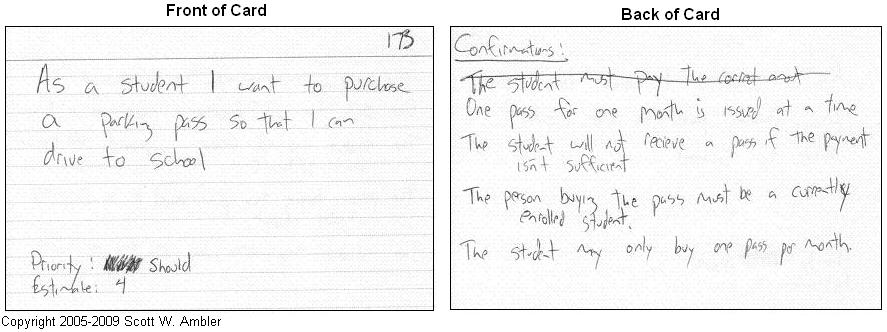
The front of the card has a short description of the story’s content, a priority and an estimate. Estimate means the effort estimate for implementing the card’s functionality. We will return to estimation in more detail soon.
The back of the card has a set of acceptance criteria for the story, written in relatively informal language.
Acceptance criteria often describe a set of different conditions for how the functionality described by the story should behave in different situations. Here the content of the story is As a student I want to purchase a parking pass, and the acceptance criteria specify different conditions related to purchasing:
- the buyer of the parking pass must have registered as attending
- the parking pass is granted for one month at a time
- only one parking pass can be bought per month
Acceptance criteria are the result of discussions with the Product Owner or the customer about the scope of the story’s functionality. Often acceptance criteria specifically limit the functionality. The criteria of the example story still leave many details open, for instance regarding payment: how does it happen? The criteria could be supplemented as follows
- the parking pass is paid in cash or by bank transfer in online banking
- in the case of an online payment, a reference number generated personally for the student must be used
Nowadays, teams that work remotely or in a hybrid fashion use some electronic system instead of post-it notes and index cards to record user stories, e.g., Jira or GitHub projects.
When stories have been recorded, e.g., as GitHub issues, implementing a story can also be handed to an AI cloud agent. In that case, the story’s description and acceptance criteria serve as the agent’s specification, and their quality determines the outcome, see Cloud agent.
Criteria for a good user story
The previous example
As a student I want to purchase a parking pass so that I can drive to school
is formulated in a form popular in many places
As a type of user, I want functionality so that business value
The idea of this formulation is that the user story draws attention to whom the described function of the system produces value for. The form does not really work in Finnish descriptions, so it is not used on this course.
This form has also started to be criticised, among other things because it draws too much attention to how the story is written down instead of the matter itself, that is, what the story is about. The popularity of the format is in fact declining:
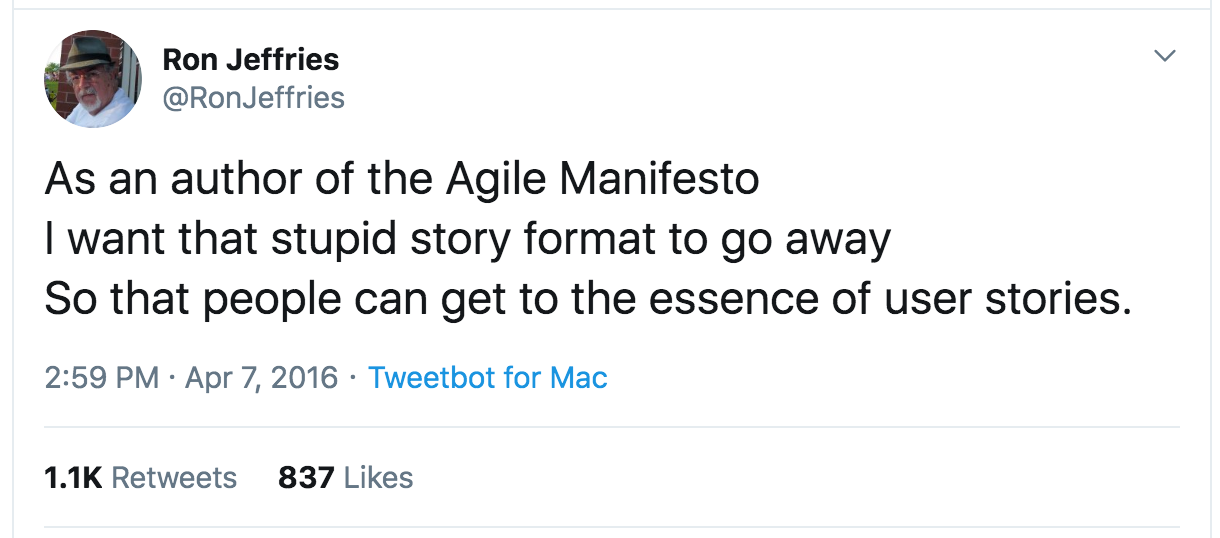
In his article INVEST in good User Stories, Bill Wake lists six desirable properties for user stories:
- Independent
- Negotiable
- Valuable
- Estimable
- Small
- Testable
According to the criterion Independent, user stories should be as independent of each other as possible, that is, it should be possible to implement the functionality described by a story regardless of the state of other stories. This in turn gives the Product Owner more freedom in prioritising the stories, that is, in deciding the order in which the functionality of the application gets done.
There are of course situations where dependencies between stories cannot be avoided, for example with the online store stories add a product to the shopping cart and remove a product from the shopping cart.
A good user story is negotiable, that is, it is not an exhaustively written requirements specification but a promise that the customer and the implementation team will agree on the content of the story’s functionality at the necessary level of detail before the story is taken into implementation.
Valuable means that the story must describe features that are valuable to the user, formulated in the customer’s language, not in technical jargon.
It is considered good practice for a user story to describe “end-to-end” functionality that concerns all parts of the system (e.g., user interface, business logic, database), and not just a technical solution that concerns a single technical layer of the system and is invisible to the user.
For example, add a row for each customer to the database table customers would not be a recommended formulation for a user story, since it is not written in a way the user can understand and it only concerns the database layer.
Estimable, in turn, says that the amount of work required to implement a user story must be estimable at a reasonable level.
Estimating effort works better if user stories are small enough, small. A user story is definitely too big in terms of functionality if it cannot be implemented in one sprint. A story that can only just barely be implemented in one sprint is also considerably risky; a better size for a story is closer to one day’s worth of work than, say, a week’s.
User stories that are too big must be split before they are taken into implementation. For example, an online store could have the use case the store administrator can log in to the site, add and update product information and view a list of deliveries made to customers, which should definitely be split into several parts:
- the administrator can log in to the application
- the administrator can add products to the selection
- the administrator can update product information
- the administrator can view a list of deliveries made to customers
The sixth desired property is testability, that is, the user stories chosen for implementation should be such that it is possible to write tests or criteria for them that make it possible to unambiguously determine whether the story has been implemented acceptably. Non-functional requirements (e.g., performance, usability) often pose challenges for testability.
For example, the online store user story the store must work fast enough even under heavy load can be formulated in a testable way, e.g., as follows: the response time for a user may be at most 0.5 seconds in 99% of cases if there are at most 1000 simultaneous users on the site.
As we will see later in this part, user stories do not need to meet the INVEST criteria of a good story all the time. The criteria really apply in full only to high-priority user stories, that is, stories that will be implemented in the near future. Lower-priority stories can perfectly well still be bigger and vaguer in terms of testability and effort estimates. Stories must be split and brought in line with the INVEST criteria at the latest when the story rises closer to the top of the priority order.
Product backlog
Last week, in connection with Scrum, we talked about the product backlog, which is a prioritised list of the requirements the customer has set for the product, that is, the desired features and functions. Nowadays, the requirements in the backlog are most often written as user stories, but the backlog can also contain, e.g., bug fixes, work on technical debt and investigation tasks.
The backlog at the start of a project
At the start of a project, it is worth immediately starting to look for and define user stories and form an initial product backlog from them. When Scrum is applied, this is most often done before the first sprint starts. This phase is sometimes called sprint zero.
All the common requirements elicitation techniques can be used to form the initial product backlog:
- interviews
- brainstorming
- workshops
- impact mapping
The initial phase of collecting user stories should not last very long, a few days at most (there are of course exceptions depending on the size of the software being developed and the developing organisation). The nature of a user story (a reminder and a promise that the requirement will be refined before implementation) makes it a good tool for starting a project. There is no need to go into unnecessary details, and it is not even worth aiming for a complete and comprehensive list of requirements, since stories will be refined, modified and added later. After all, the second item of the definition of a user story is conversations about the story to serve to flesh the details of the story, which means that the content of a story may evolve over time.
Once the initial list of user stories has been collected, the stories are prioritised and their effort is estimated at a level appropriate for the project. This forms the initial product backlog, that is, a prioritised list of requirements.
Prioritising the backlog
The product backlog is thus a prioritised list of requirements, most often user stories.
As noted when Scrum was introduced, the Product Owner is responsible for prioritisation. The priority determines the order in which the developers implement the functionality in the backlog.
The goal of prioritisation is to maximise the benefit and value the customer gets from the software being developed. The aim is to implement the most important things as quickly as possible so that an initial version of the product can be brought to market as soon as possible.
In addition to the value the functionality described by a story brings to the customer, the prioritisation of user stories is affected at least by the effort needed to implement the story and the technical risk involved in the feature the story describes.
So it is not necessarily cost-effective overall to prioritise based solely on the value the customer gets from the user stories: some story may produce a lot of value but be too laborious to implement. A better return on investment (ROI) (page in Finnish) may be achieved with some alternative story that is less laborious to implement.
Technical risks related to the project should also be taken into account in prioritisation. A technical risk can be, e.g., whether some feature that is critical for the software can be implemented efficiently and with economically sensible resources at all. It is better to investigate such a risk factor right away than only when a large amount of resources has already been invested in the project.
Estimating, that is, effort estimation
There are two motivations for estimating the effort required by user stories:
- to help the customer with prioritisation
- to make it possible to roughly estimate the time and financial investment needed for the whole project or for releases containing certain sets of functionality
Many different methods have been developed over the years for estimating effort. What they all have in common is that they do not work properly, that is, it is impossible to give precise effort estimates. Effort estimation is sometimes jokingly called guesstimation, since in the end it is usually mostly guesswork.
The uncertainty of estimation is described by the concept cone of uncertainty:
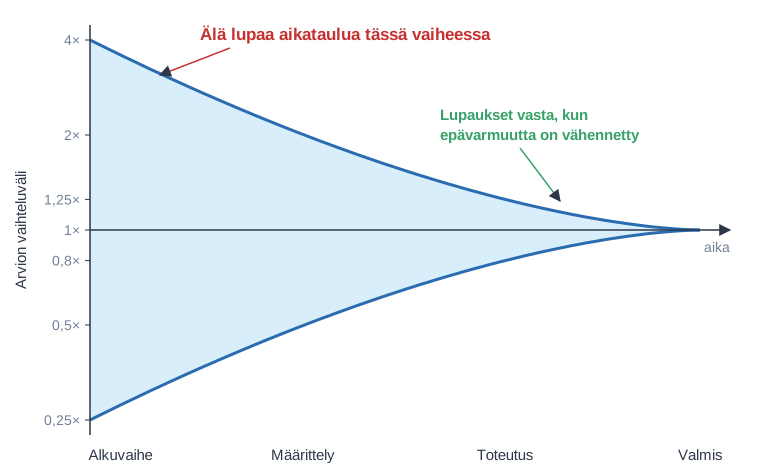
That is, the further away the completion of the product/feature is, the less accurate the effort estimates are. This is because the number of unknown sources of uncertainty is large at the start, but as the building of the product proceeds, understanding grows and the effort estimates also start to become more realistic. If we think, e.g., of the user story a product can be removed from the shopping cart, it is very hard to give any kind of effort estimate for the story in the initial specification phase of the system. As development proceeds and it is known how the shopping cart is implemented technically, what the user interface of the application is like, etc., making an effort estimate for the story about removing a product from the shopping cart becomes considerably easier.
The cone describes the best possible situation, however. Uncertainty does not narrow by itself, but only if the team actively reduces it, and data collected from real projects shows that estimates often remain inaccurate far into the project (Little 2006).
Estimation based on relative size
Agile software development methods take it for granted that estimation is uncertain and becomes more precise only as the project proceeds. Because of this, they try to avoid making firm promises about software delivery schedules based on estimates.
According to Mike Cohn (Agile estimation and planning, chapter 8), even though it is hard to estimate the exact time it takes to implement features, software developers are to some extent able to estimate the effort required by different tasks relative to each other. There is little research evidence that relative estimation is better, though. A central finding of estimation research is that all estimation methods are inaccurate and prone to, e.g., excessive optimism and anchoring, that is, to, e.g., the schedule the customer hopes for affecting the estimate (Jørgensen 2014).
Agile methods often use estimation based on relative size, where the unit of estimation is typically an abstract story point that does not necessarily correspond to any real amount of time. In an online store, it could be decided, for example, that the size of the story adding a product to the shopping cart is one story point. Since removing a product from the shopping cart is estimated to take equally long, its size is also one story point, and paying for the products in the shopping cart by credit card, which is about three times as laborious, gets a size of three story points.
It is not advisable to tie story points to hours or days, even though some teams do size a story point at the start of the project as, e.g., one uninterrupted working day (ideal working day). Many sources recommend avoiding this: if a story point were defined as, e.g., eight hours of work, the estimates would easily start to be seen, e.g., by company management, as commitments to the time each piece of work takes, which agile methods want to avoid because of the uncertainty of estimates. Story points of different teams are also not comparable with each other.
Carrying out estimation
Estimation is done in collaboration between the developers and the Product Owner. The Product Owner’s role is to clarify the requirements of the user stories being estimated to the extent that the developers understand precisely what they are about. The estimation itself, that is, the effort estimates, are however always made by the developers. This is important, since only the developers have even somewhat realistic prerequisites for making the estimates.
The estimate must cover all the work required by the Definition of Done, e.g., design, implementation, automated tests, integration and documentation, and not just the time spent on programming.
Estimation is often helped by breaking the story down into technical-level work steps, that is, tasks, which may also require a little technical design. We will return to tasks with an example in connection with the technical planning of a sprint.
If a story resembles something implemented earlier, it can be estimated directly by comparing it to that, without breaking it down into tasks.
Since estimation is inaccurate in any case, it is not worth spending a lot of time on it, e.g., at most 15 minutes per story. If the time is not enough, the content of the story is probably not yet known well enough, or the story is too big and should be split into smaller ones. Estimates are also refined as the project proceeds and understanding of the implementation grows.
Estimation methods
One useful approach to estimation is to fix a few stories of different sizes as references and then compare the difficulty of other stories to these:
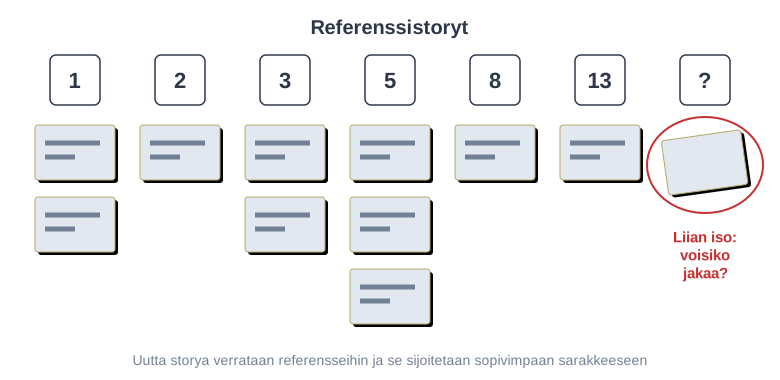
Estimation usually uses a scale that becomes sparser towards the top, e.g., the Fibonacci sequence 1, 2, 3, 5, 8, 13, 21 or its variant 1, 2, 3, 5, 8, 13, 20, 40, 100. Since estimating big stories involves great uncertainty, it is not worth pretending that the scale is very precise for them.
A story that is too big or poorly understood can be given the estimate epic. For example, Mike Cohn recommends using the scale 1, 2, 3, 5, 8 and giving bigger stories the value epic. Such stories must be broken down into smaller ones before they can be estimated. We will return to epics a little later.
It is considered a good principle that all developers take part in estimation. One popular way to do this is planning poker.
Planning poker
In planning poker, the user stories of the backlog are gone through one at a time. The Product Owner presents the story, and the team discusses it. When everyone is ready, everyone shows their estimate at the same time, often with playing cards containing the estimate values. If the estimates are close to each other, the estimate is recorded. If they differ a lot, the team discusses the reasons for the differences, e.g., whether everyone understands the requirements of the story in the same way, and estimates again.
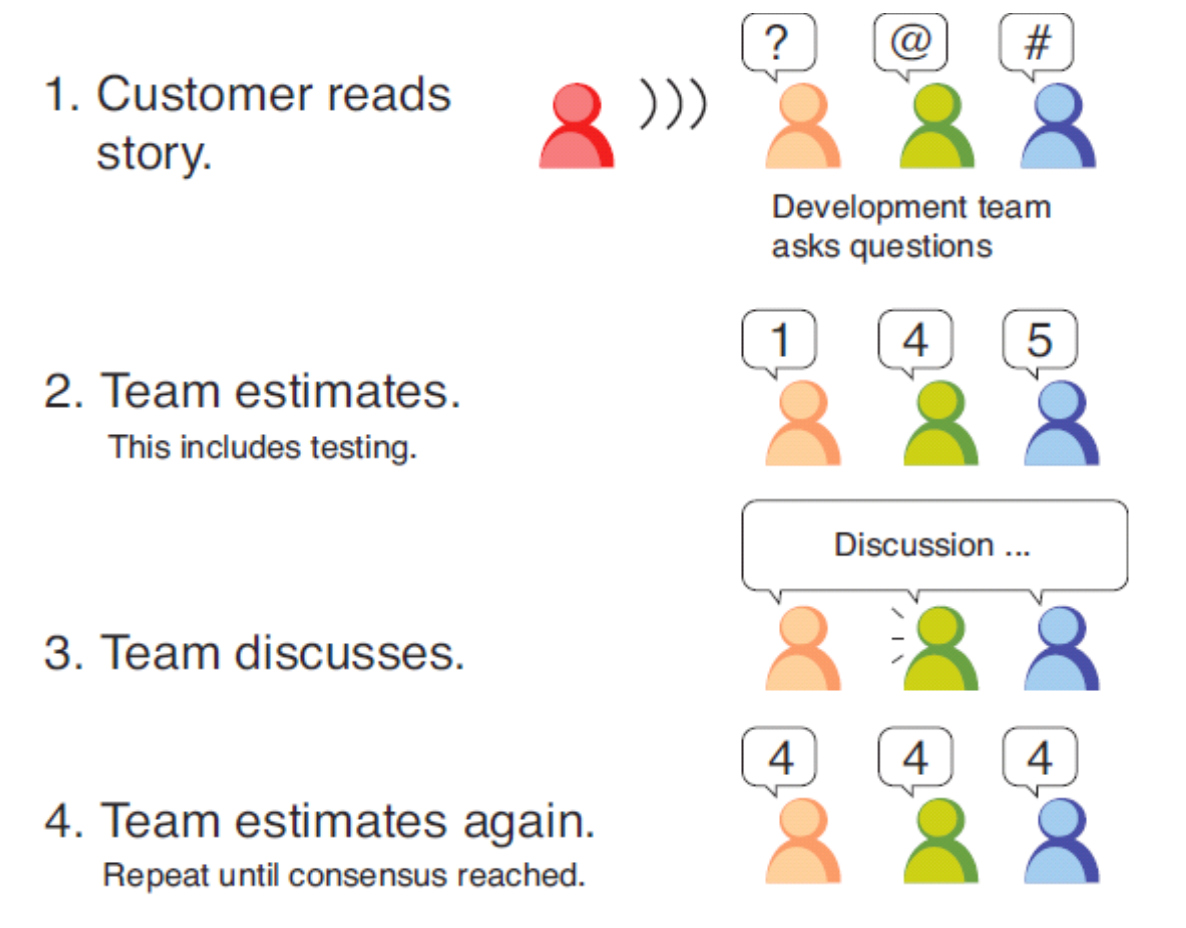
The most important benefit of estimating together is often the discussion itself: understanding of the content of the stories spreads to the whole team, which improves the transparency valued by agile methods. Showing the estimates at the same time also gives the least experienced team member the same voice as the most experienced one, since no one has to conform to what others have already said. If someone keeps a differing estimate to themselves, the estimate does not reflect reality, and the problems come to light only during the sprint.
A good product backlog is DEEP
Mike Cohn and Roman Pichler have launched the acronym DEEP to describe the properties of a good backlog. The acronym comes from the words detailed appropriately, estimated, emergent and prioritized.
Of these properties, estimated and prioritized are already familiar to us: the stories have effort estimates and the stories have been prioritised, that is, put in order of importance.
A good backlog is also detailed appropriately. The highest-priority user stories in the backlog, that is, those to be implemented in the near future, must be relatively small, their acceptance criteria must be roughly clear and there should be a reasonably good idea of the effort required.
Lower-priority user stories can still be bigger and more roughly estimated. In fact, it is not even worth defining lower-priority stories very precisely, since it will still be a long time before they are taken into some sprint for implementation. It often even happens that lower-priority stories are never implemented, since the functionality they define turns out to be unnecessary. So it is not worth investing too much time speculatively in low-priority stories.
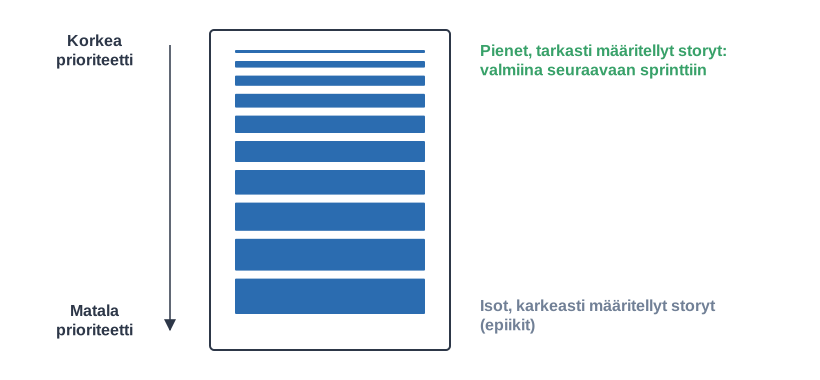
Emergent describes the changing nature of the backlog:
The product backlog has an organic quality. It evolves, and its contents change frequently. New items emerge based on customer and user feedback, and they are added to the product backlog. Existing items are modified, reprioritized, refined, or removed on an ongoing basis.
The backlog thus does not stay unchanged but lives all the time. New stories come in, existing stories are refined and split, unnecessary stories are removed. Effort estimates and priorities are redefined.
Of course, none of this happens by itself; the backlog must be actively maintained (backlog refinement, previously also called backlog grooming) as the project proceeds. The Scrum guide mentions that refining the backlog should happen throughout the sprint in collaboration between the Product Owner and the developers.
Product Backlog refinement is the act of breaking down and further defining Product Backlog items into smaller more precise items. This is an ongoing activity to add details, such as a description, order, and size.
The idea is thus to keep the backlog in a DEEP state all the time, which in turn makes the sprint planning done before each new sprint considerably easier. If the backlog is in bad shape at sprint planning (priorities all over the place, important stories in a vague state, stories corresponding to newly identified needs not added to the backlog), everyone’s time is wasted.
User story and epic
Earlier it was mentioned that a good user story follows the INVEST criteria, that is, the story is independent, negotiable, valuable, estimable, small, testable. One of the criteria is thus the smallness of the story: a user story must be implementable in one sprint. The DEEP criteria of the backlog, on the other hand, say that the backlog must be detailed appropriately; in particular, low-priority stories should not be made too precise. The INVEST criteria thus apply specifically to high-priority stories: before a story can be taken into implementation, it must be small enough, well estimated and testable, that is, the story’s acceptance criteria must be clear.
The stories in the lower parts of the backlog can be big, even so big that they could by no means be implemented in one sprint, and instead they must be split into smaller, more limited stories before they are possibly implemented. Big stories like this are often called epics.
In some contexts, user stories are said to be ready if they follow the INVEST criteria, that is, they are ready to be taken into a sprint. The criteria for readiness are sometimes called the definition of ready. It is not part of the Scrum Guide, however, and you should be careful with it: if it is turned into a strict gate that every story must pass before the sprint, it is easy to slip back into waterfall-style thinking where everything is specified before implementation. It is often sensible to refine the content of a story further during the sprint together with the Product Owner.
During its lifetime, a user story is thus likely to be an epic first. As time passes, the story may be split, and some of its parts become ready as they are refined when their priority rises. When the story has been chosen for a sprint and it is implemented, its state changes to done. Of course, not all stories added to the backlog are so big that they could be considered epic in size; a new story may be fairly small but have unclear requirements, that is, not yet be ready.
Velocity
The second central motivation for estimating user stories is that it makes it possible to roughly estimate the amount of time needed for the whole project or some larger part of it.
As mentioned earlier, a common unit of estimation in agile methods is the abstract concept story point, which does not directly correspond to any amount of time. How can estimates nevertheless be used to estimate the amount of time a project takes?
The development team’s velocity offers a partial solution to this. Velocity means the number of story points the team is able to implement on average during one sprint.
If the team’s velocity is known and the user stories intended to be implemented in the project, or in some part of it, have been estimated, it is easy to make an initial estimate of the time required
(sum of the user story estimates) / velocity * sprint length
At the start of a project, the velocity is usually not known, unless the team has already worked together before. Several different ways have been developed to try to predict the velocity even before the project starts. These are very unreliable, however, and we will not cover them now. At the start of a project, estimates of its duration are therefore very inaccurate, little more than guesses.
Velocity typically varies quite a lot at the start, especially if the application domain and/or the technologies used are not entirely familiar to the team. Velocity usually starts to stabilise after a few sprints, however.
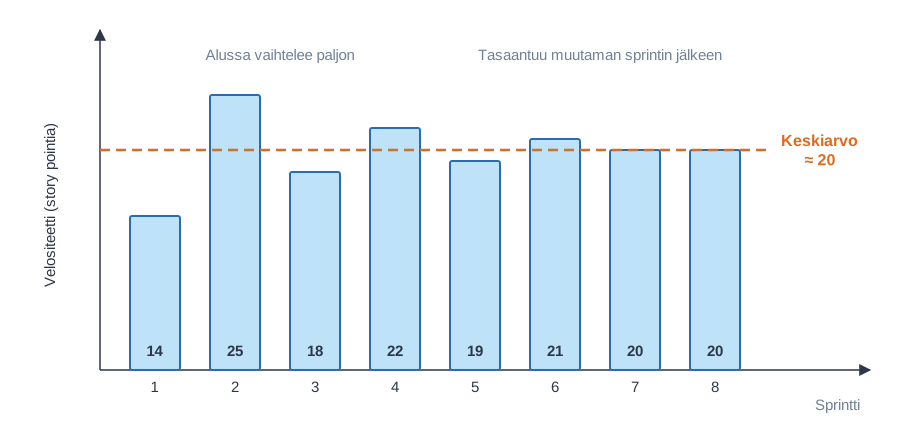
The team’s velocity, and the estimate of the duration of the project or a part of it based on it, gradually become more precise.
In agile methods, it is essential to describe the progress of the project as realistically as possible. For this reason, only the story points of user stories that have been implemented completely (that is, at the quality level defined by the Definition of Done) are counted in the velocity. Work that is “almost done” is thus not considered done work at all.
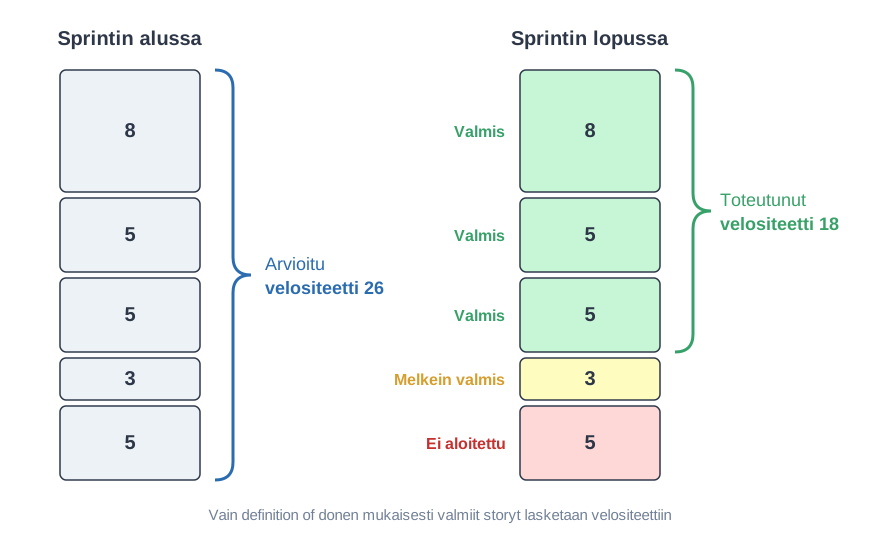
Comparing the velocities of different teams
As mentioned earlier, a story point does not correspond to any time-bound amount of work. Each team defines for itself what a story point means for the team. Often the definition is based on the assumed effort of some particular user story. The team may define, for example, that the size of the story the user adds a product to the shopping cart is one story point. For this reason, the velocities of different development teams are not comparable at all, except in situations where the teams work on a shared backlog and do the estimation together.
Velocity should also not be used as a measure of the team’s performance or as a target. If increasing velocity is made a target, the team easily starts, consciously or unconsciously, to inflate its estimates, so that velocity grows but the value produced does not. The phenomenon is known as Goodhart’s law (page in Finnish): when a measure becomes a target, it ceases to be a good measure. If velocity is used against the team, the team starts to protect itself, and estimates and problems are no longer reported honestly. Velocity is meant solely as a tool for the team’s own planning.
Burndown and burnup charts
The progress of an agile project is sometimes described with a release burndown chart. Time proceeds on the x-axis of the chart one sprint at a time, and the y-axis shows the amount of remaining work measured in story points:
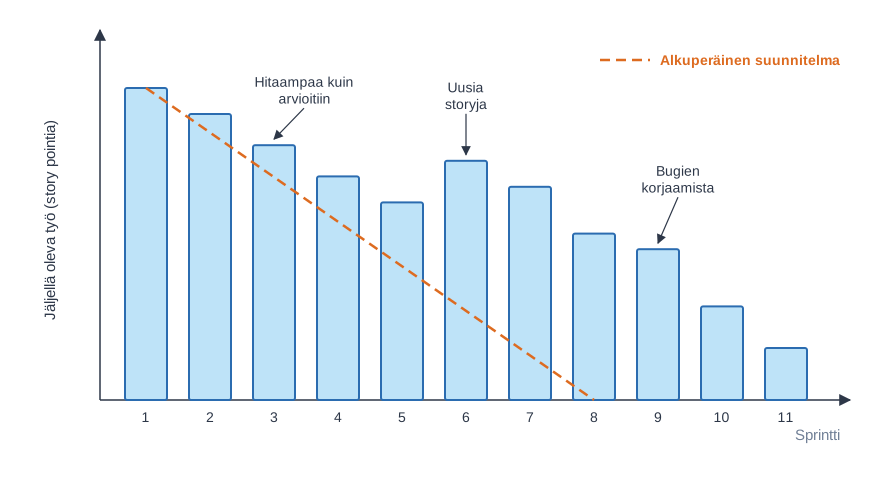
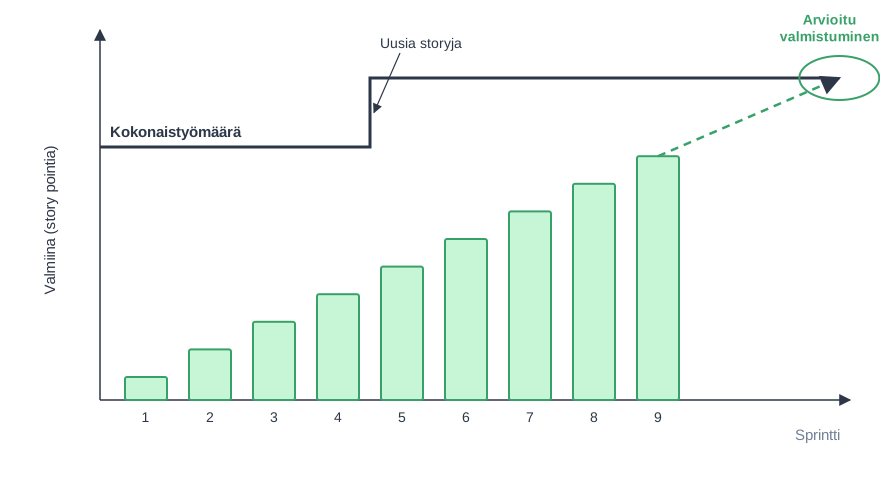
In an agile project, requirements may change during development, so the amount of remaining work does not always decrease. That is why burn up charts are sometimes used, as they show more clearly the growth in the amount of work that happens in the middle of the project:
Release planning and the product roadmap
The product backlog thus lists the user stories describing the requirements of the system in priority order. The priority is most often determined by the value the stories bring to the customer. The developers implement stories one sprint at a time, choosing for each sprint a set of the stories with the highest priority at that moment.
When developing software, a view of the project’s scheduling and the direction of development at a higher level than just the backlog and individual sprints is often needed. There are many reasons for this. Applications may, for example, have various deadlines by which certain features absolutely must be ready. In some situations, on the other hand, versions of the application are to be released at regular intervals, for example every 4 months.
This kind of planning over a longer period than individual sprints is often called release planning. Release planning usually considers at a more general level than user stories which bigger functional entities are to be included in each release or milestone. Milestones in turn typically consist of several sprints.
You can think of release planning as roughly dividing the contents of the backlog into bigger blocks, into which are placed the user stories that, at the time of planning, are thought to belong to that milestone:
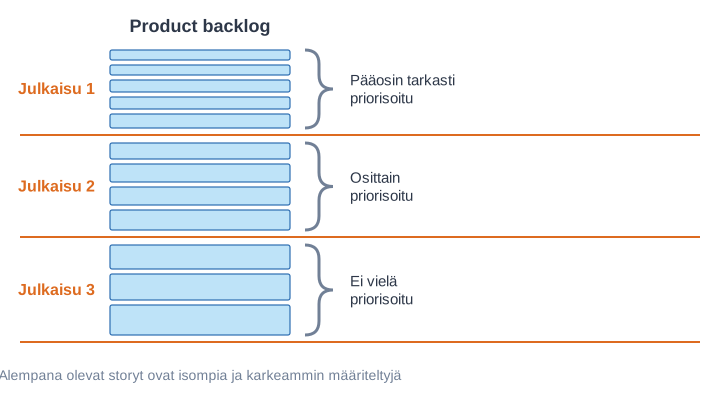
Different milestones may be equally long in time, that is, they may consist of a fixed number of sprints. This is not appropriate in every situation, though, and it may make sense for the length of milestones to vary.
Each milestone can have its own higher-level goal, e.g.:
- milestone/release 1: the basic functionality of the online store
- milestone/release 2: product reviews and recommendations based on reviews
- milestone/release 3: product recommendations based on users’ purchase history
This makes the planned progress of the big lines of the software considerably easier to communicate to the software’s stakeholders than using the product backlog alone as the means of communication.
In the agile spirit, however, the content of milestones can evolve, and the further into the future we look, the more speculative the content of the release plan is. The release plan is often also called the product roadmap.
User story mapping
The problem with the product backlog is that it is a one-dimensional list in priority order. The list does not show how the stories relate to each other and which of them together form a meaningful whole for the user. If the top of an online store’s backlog has ten stories that improve product search, they can be implemented carefully, but the user still cannot buy anything because the checkout is missing.
User story mapping, developed by Jeff Patton, solves the problem by arranging the stories into a two-dimensional map:
- horizontally, there is the user’s journey through the application, that is, the steps in the order in which the user encounters them. In an online store selling clothes, the steps could be product search, product page and checkout. This top row of the map is called its backbone
- vertically, under each step, are the stories related to it in order of importance, the most important at the top
- the map is divided into releases with horizontal lines
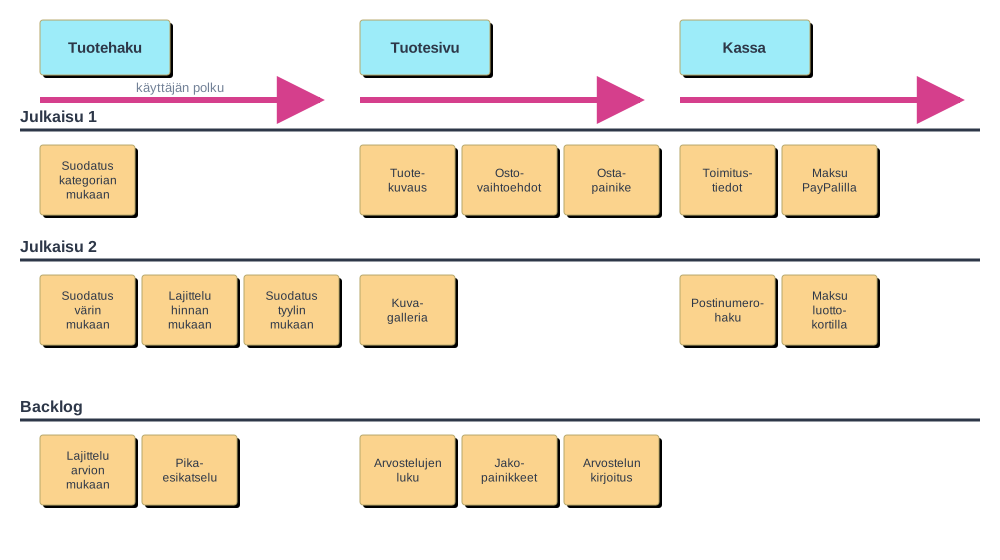
The most important idea of the map is that the first release is a horizontal slice through the whole map. It includes only the bare essentials from each step, so that the user can get from the beginning of the journey to the end. In the first release of the example, the user can filter products by category, read the product description, choose a size and colour, press the buy button, enter delivery details and pay with PayPal. Product search is still modest, but the online store works and can be used. The second release improves every step: search gets filtering by colour and style and sorting by price, the product page gets an image gallery, and the checkout gets postal code lookup and card payment. The bottom row has stories left for a later time.
A story map is usually created together by the Product Owner and the team, e.g., with post-it notes on a wall or on an electronic whiteboard such as Miro. First, the steps of the journey are written down by telling what the user does with the application from start to finish. After that, the stories related to each step are written under it and put in order of importance. Finally, the release boundaries are drawn. Walking through the journey also often reveals missing stories. For example, the question “what happens after payment?” can bring up the need for an order confirmation.
A story map does not replace the product backlog but is one view of it. The map gives the order of the backlog, and each release can form its own milestone. If the first release is too big for one sprint, the slice can be made thinner or its implementation can be divided over several sprints.
Is estimation worth it?
As noted earlier, the purpose of estimation is to help with prioritisation and to estimate the duration and costs of the project or its parts.
Relative estimation based on story points has achieved a firm position in the canon of agile software development. The Scrum Guide mentions size as one of the attributes added to backlog items during refinement, and, e.g., the DEEP principle also requires an estimated backlog.
In the early 2010s, the #NoEstimates movement emerged. It has started to question story point based estimation and considers the benefits gained from it too small compared to the time and effort spent on estimation. The #NoEstimates movement by no means denies that effort estimates are useful; the purpose is rather to get people to think about in which situations estimation is sensible and to bring up alternative ways of doing estimation.
One method that has been used for years is to estimate the development team’s velocity by counting the number of user stories completed in each sprint instead of using story point based estimation. According to the experience of many, the method works quite well, especially if the stories are of fairly even size.
AI tools make estimation even more difficult. They speed up different types of tasks in very different ways, so the relative sizes of stories change, and after the tools are adopted, the earlier velocity no longer predicts the future. In addition, developers easily overestimate the benefit AI brings, and research on its productivity effects is contradictory in general. Forecasting based on the realised throughput adapts to changes better than estimates do, see also AI and the software development process.
Sprint planning
To recap from last week, Scrum prescribes a planning meeting before each sprint, where the sprint goal (why), the user stories chosen for it (what) and how they will be implemented (how) are agreed on. In this chapter we focus especially on the latter two.
The starting point of sprint planning is a product backlog in a suitable state, that is, a DEEP product backlog. The backlog is thus prioritised and estimated, and the highest-priority user stories are small enough and well understood by the Product Owner.
In sprint planning, the Product Owner makes sure that the developers understand the user stories at the top of the product backlog well. The team chooses as many of the backlog’s stories as it estimates it is able to implement during the sprint at the quality level defined by the Definition of Done.
Sprint goal
According to the Scrum Guide, a sprint goal is defined in connection with planning, that is, the one shared objective of the sprint. In practice, it is often a short, one- or two-sentence description of what the team intends to achieve during the sprint.
In his book written in 2002, Ken Schwaber, one of the developers of Scrum, mentions that he often sets the following as the goal of the first sprint: demonstrate a key piece of user functionality on the selected technology.
For example, when developing an online store, the goals of the next sprints could be:
- Basic functionality of the shopping cart: adding and removing products
- Paying for purchases and choosing the delivery method
The sprint goal serves as a quick description for people outside the team of what the team is doing during the current sprint. Even though in principle the same thing can be found out by looking at which user stories the team is working on, a shorter description in a more generic form is better for many of the software’s stakeholders, such as company management, who are not interested in following events at the level of individual stories.
The success of a sprint is usually assessed relative to the sprint goal, that is, even if some individual user stories are left unimplemented in the sprint, the sprint can be considered successful if the implemented functionality covers the essential parts of the sprint goal.
Choosing the user stories to implement in the sprint
The developers thus decide how many user stories are taken into the sprint for implementation. The main principle is to choose “a suitable number” of the highest-priority user stories in the backlog and move them to the sprint backlog.
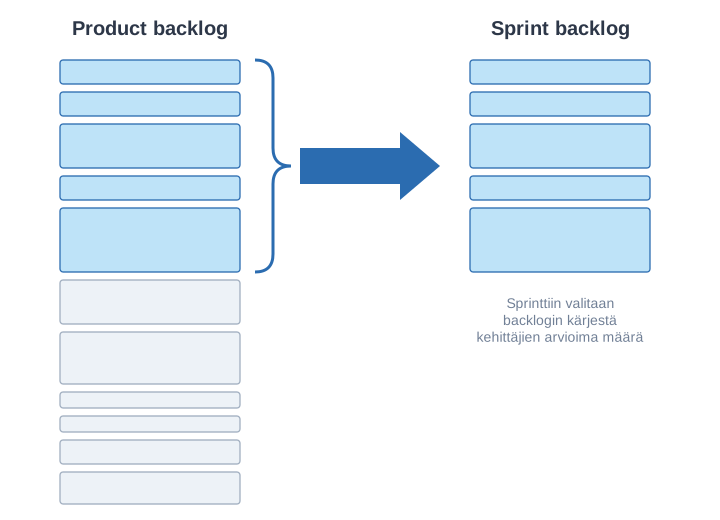
There are several ways to decide the number of stories taken into a sprint:
- if the stories have been estimated and the team’s velocity is known, stories are taken into the sprint up to the velocity
- if there are no estimates and/or the velocity is not known, as many of the highest-priority stories are taken as all team members estimate they have time to implement
- a combination of the previous two, that is, even if the velocity and estimates are known, judgement is also used as to whether the amount chosen based on velocity feels suitable to the team members
Whichever selection principle is used, it is in any case essential to choose for implementation only as many stories as the team feels it can implement properly, that is, at the quality level defined by the Definition of Done.
How the Product Owner can influence the stories in a sprint
By default, a sprint thus takes a set of user stories from the top of the backlog:
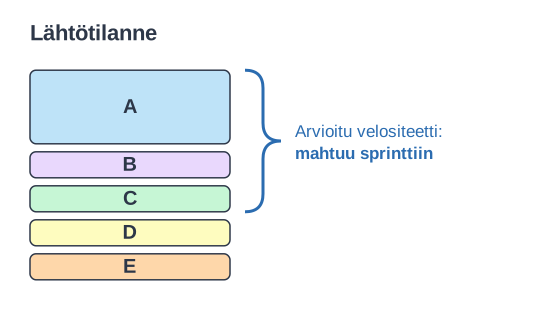
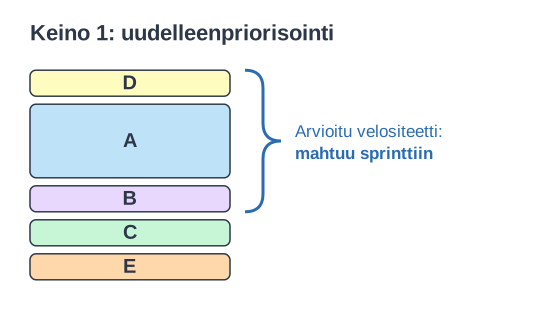
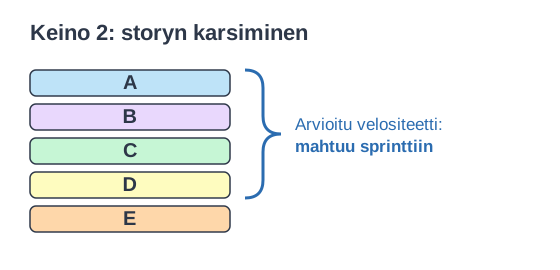
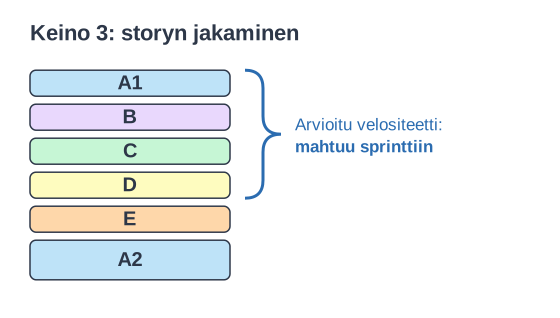
The Product Owner has three ways to influence which stories fit into the sprint:
1. Reprioritisation. If the Product Owner wants story D included, they raise D’s priority, and C drops out:
2. Cutting down a story. If the Product Owner wants all the stories A–D included, something has to give: the Product Owner cuts down A’s functionality, the developers estimate the reduced A, and A–D fit into the sprint:
3. Splitting a story. If none of A’s functionality can be given up, A is split into two parts. A1 contains the most important features and is taken into the sprint, and A2 is left for later with a lower priority:
The final decision on the amount of work that fits into the sprint is, however, always made by the developers.
Splitting user stories
Splitting user stories into smaller ones is not easy for a beginner, and not always for a professional either.
The INVEST principle mentioned earlier gives six criteria for a good user story that is suitable for implementation, and these criteria are also worth keeping in mind when splitting stories into smaller ones. One fairly obvious way would be to split stories according to the architectural layers of the software, that is, e.g., add a product to the shopping cart would be split into the following stories:
- a button for adding a purchase in the browser-based user interface
- a mechanism for updating the shopping cart in the application logic on the server
- a table in the database for representing the shopping cart
Such a split is not a good one, though. Stories split this way do not produce value for the customer (valuable) and are not independent of each other (independent): if, say, the first and second of the stories were implemented, the third story would still be needed before the functionality made sense.
Below are a few different ways of splitting stories, inspired by Richard Lawrence.
Pattern 1: business rule variations
A story that contains many kinds of complex conditions (business rules), e.g.
As a user, I can search for flights with flexible dates.
is worth splitting so that each of these conditions becomes its own story:
- … as “between dates x and y”
- … as “a weekend in December”
- … as “± n days of dates x and y”
Pattern 2: simple/complex
Somewhat similar to the previous approach is to split a complex user story by separating from it a simple but in itself useful story, a kind of “minimum viable product”, and forming a set of stories that add to the basic functionality it defines.
For example, the story describing a flexible flight search
As a user, I can search for flights between two destinations
can be split as follows
- … when only direct flights used
- … specifying a max number of stops
- … including nearby airports
- … using flexible dates
Pattern 3: major effort
Sometimes a good basis for splitting is to first implement the story to work with one example case and to generalise it as a story of its own. For example, the story about credit card payment
As a user, I can pay for my flight with VISA, MasterCard, Diners Club, or American Express.
could be split in two, where the first story would only handle one credit card type, and the next story would generalise the functionality to all cards:
- … I can pay with VISA
- … I can pay with all four credit card types (VISA, MC, DC, AMEX) (given one card type already implemented)
Pattern 4: data entry methods
A good way to split stories is also to first create a version with a simple user interface and extend it as a story of its own. The user story
As a user, I can search for flights between two destinations
is easily split in two, e.g., as follows
- … using simple date input
- … with a fancy calendar UI
Pattern 5: Defer Performance
In some cases, a corresponding split can be made with respect to performance, that is, a basic version is made first and an extending story optimises performance. The user story
As a user, I can search for flights between two destinations
is thus split in two as follows:
- … slow—just get it done, show a “searching” animation
- … in under 5 seconds
Pattern 6: Operations
One of the most common ways of splitting is to separate the operations included in a story into stories of their own.
The story describing account management
As a user, I can manage my account
splits nicely into several parts
- … I can sign up for an account
- … I can edit my account settings
- … I can cancel my account
Pattern 7: Break Out a Spike
There are many situations where the size of a story is really hard to estimate in advance. The story may either have unclear requirements, that is, it is not yet really known what is wanted, or the story may contain some part that is technically risky to implement. Sometimes the uncertainty in a story cannot be removed in any other way than by making an experimental implementation that investigates the technical risks or finds out what the user wants.
Such an experimental implementation is called a spike solution, and most often a limited amount of time is given for implementing it, e.g., 2 days.
If the team has never implemented functionality related to credit card payments, it is worth separating from the user story
As a user, I can pay by credit card
a time-boxed experiment that is carried out in an earlier sprint. After this, the story that implements the functionality itself can hopefully be estimated better:
- Investigate credit card processing
- Implement credit card processing
Earlier in this part, we talked about the Lean startup method, where a minimum viable product (MVP), that is, a minimalist version of an idea, is implemented and its effectiveness is measured with real users, e.g., with A/B testing. A spike and an MVP resemble each other in that both are experiments that reduce uncertainty before the real implementation. The difference lies in what is being investigated: a spike usually answers the team’s own questions, e.g., whether something is technically feasible, whereas an MVP tests whether the idea is valuable to users.
Splitting user stories has many benefits. When stories are split, it is often noticed that the original big story, that is, the epic, in fact describes much broader functionality than is needed, so splitting stories may make it possible to cut a lot of unnecessary functionality from the application. Small stories also increase the predictability of software development. The smaller the stories are, the easier they are to estimate and the more surely they get implemented within one sprint, and so the team’s velocity becomes more predictable.
Technical planning of a sprint
In connection with sprint planning, a sufficient amount of technical design is usually also done for the user stories chosen for the sprint, that is, the team outlines how the stories will be implemented. Components and interfaces are designed at a rough level, and the changes the user stories cause to the existing part of the application are taken into account.
In connection with planning, it is common to break each user story down into technical-level tasks that must be completed for the user story to be done.
For example, the story adding a product to the shopping cart could be broken down into the following technical-level tasks:
- a session that remembers the customer is needed
- objects and data structures for representing the shopping cart and a purchase
- an extension to the database schema
- the html view must be updated with the necessary buttons
- a controller for handling the buttons
- unit tests for the controller and the shopping cart logic
- automating the acceptance tests
The same principle applies to working with a coding agent: when making bigger changes, it is worth letting the agent first draw up a plan that is reviewed before implementation, see Plan mode.
Sprint backlog
The sprint’s task list, that is, the sprint backlog, consists of the user stories chosen for the sprint and the technical-level work related to them, that is, tasks. The sprint backlog is primarily a tool for the developers, and the developers decide themselves how it is organised.
The sprint backlog is often organised as a table-like taskboard that has one row for each user story chosen for the sprint. The tasks of a story move from left to right through the columns describing their status, not started, in progress, done:
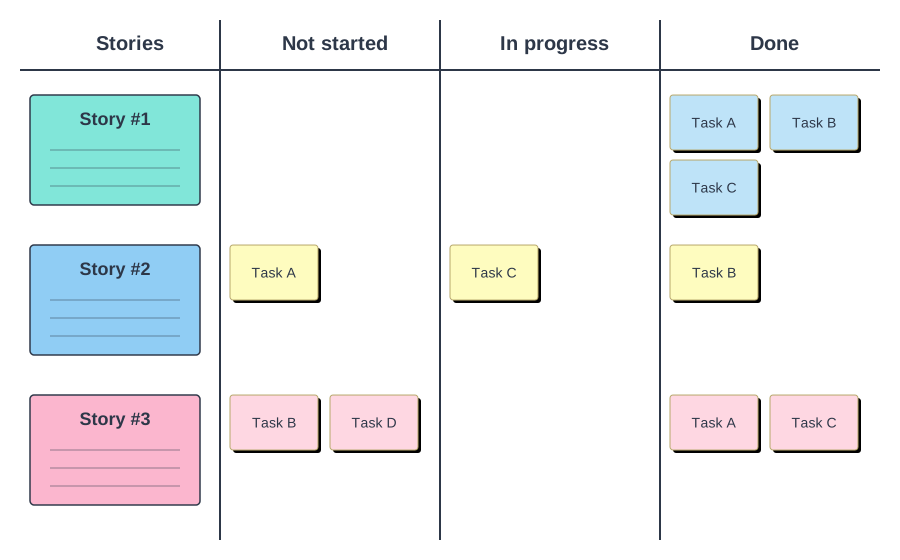
Usually not all tasks related to a story are found during sprint planning, and new tasks are added as needed as the sprint proceeds.
Teams working in the same space often use physical taskboards, where user stories are, for example, index cards and tasks are written on post-it notes.
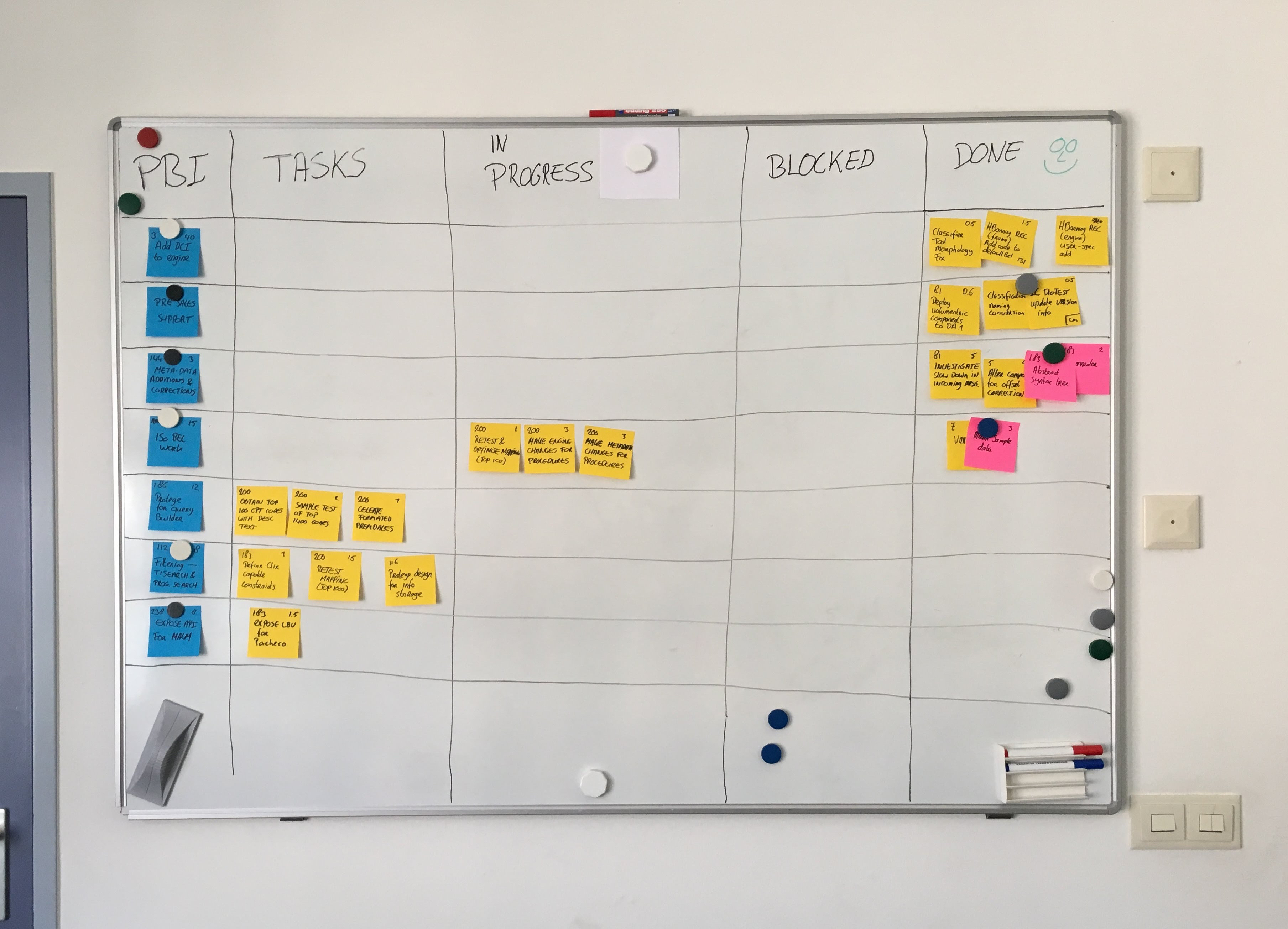
Unlike the previous one, the example taskboard also has the column blocked, which shows the tasks whose implementation has been interrupted by some obstacle for one reason or another. A taskboard can indeed contain any columns. Scrum gives no instructions for forming the sprint backlog; the main thing is that the team shapes its taskboard to support its own goals. It is also quite typical for a team to modify its taskboard during the project when it notices that the structure of the existing taskboard is no longer optimal for the team’s work.
The format of the sprint taskboard
For a team working in the same space, a physical taskboard using post-it notes is often an illustrative and easy-to-use way of managing the sprint.
Nowadays, however, most teams use an electronic taskboard. Sometimes company practices force this, sometimes the team members’ way and place of working; for example, for a hybrid or remote team an electronic taskboard may be the only workable solution.
There are countless solutions for building an electronic backlog and taskboard. Some general-purpose application can be used, for example Excel or Google Drive. GitHub Projects nowadays offers a quite usable taskboard view of GitHub issues. There is also a large number of more or less usable applications made specifically for managing agile projects; a few examples are Jira, Linear, Azure Boards, Asana and Trello.
The taskboard and a possible burndown chart clearly show how far the sprint has progressed, and it is recommended that they are visible to all team members and the project’s stakeholders. With electronic taskboards there is always the risk that they do not radiate information as well as a manual taskboard on the wall. In this way, the principle of transparency, vital for agile development, may be compromised.
Example: backlogs with GitHub Projects
Let’s look at an example of how the product backlog and the sprint backlog can be implemented with GitHub Projects. The example is from the course’s mini project boilerplate repository. The application is a simple todo application, and the backlogs are as they could be in the middle of the second sprint.
Each user story and task is its own GitHub issue. The issues are gathered into the same project, where they are given custom fields such as Sprint and Tyyppi (type: user story or task). Several views are created in the project, in which the issues are filtered based on these fields.
The product backlog is a table view filtered to show only the user stories, in priority order:
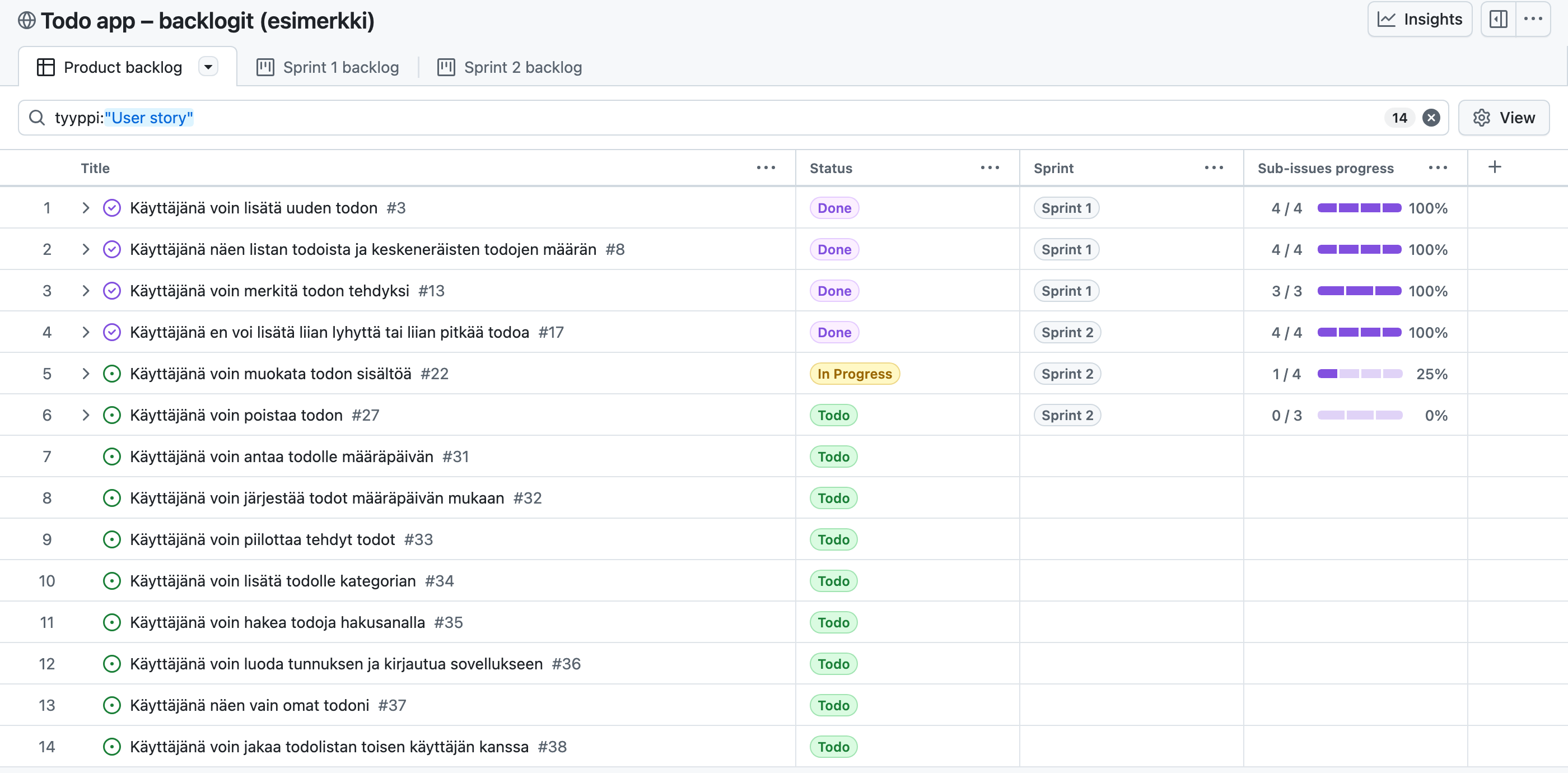
The table shows the status of each story, the sprint the story has been taken into, and how many of the story’s tasks are already done. The backlog is DEEP: the top stories have been defined precisely with their acceptance criteria, whereas the content of lower ones, e.g., Käyttäjänä voin jakaa todolistan toisen käyttäjän kanssa (As a user I can share a todo list with another user), will be refined with the customer only later. In the example, the stories have not been estimated, since that is not required in the mini project. A separate number field could be added to the project for estimates.
In sprint planning, the stories chosen for the sprint are broken down into technical-level tasks, which are sub-issues of the story’s issue. The page of story #22 shows its tasks and their status. The story’s description has a link to a test file in which the story’s acceptance criteria have been written as automatically executable tests:
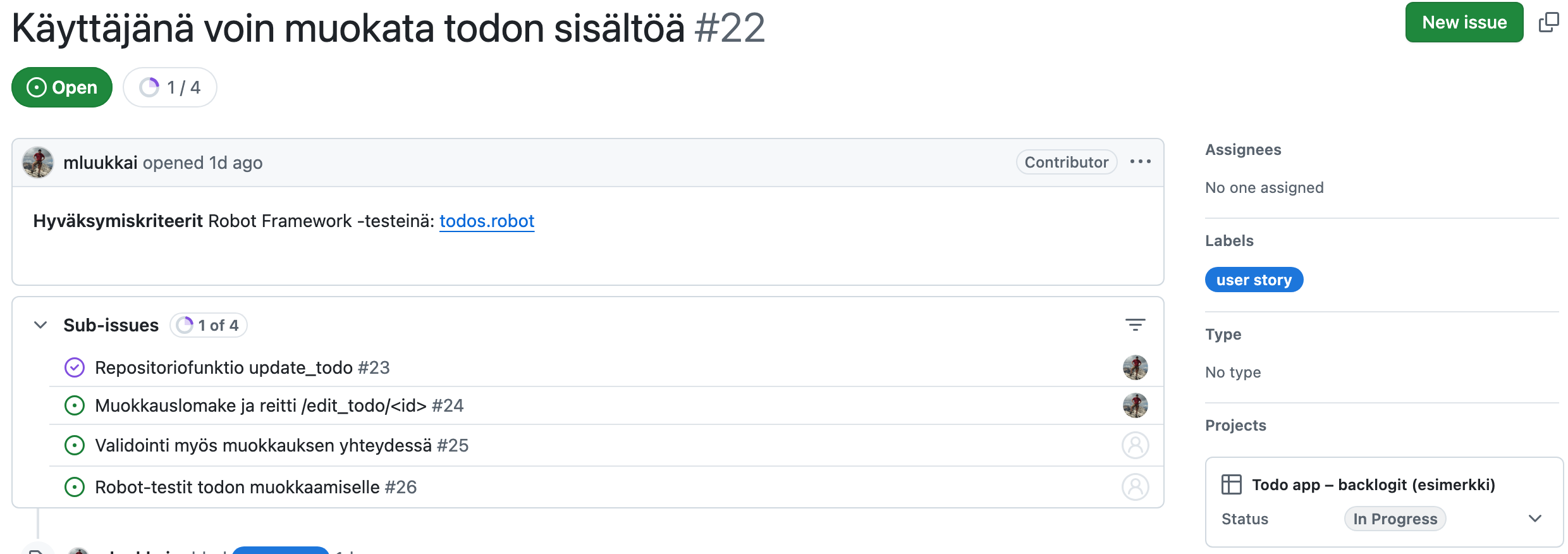
The backlog of sprint 2 is a view of the sprint’s tasks organised as a taskboard. The columns correspond to the status of the tasks, and each card shows which story the task belongs to and who is working on it:
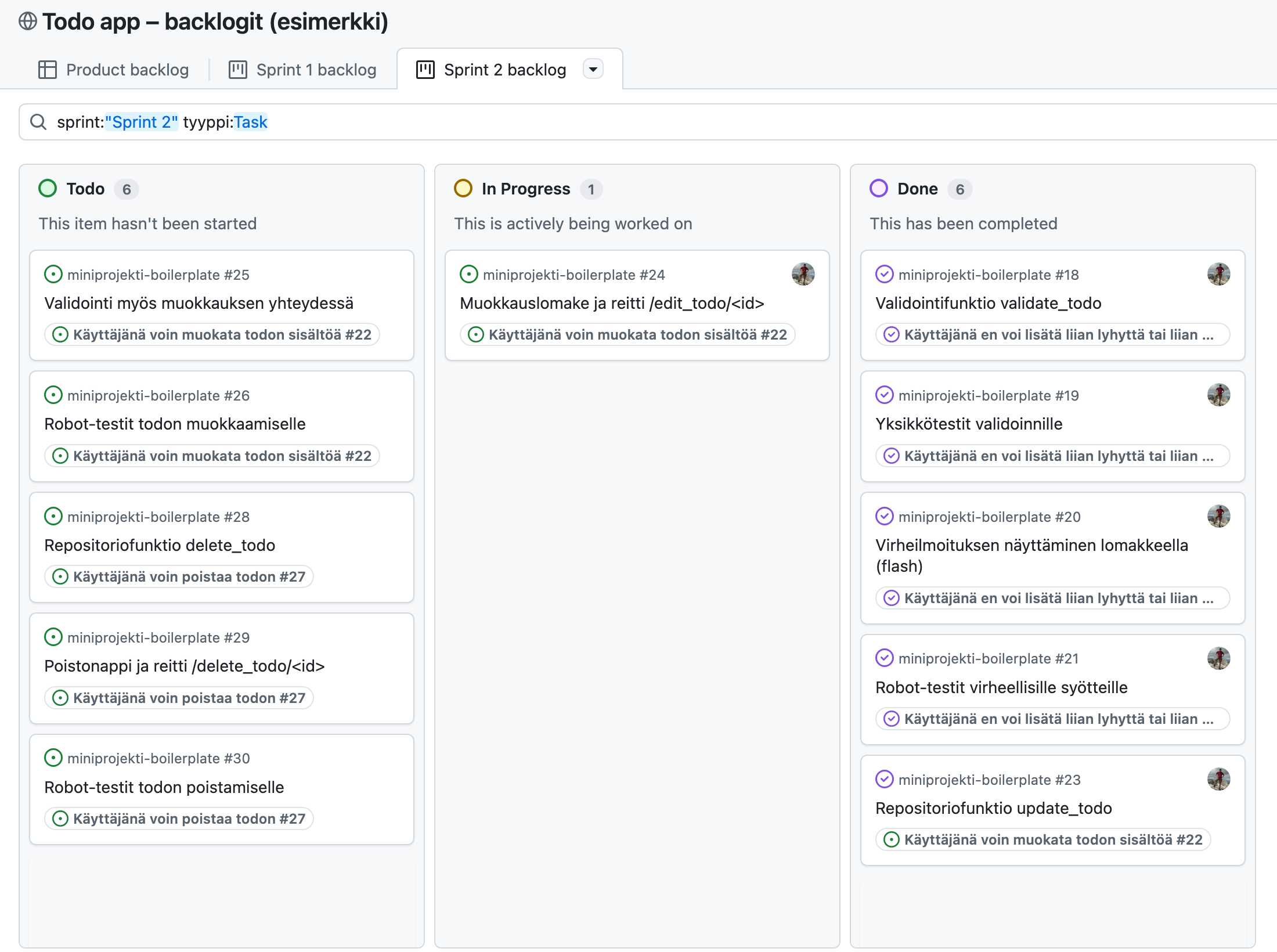
The taskboard shows, e.g., that the team finishes stories one at a time: the tasks of story #17 are done, work on story #22 is in progress and the tasks of story #27 are waiting their turn. We will return to this soon in connection with WIP limits.
Instructions for building the backlogs and a ready-made template to copy can be found in the boilerplate’s BACKLOG.md file.
Tracking the progress of a sprint
During the sprint, it is good for the team to see all the time how the sprint is progressing relative to the sprint goal. The currently recommended way is to track completed user stories, either their number or the sum of their story points. A Scrum book justifies this by noting that a team can get almost all of the tasks done in a sprint without getting a single story completely done. In that case, a chart drawn based on tasks looks good, but the value the customer gets is zero.
Progress is often visualised with a sprint burndown or burnup chart, where the x-axis shows the days of the sprint and the y-axis the number of remaining (burndown) or completed (burnup) stories. Electronic tools such as GitHub Projects and Jira nowadays draw the charts automatically based on the state of the issues. When a physical taskboard is used, the simplest way is to look at the taskboard to see how many of the sprint’s stories are already done. Tracking the number of completed tasks is also a simple and more fine-grained way of seeing how the work progresses, and it is used, among other places, in the course’s mini project. In that case, however, care must be taken that tasks are finished one story at a time, so that stories also get done.
Previously, a common approach was to also estimate the sprint’s tasks in working hours and to update the remaining effort of each task, e.g., in the daily scrum. A sprint burndown chart was drawn from the number of remaining hours:
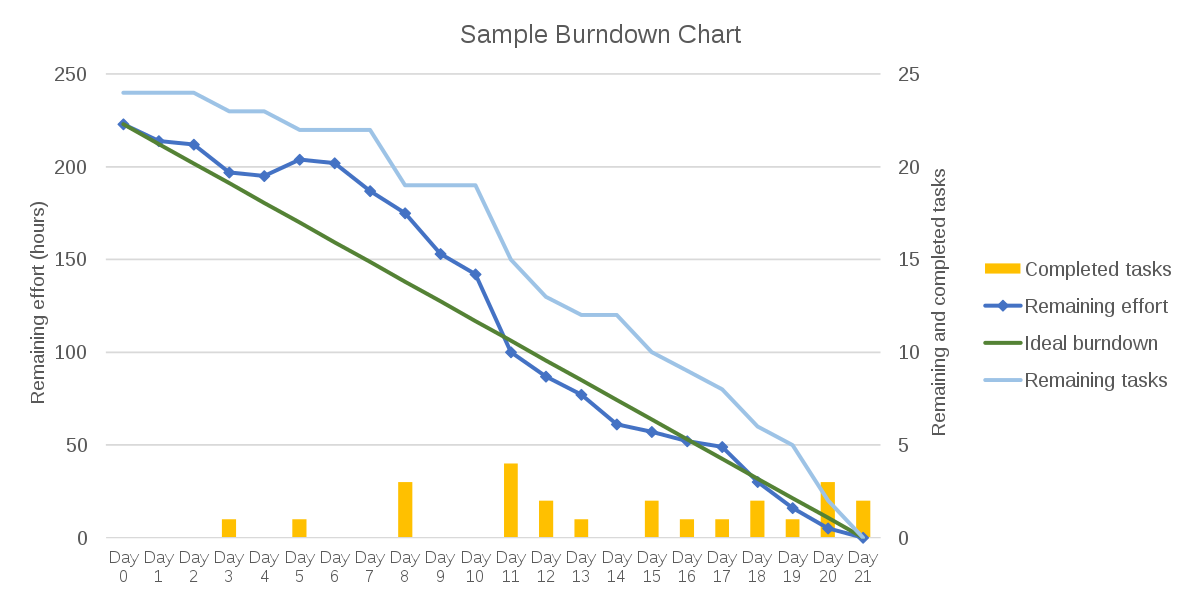
In the picture, the darker blue curve shows the remaining work in the sprint in hours. What was essential in this approach was that the remaining effort was always estimated for the tasks, not the time already spent on them. Since its 2020 version, however, the Scrum Guide no longer mentions tracking the amount of work within the sprint, and hour-based task estimation has become rare.
Limiting work in progress
A large number of tasks in progress at the same time can become a problem in Scrum. If every team member always starts a new task instead of helping to get the already started ones completely done, including testing, the taskboard may look like the following near the end of the sprint:
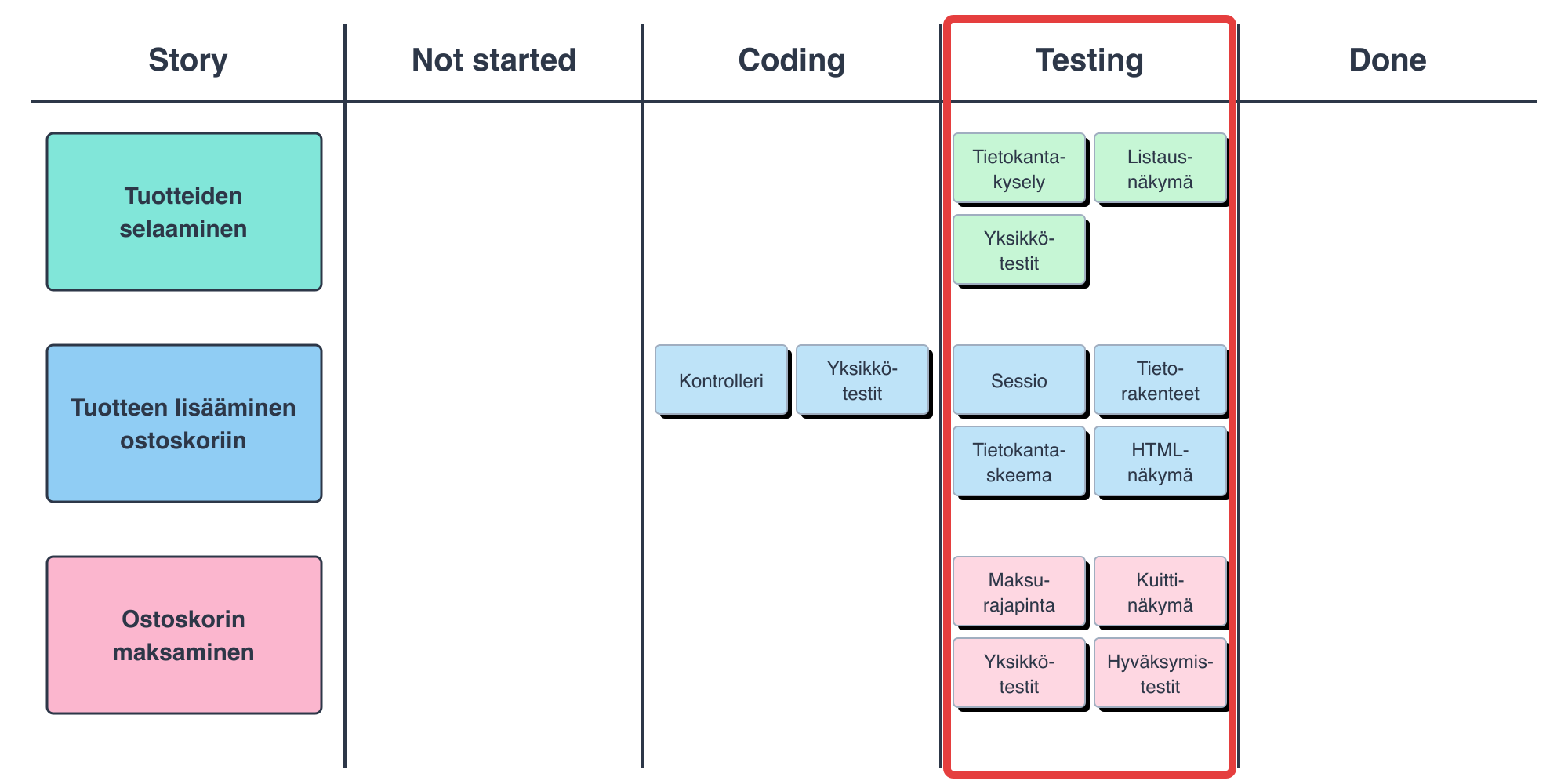
Almost all tasks have been programmed, but they have got stuck in a queue in the testing phase, and not a single one of the three stories is done. If the sprint ends now, there is nothing to show the customer, even though the team has done a lot of work.
This situation can be avoided by limiting the amount of work in progress at the same time with work in progress (WIP) limits. WIP limits are borrowed from the Kanban method, which we will cover in more detail in Part 5. The combination of Scrum and Kanban is often called Scrumban, to which we will return at the end of this chapter.
WIP limits can be applied in many ways, e.g., by limiting the number of work items in a certain phase of the taskboard:
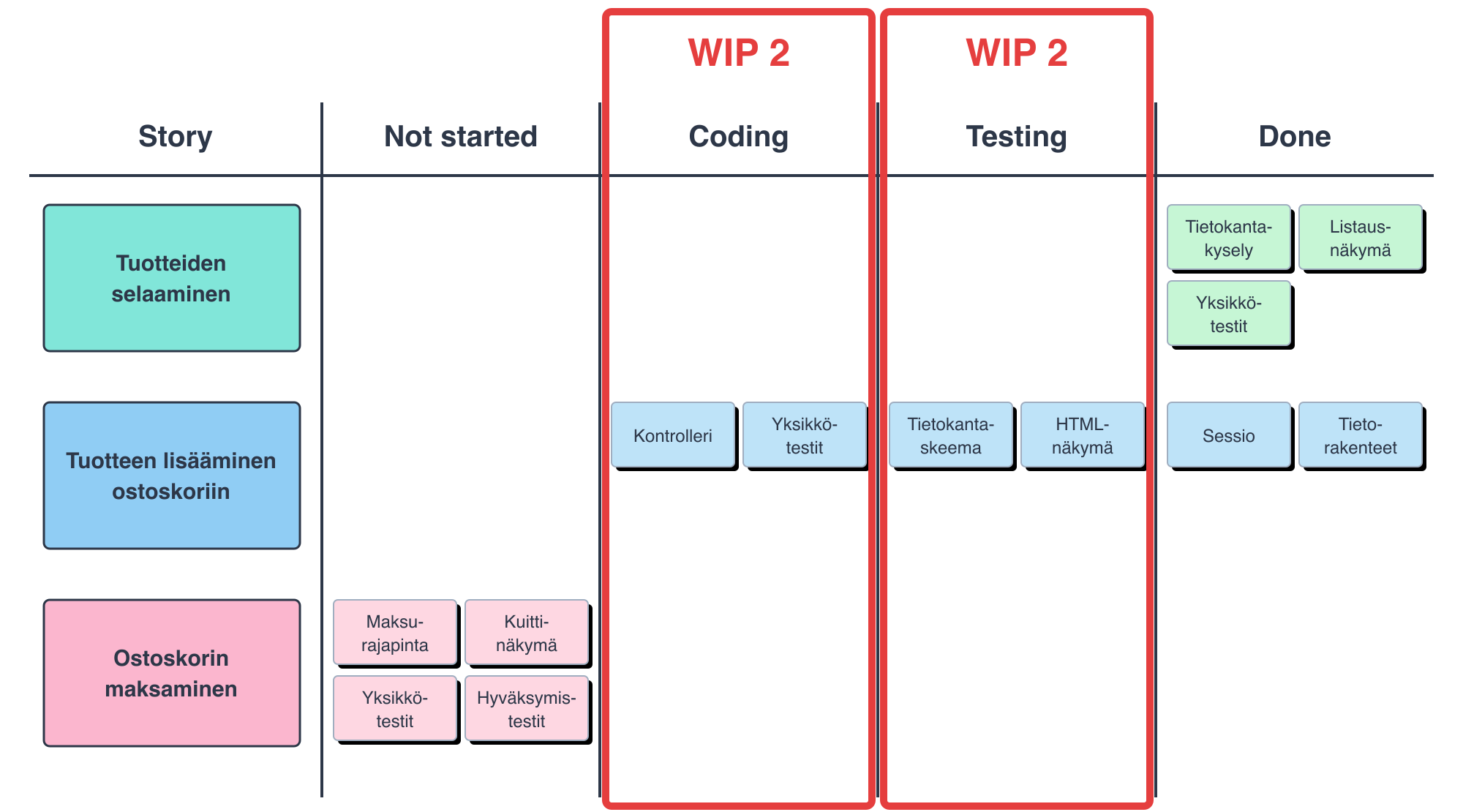
In the example, the columns Coding and Testing may each have at most two tasks at the same time. When the testing phase is full, a new task cannot be moved to testing, and the programmer should help with testing instead of starting a new task. This way, the work proceeds to completion one story at a time: Tuotteiden selaaminen (browsing products) is already done, Tuotteen lisääminen ostoskoriin (adding a product to the shopping cart) is in progress, and Ostoskorin maksaminen (paying for the shopping cart) is waiting its turn.
The idea of WIP, or work in progress, limits that control the amount of work done at the same time thus comes from the Kanban method. The Kanban method in turn is one of the most central tools of Lean thinking.
Behind Lean thinking is the idea of eliminating waste (Japanese muda), that is, things that do not produce value, from the operations of organisations. Lean thinking originates from the Toyota Production System, which is already decades old.
Lean identifies several types of waste (lean waste), among them, for example, partially done work, intermediate inventory and unnecessary waiting. Applied to the context of software development, work items that are not yet done in the sense of the Definition of Done represent waste in the Lean sense. For example, functionality (user stories) waiting for testing is considered to be “in intermediate inventory”, and likewise functionality that has already been tested but is still waiting to be deployed to production is “in inventory”.
Functionality starts to produce value for the customer only when it is put into use; while functionality is in progress, it only causes costs and constitutes a risk.
WIP limits can be applied in connection with Scrum in many ways. In the example above, the number of tasks allowed in one work phase at a time was limited. It may also make sense to define how many tasks one person may have in progress at a time. Perhaps the best way to apply WIP limits is to limit the number of user stories in progress at a time. For example, the Scrum book recommends having only one user story in progress at a time. This ensures that value-producing increments “flow” to the users of the application as evenly as possible.
WIP limits are often adjusted in retrospectives if problems are noticed in development.
In Kanban, the progress of work is tracked with so-called flow metrics. The Kanban Guide requires tracking at least the following:
- WIP (work in progress): the number of items in progress
- cycle time: the time from starting work on an item to its completion
- throughput: the number of items completed per unit of time
- work item age: how long an unfinished item has been in progress
The metrics are related to each other through so-called Little’s law: average cycle time = average WIP / average throughput. When the amount of work in progress at the same time is limited, individual stories are thus completed faster, as long as the team’s throughput stays the same. This is the central justification for WIP limits.
AI can move the bottleneck: if writing code becomes faster but reviewing and testing do not, an inventory of changes waiting for review builds up. WIP limits and flow metrics help to notice the situation, see AI and the software development process.
Scrumban
The name Scrumban was launched by Corey Ladas in 2008 in his post Scrum-ban. Originally he used it to describe a way of moving gradually from Scrum towards Kanban, but nowadays the name more generally means any combination of Scrum and Kanban. There is no single official definition of the combination, but typically in Scrumban the roles and events of Scrum, such as retrospectives, are supplemented with practices borrowed from Kanban:
- the work phases are visible on the taskboard and WIP limits are set for them
- work proceeds according to the pull principle: a new story is started only when the previous one is done and capacity is freed up
- planning is done as needed, e.g., whenever the queue of stories waiting for implementation drops below a certain limit, and not necessarily according to a fixed sprint rhythm
- estimation is lightened or given up, and forecasts are based on the realised throughput
- the progress of work is tracked with the flow metrics presented above
In Kanban and Scrumban, WIP limits are most often used to limit the number of user stories in progress at the same time. Kanban and Scrumban usually do not have a concept like the Scrum sprint that sets the rhythm of development; instead, the team may follow a principle where it finishes one user story at a time, demos it to the customer and picks the next story from the product backlog to work on. In some cases, customer meetings and demos of finished stories may still take place on an agreed schedule, for example every two weeks, even if the development itself does not follow sprints but proceeds one story at a time.
Backlog and taskboard in Scrumban
Since Scrumban does not necessarily have sprints, there is no separate sprint backlog either. The product backlog and the taskboard are often combined into a single board whose leftmost column is the product backlog. The cards on the board are user stories that move from one work phase to another, and WIP limits restrict the number of stories in each phase:
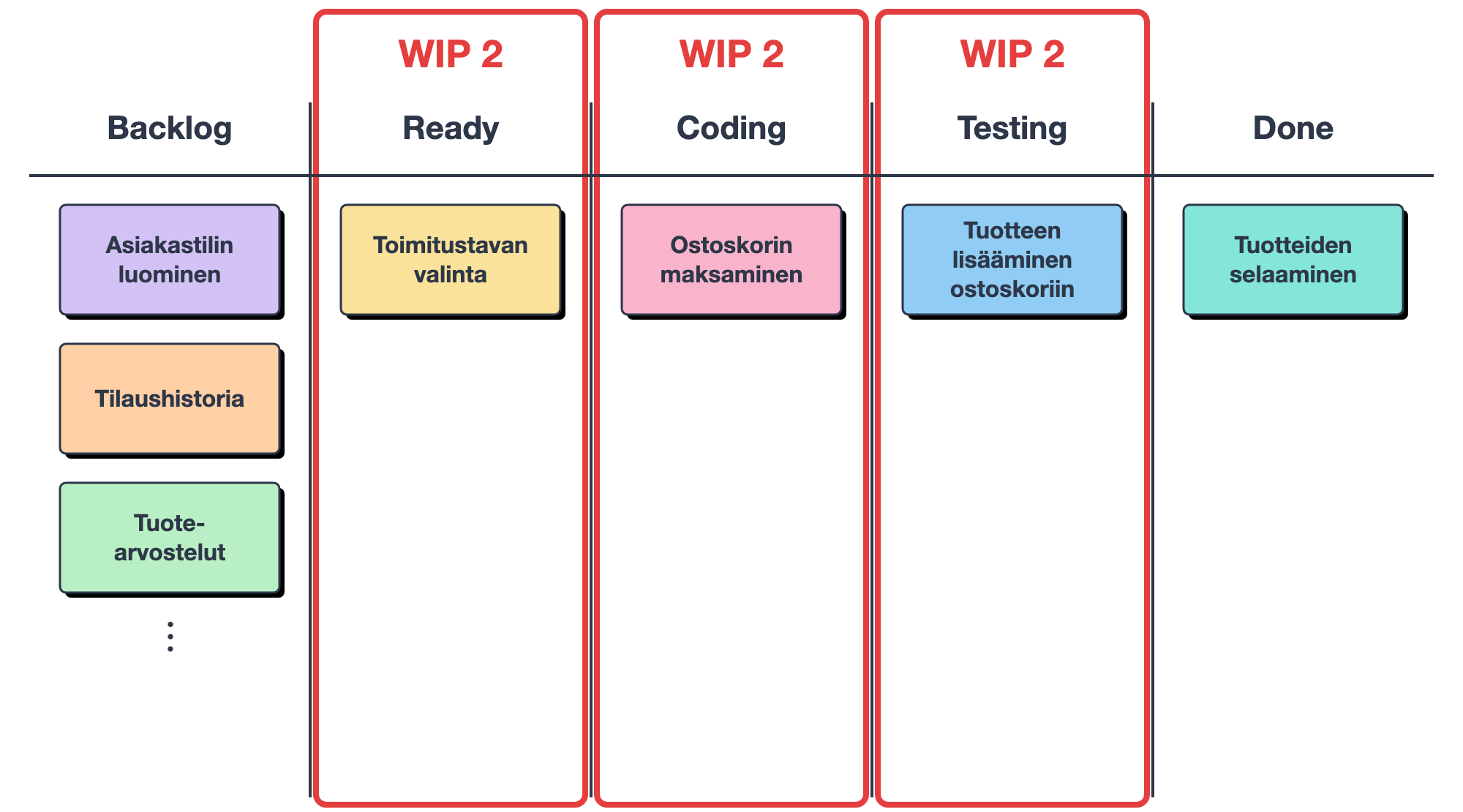
The Ready column contains the stories that have been refined and are ready to be started. When space frees up in the column, the team picks the next story from the top of the backlog and refines it. This replaces Scrum’s sprint planning.
Splitting stories into tasks is useful in Scrumban too. One way is to write the tasks as a checklist on the story’s card. The story still moves on the board, and its tasks are marked done as they are completed:
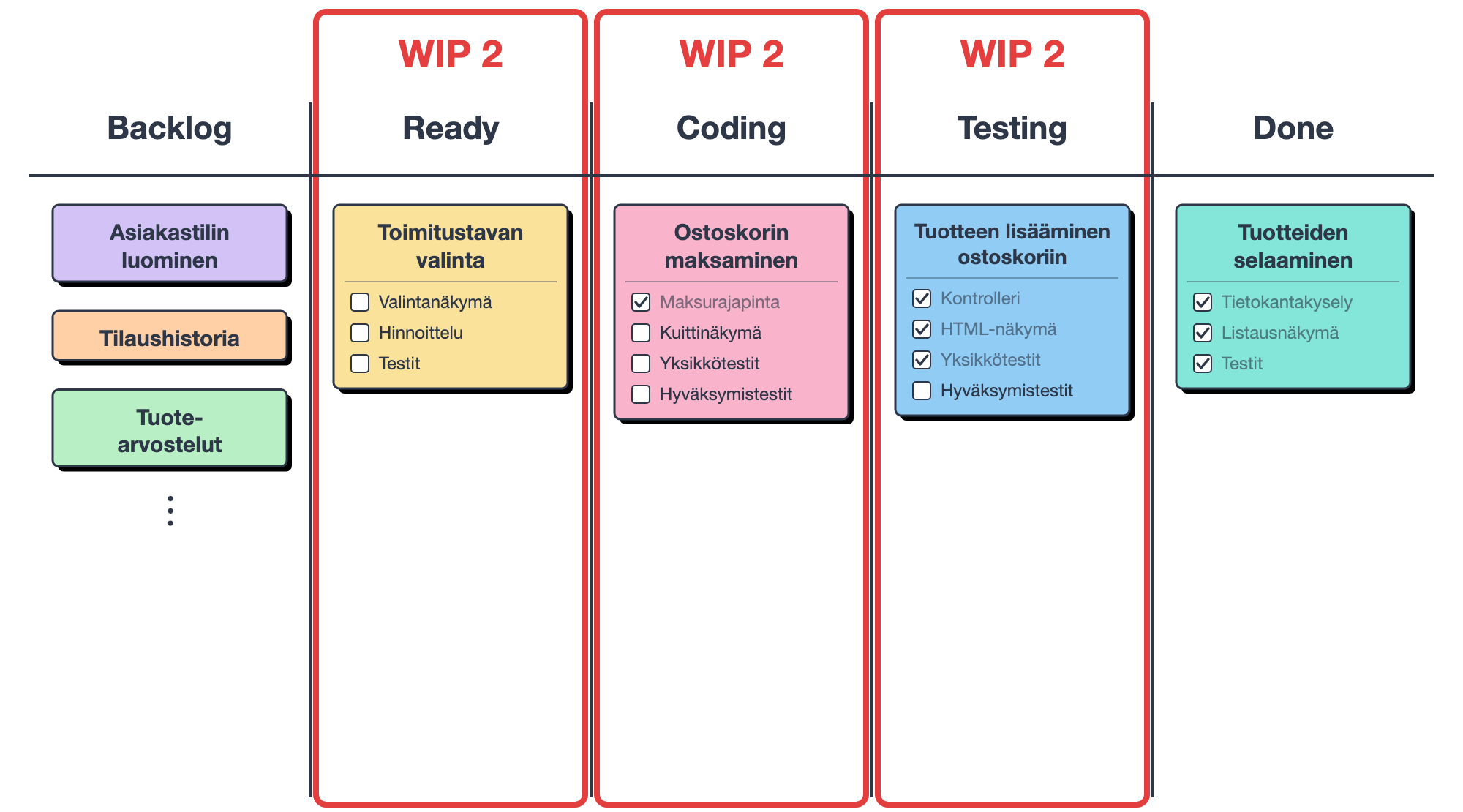
Another way is to use story-specific rows, like the Scrum taskboard, on which the tasks move from one work phase to another. Only the stories in progress are on the board as rows, and in this case the WIP limits apply to tasks:
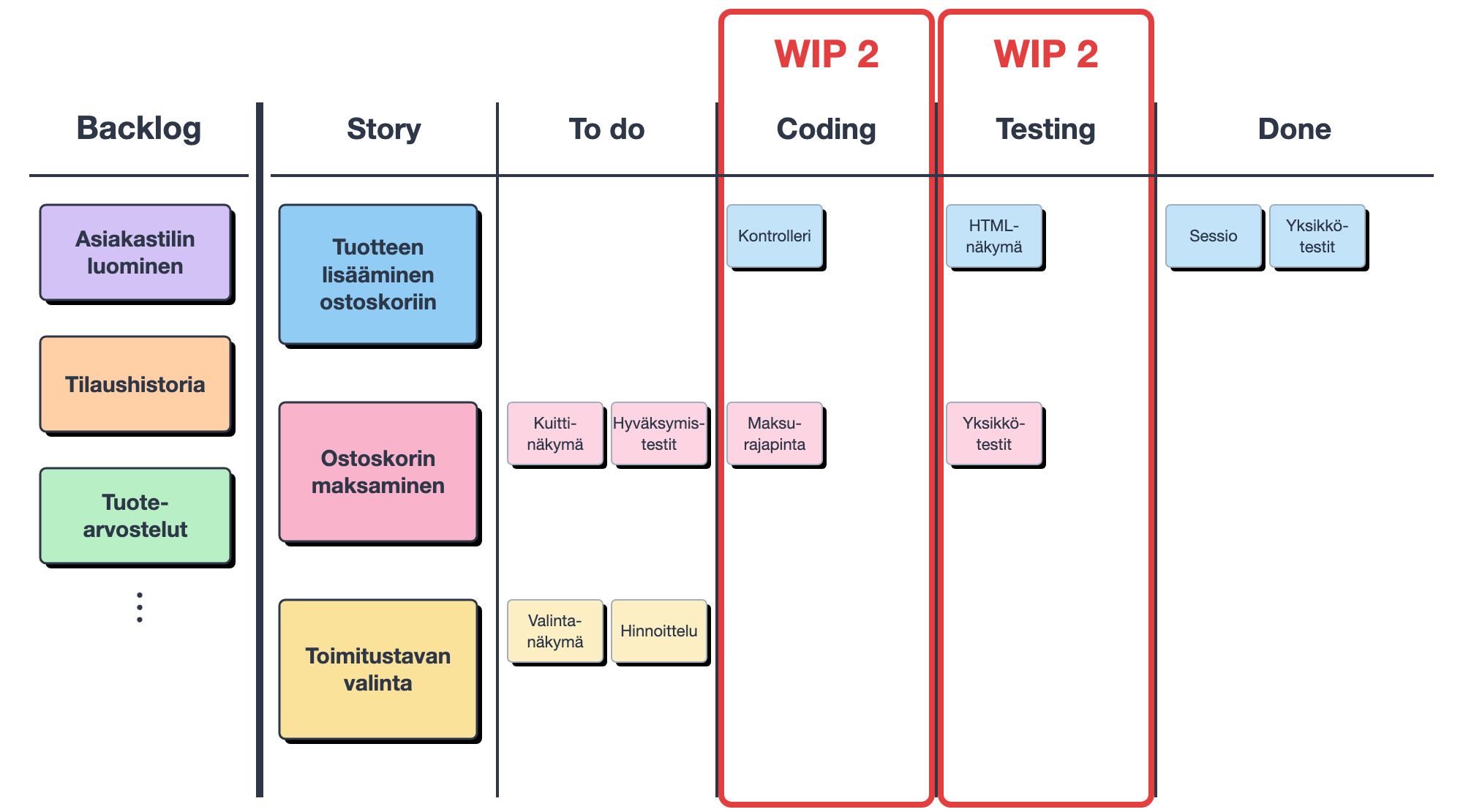
Work phases can also be divided into doing and done parts. The done part shows that the work is finished in that phase and is waiting for the next phase. Since the WIP limit applies to the whole phase, the waiting items also count towards the limit, and queues become visible:
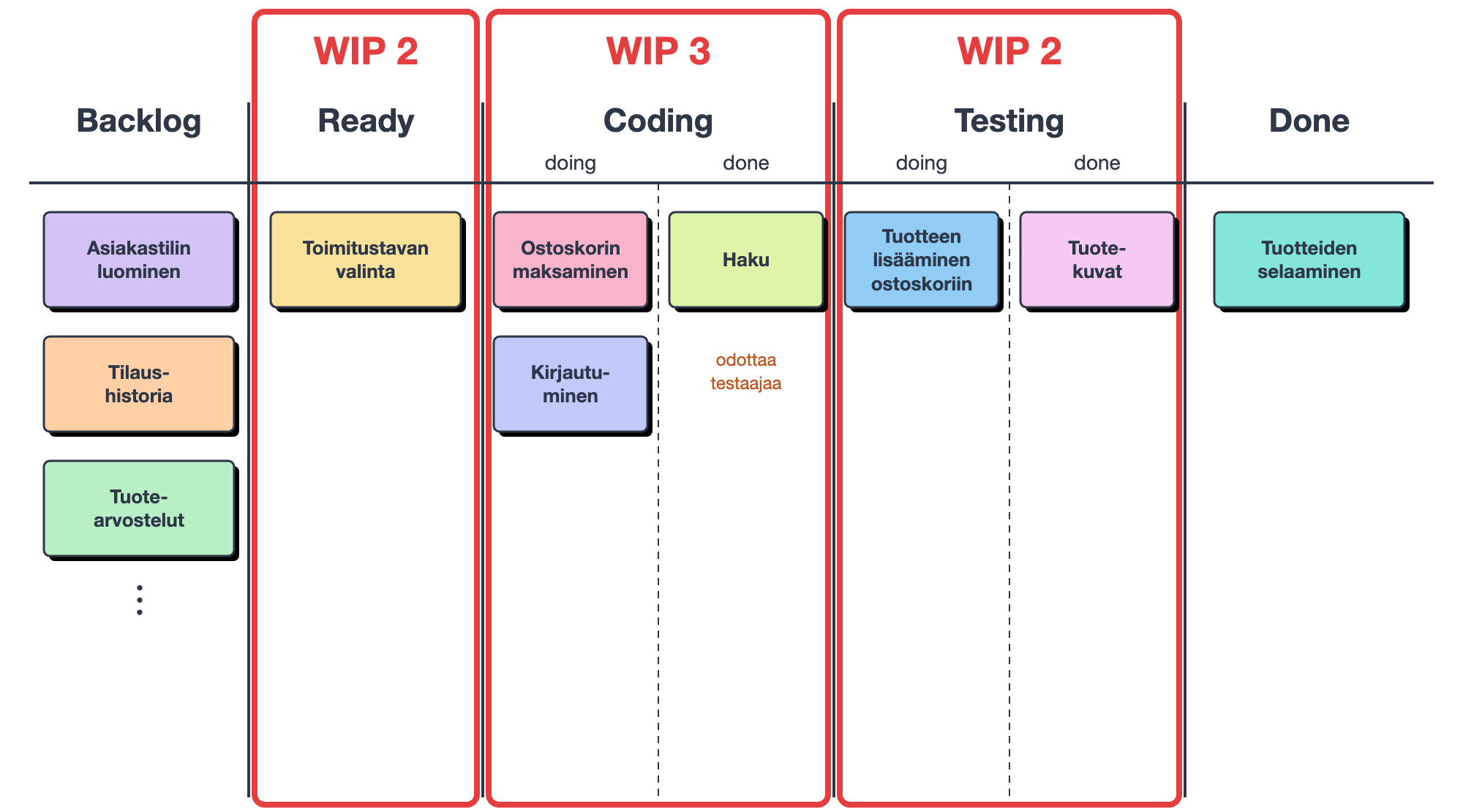
In the picture, search has been coded, but it is waiting for a tester, since the limit of the testing phase is full. Since the limit of the coding phase is also full, the coders cannot start a new story, and should instead help with testing. In this way, WIP limits reveal the bottleneck and steer the team to get started work done before starting new work.
Scrumban suits especially situations where work comes in continuously and unpredictably, e.g., for maintenance and support teams. In such work, agreeing on the content of a two-week sprint in advance is often artificial, because urgent fixes mess up the plan anyway. On the other hand, a fixed sprint rhythm gives the team a regular moment to stop and examine the product and its own way of working, and a team that drops sprints has to make sure that this does not disappear.
Scrum.org, the maintainer of Scrum, has also published a guide for using Kanban practices in Scrum. Its starting point is somewhat more cautious than Scrumban: sprints and the other Scrum events are kept, and Kanban’s WIP limits, pull principle and flow metrics are brought inside them to improve the flow of work. An example of adopting Scrumban, in Finnish, can be found, e.g., in this bachelor’s thesis. Kanban is covered in more detail in Part 5.
Scrumban is an example of a broader phenomenon: in practice, few organisations follow a single method as such. According to a study based on a large international survey, the vast majority of organisations combine several methods and practices, e.g., Scrum, Kanban and even features of the waterfall model. Such hybrid models are thus the rule rather than the exception.
Before the next sprint starts
As mentioned in the previous part, a sprint review and a sprint retrospective are held at the end of the sprint. The review evaluates the work done by the development team. User stories that were left unfinished or implemented inadequately are moved back to the backlog.
During the sprint, new user stories may have come into the product backlog, or existing stories may have been modified and reprioritised. It is recommended that the developers spend a small amount of time during the sprint on the work the product backlog requires, that is, on backlog refinement, e.g., estimating new user stories. If the product backlog is in good shape, that is, DEEP, when the sprint ends, it is again easy to move on to sprint planning and a new sprint.
In the retrospective, on the other hand, the team itself examines its own way of working and identifies possible improvements for the next sprint. One important thing to examine in the retrospective is the sprint taskboard: does it bring enough transparency to tracking the sprint, should more work phases be made visible on the board (e.g., testing, releasing, …), did tasks get stuck in some work phases unexpectedly, should WIP limits be added to the board?