This English version of the course material has been machine translated from the Finnish original and may contain errors. If something is unclear, check the Finnish version of this page.
Part 3

In this part, we look at software quality assurance, and especially at the testing and quality assurance methods favoured by agile methods.
Typos in the material
Suggest a fix by editing this file on GitHub.
Course feedback
In addition to the usual feedback collected at the end, the course uses so-called continuous feedback: you can give anonymous feedback to the course staff at any time at https://norppa.helsinki.fi/targets/112400522/feedback
The basic questions of quality assurance: verification and validation
Two essential concepts in software quality assurance are verification and validation.
Verification aims to ensure that the software meets the requirements set for it during requirements engineering. This is usually done by testing that the program implements the functional and non-functional requirements recorded in the requirements specification. Verification thus tries to answer the question are we building the product right.
Validation, on the other hand, aims to ensure that the software meets the user’s expectations and needs. The requirements recorded during requirements engineering are not always what the user really needs. The essential question of validation is therefore are we building the right product, that is, are we building the right system for the intended purpose in the first place.
The goal of verification and validation is to ensure that the program is good enough for its intended purpose. Goodness is relative and depends on what the program is used for. A program usually does not need to be completely free of defects to be good enough for the needs of its end users.
Carrying out verification and validation is commonly called quality assurance (QA). If quality assurance is the responsibility of a separate team, it is often called the QA team.
Quality assurance techniques
Traditionally, quality assurance has used two techniques of a different nature: reviews/inspections and testing.
In a review, the documents and program code produced during the software development process are gone through in search of various problems.
Inspections, in turn, are a more formal version of reviews. An inspection is carried out by arranging a formal meeting with a precisely defined agenda and predefined roles for the participants. Inspections belong to the world of the waterfall model, and nowadays they are rarely favoured except in the development of safety-critical systems.
Review is a static technique: executable program code is not necessarily needed. Even if the target is program code, the program is usually not executed during the review.
Testing, on the other hand, is a dynamic technique that always requires executing the program code. In testing, we observe how the program reacts to the given test inputs.
Validating requirements
Validation thus answers the question are we building the right kind of system for the customer’s needs.
The requirements defined for the software must therefore be validated, that is, we must make sure that the specification document describes software that meets the customer’s needs.
In the waterfall model, the requirements recorded in the specification document are validated specifically by reviewing them. Requirements engineering ends with the customer reviewing the specification document and making sure that the recorded requirements match the customer’s idea of the system being ordered. When the waterfall model is applied, the specification document is frozen after the review, and changing it usually requires a complicated process and may require a new contract between the customer and the supplier.
In agile software development, requirements are validated in the demonstrations at the end of each iteration (the sprint review in Scrum).
The customer is shown a working version of the software and can compare for themselves whether the result corresponds to what they acually want. The functionality the customer needs may differ from what was specified before the iteration, and/or the developers may have misinterpreted the requirements described by the user stories.
If the customer notices that the application is not heading in the desired direction, that is, the recorded requirements did not match the acual need, the need has changed, or the requirements have been misinterpreted, a correction can be made in the next iteration.
It is evident that the agile way of validating requirements works better in situations resembling product development, where the product being built is hard to specify precisely in advance.
Code review
Code review, that is, having someone other than the programmer read the code, has been found to be a very effective way of improving code quality. A review can reveal problems in the code that are hard to detect by testing, for example whether the code follows the agreed style and whether it is maintainable.
Traditionally, code review has meant going through the code to make sure it does not contain the risky features listed in various checklists. For example, one checklist for reviewing C programs can be found here. In some languages, such as Java, the checks done by the compiler make some of the checks in the linked list unnecessary.
Today, there are many tools that automate much of the reviewing by performing static analysis, for example ESlint in the JavaScript ecosystem and Python’s Pylint, which we already used in the week 2 exercises. An increasingly popular alternative in Python is the fast Ruff, which combines a linter and a code formatter.
Static analysis in the cloud
Cloud services have made developers’ work easier in many ways; for example, thanks to GitHub, nobody has had to maintain their own version control server for years.
Static analysis is also offered as a cloud service. GitHub has built-in tools such as CodeQL, which looks for security vulnerabilities, and Dependabot, which warns about vulnerable dependencies and suggests updates for them. A more comprehensive analysis is offered, for example, by Qlty, which analyses, among other things, the following aspects of the code:
- unnecessary complexity in the code
- security risks in the code
- copy-paste code
- untested code
Any project on GitHub can be configured to be checked by Qlty at the press of a button. Qlty runs its checks every time new code is pushed to GitHub.
The summary report of Oodikone, an application used for learning analytics at the University of Helsinki, looks like this:
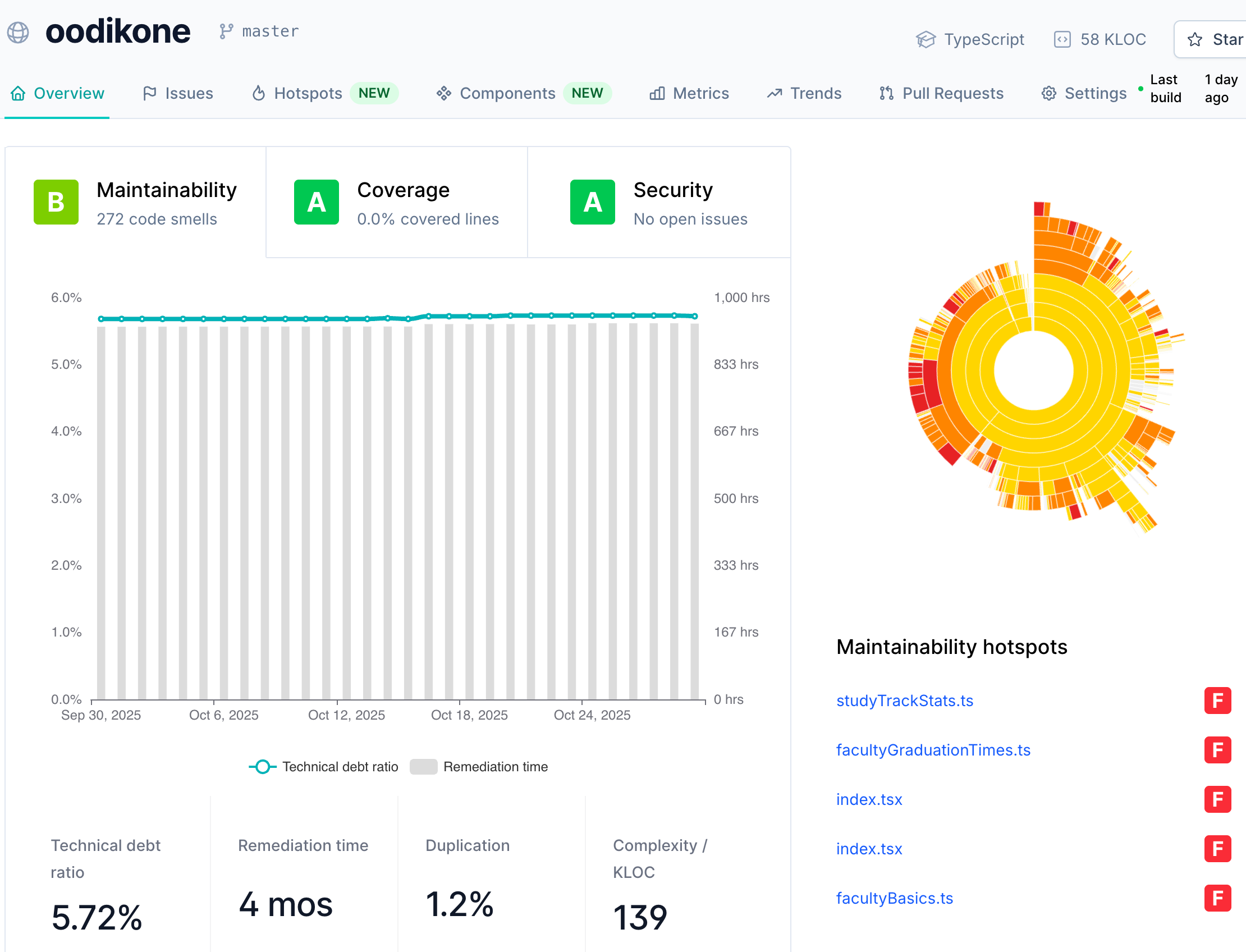
The application’s maintainability grade is B, the second highest, and no security issues have been detected. Qlty estimates the time to pay back the application’s technical debt at just under 1000 hours. The diagram on the right shows the maintainability hotspots of the code, that is, the parts of the application most in need of maintenance work.
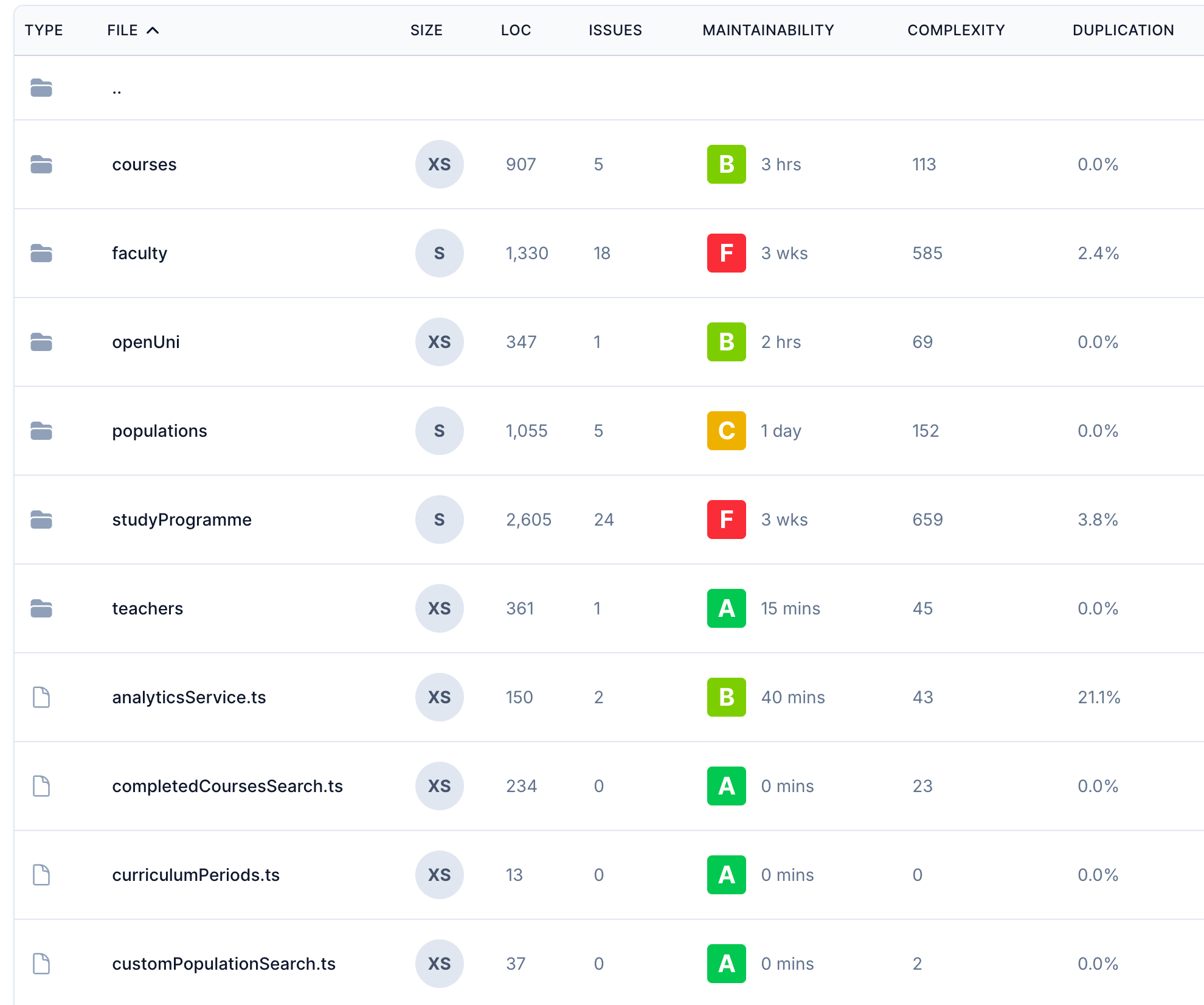
Qlty offers many different views. The maintainability of the code can be examined at many levels. The following view reveals that the code in the directories faculty and studyProgramme might need some improvement:
There are several similar services, such as SonarQube and Codacy. Static analysis tools increasingly advertise themselves as AI-powered. For example, Qlty can offer fix suggestions generated by AI.
Most of the code in today’s applications comes from third-party libraries, so an application’s security also depends on them. This is called software supply chain security. In addition to Dependabot, which monitors vulnerabilities in dependencies, GitHub offers secret scanning, which warns you if, for example, an API key or a password accidentally ends up in the repository.
Code review: GitHub and pull requests
A large share of software development projects store the application’s source code on GitHub. GitHub’s pull requests provide a good and widely used tool for doing code reviews.
When pull requests are used, the workflow is as follows:
- A developer makes the changes in their own version control branch and opens a pull request from it. In open source projects, an outside developer usually makes the changes in their own fork of the repository.
- A maintainer, for example the team’s senior developer, the person in charge of the open source project or some other developer, reviews the pull request.
- If the code is not yet good enough for the changes to be merged into the repository, the maintainer writes a set of improvement suggestions for the author of the pull request.
- Once the changes are acceptable, the pull request is merged into the main repository.

Below is an example of a pull request made to the mini project boilerplate repository. The pull request implements deleting a todo. The description mentions the story the change relates to, and the lines Closes #28 and Closes #29 tell GitHub that merging the pull request also closes two tasks of the story. The reviewer requested for the pull request is shown on the right.
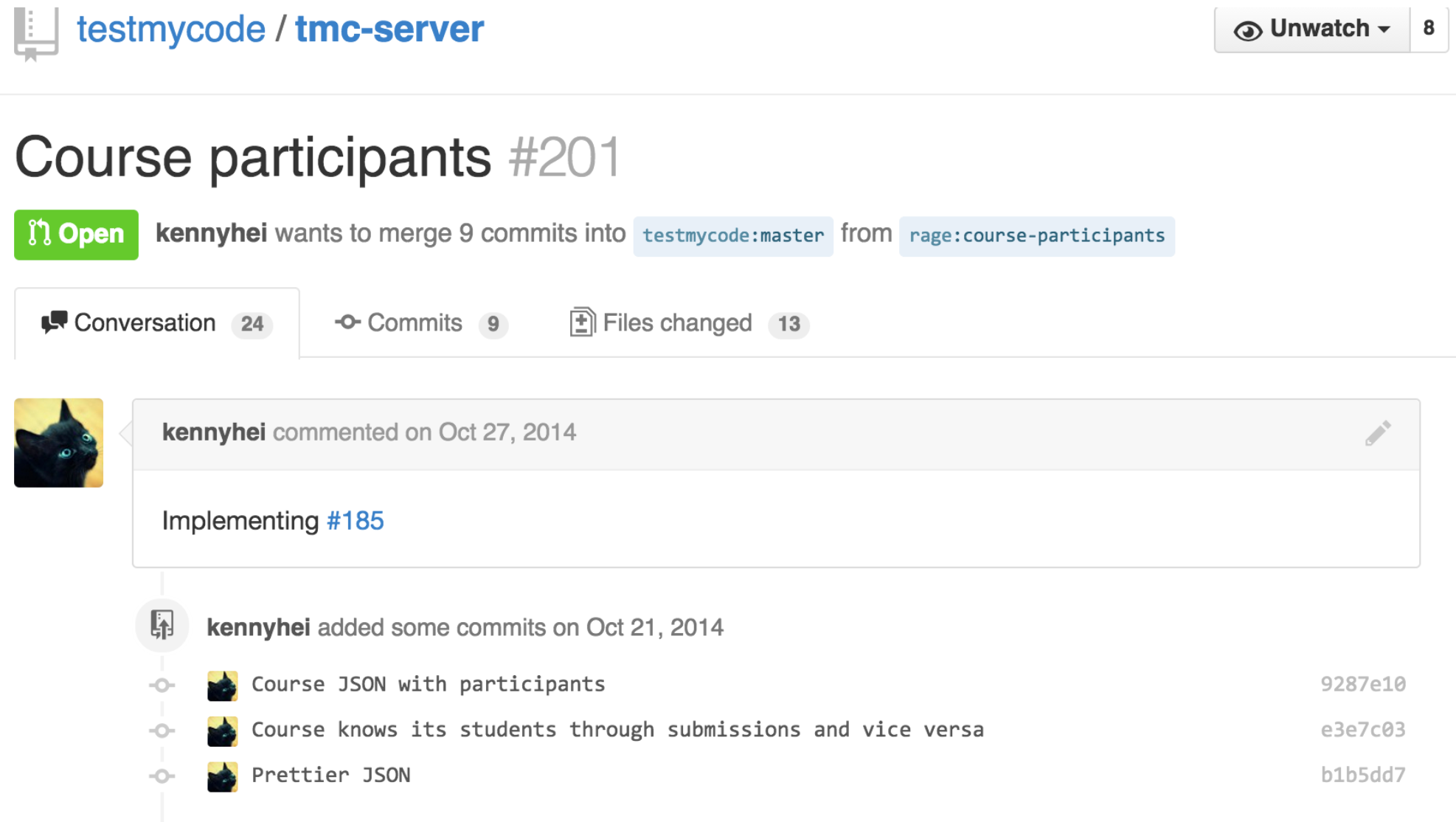
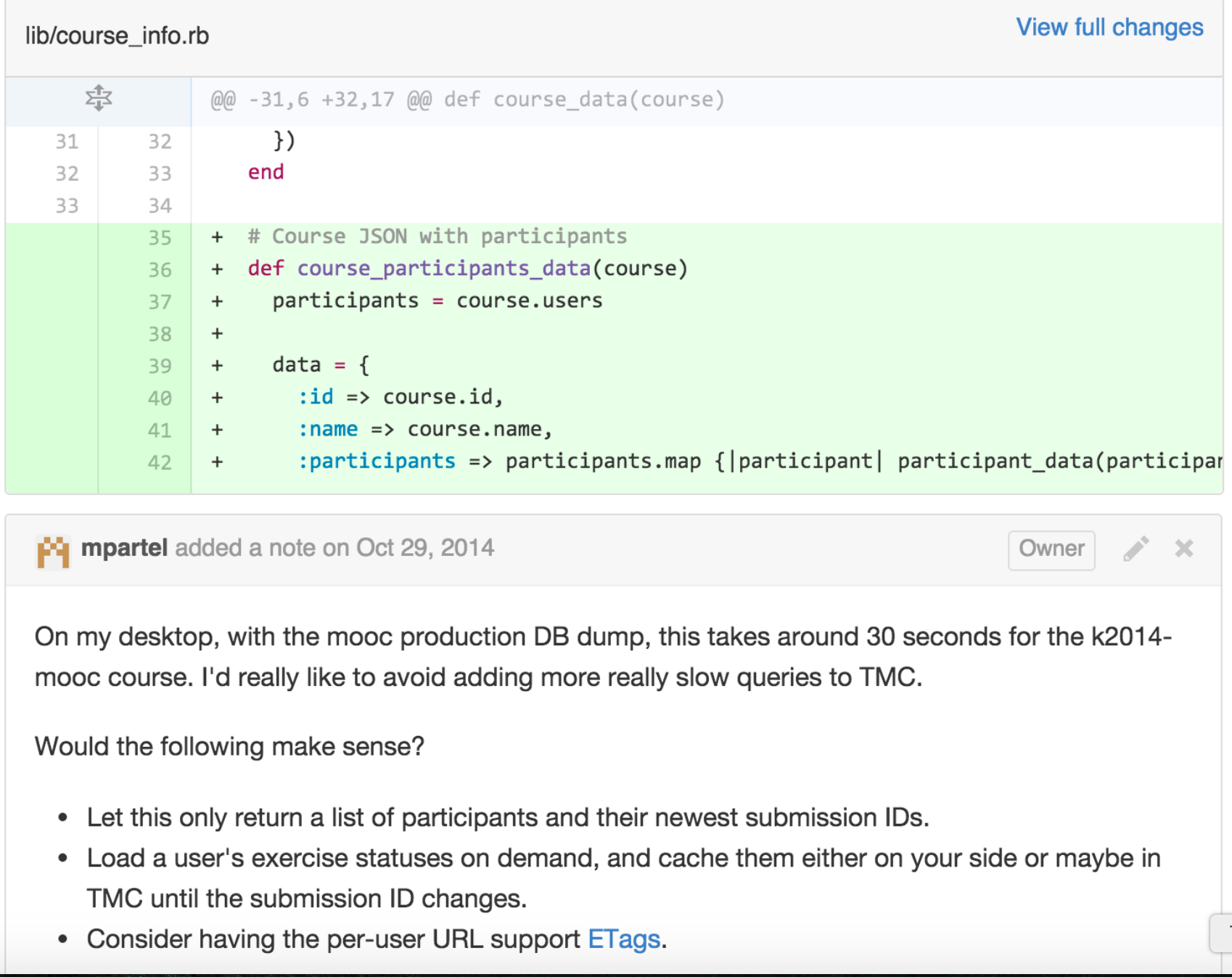
The reviewer does not approve the changes yet, but requests fixes (request changes). Deletion has been implemented as a link, that is, as a GET request, which is risky, and the reviewer suggests a POST request instead. The suggestions have been made with GitHub’s suggested change feature, so the author of the pull request can accept the change with a single click. The reviewer also points out that the Robot tests required by the Definition of Done are missing.
Nowadays many development teams use pull requests regularly, and some have even written into their Definition of Done that one of the criteria for done is that someone other than the implementer has reviewed the code. The reviewer can be another developer or, in the case of beginning coders, a somewhat more senior member of the team.
The benefits of review are not limited to finding defects. A study conducted at Microsoft found that although developers considered finding defects to be the main goal of review, most of the comments concerned maintainability and the understandability of the code. Spreading knowledge within the team and finding alternative solutions also emerged as important benefits. Similar results were obtained at Google, where review is mandatory for all code: review was seen above all as a way of keeping the code understandable and spreading know-how. At Google, the changes being reviewed are typically small, and their review is usually completed within a few hours. Indeed, the single most important thing for smooth reviews is to keep pull requests small: a small change can be reviewed carefully, whereas a thousand-line change easily gets just an “LGTM”.
Review is also a social interaction: pointing out mistakes and disagreeing are interpersonal risks for both the reviewer and the author of the code. That is why comments should be directed at the code and not at its author, as advised for example in Google’s review guidelines. A review can also be done together, which turns it into collaboration and gives both parties a chance to justify their solutions and deepen their understanding.
Using AI in code review
On GitHub, you can ask Copilot to do a code review of a pull request. In the example, an interactive user interface has been vibe coded into ohtuvarasto, and a pull request has been made of the addition, with a review requested from Copilot. The overview of the review looks like this
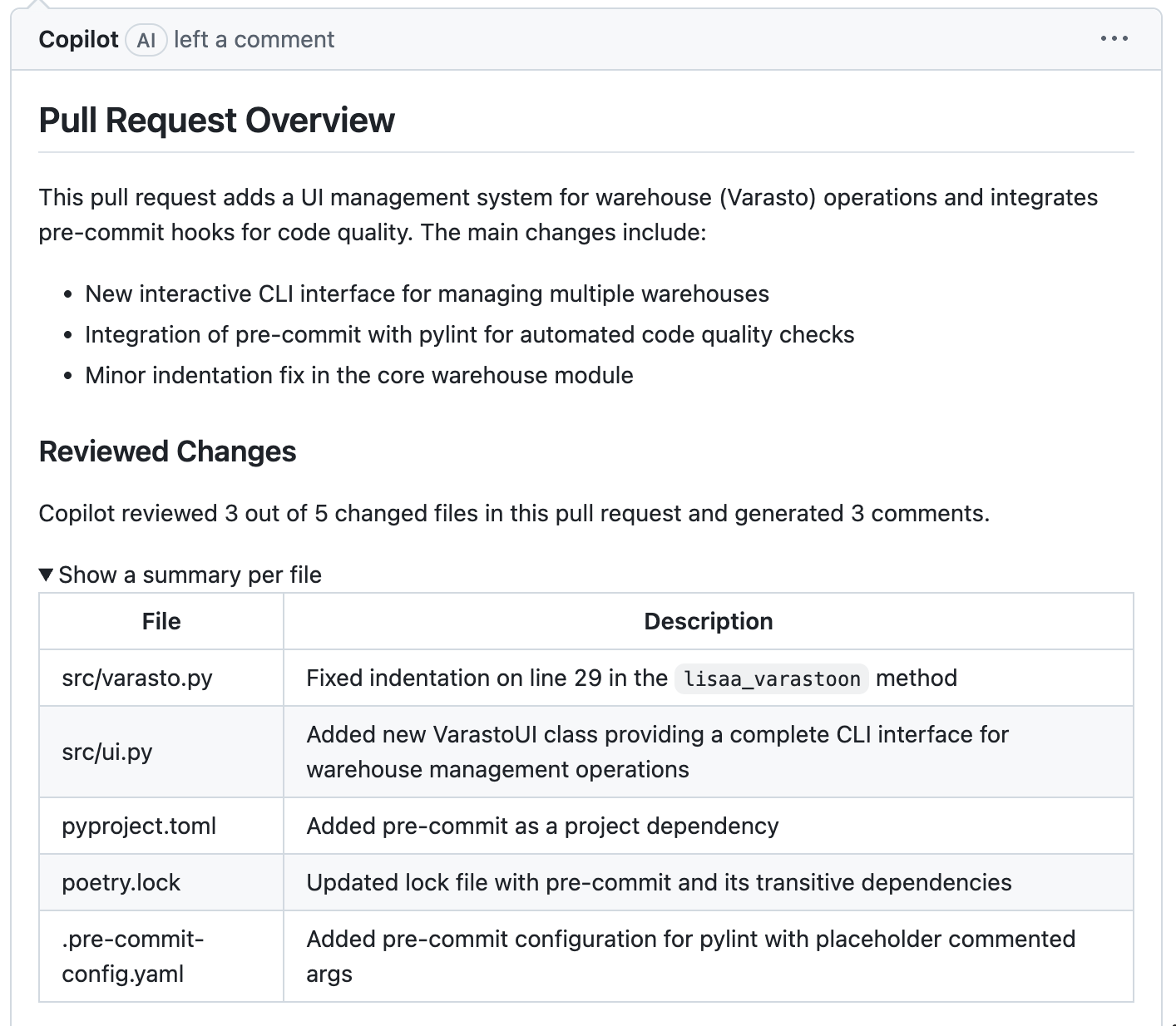
Copilot also gives more detailed comments and improvement suggestions
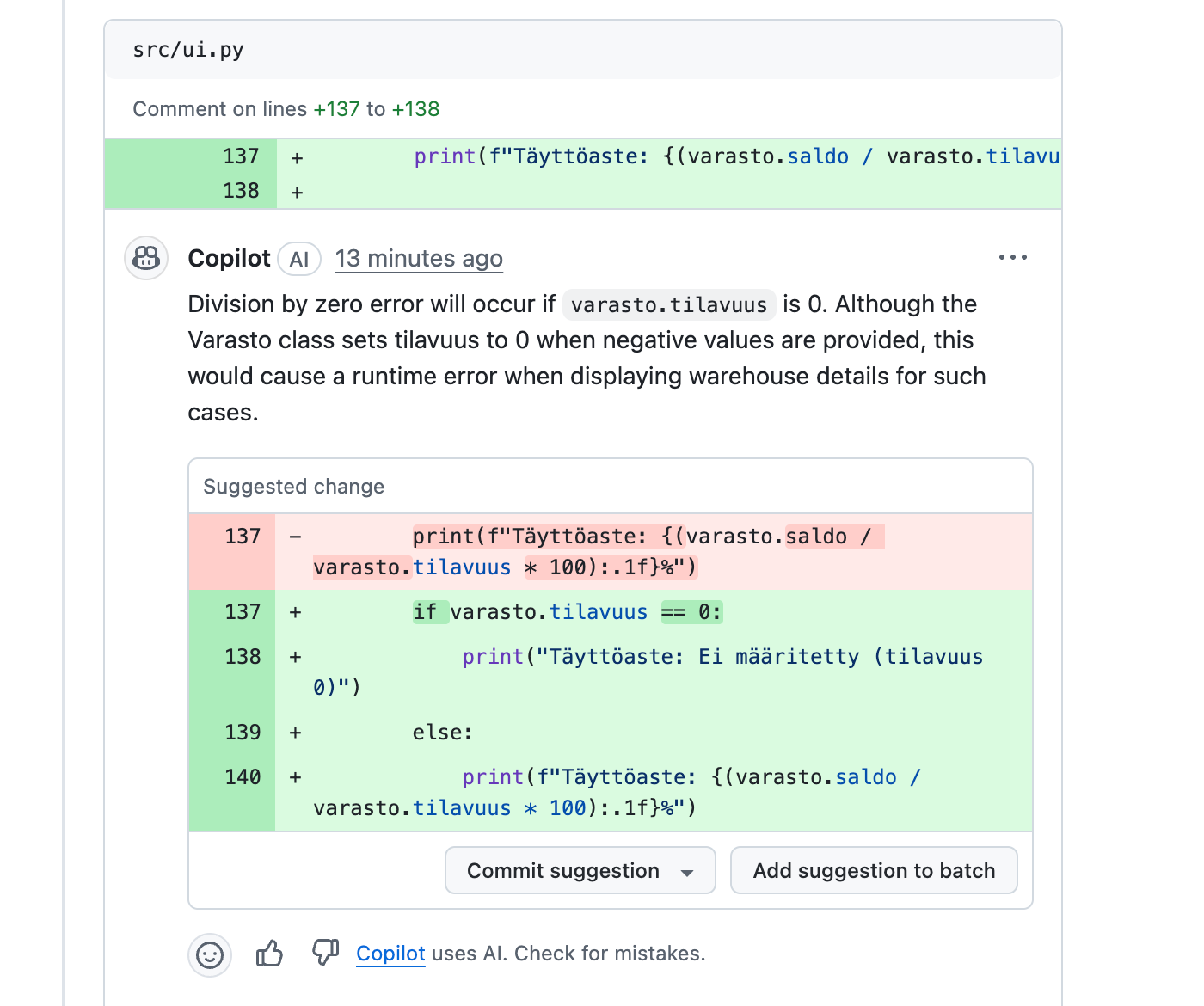
This time, the comment and the fix suggestion look reasonable. If you want, you can commit the fix suggestion, in which case the commit is added to the pull request.
The strengths and limitations of AI review are discussed in more detail in the AI material.
Extreme programming review practices
Unlike Scrum, eXtreme Programming, or XP, which was particularly popular in the early 2000s, defines several practices that concern how developers do their work.
Most XP practices are best practices that have been well known for decades, but often taken to an extreme form. Some XP practices aim to maximise software quality, and a few serve the same function as code review.
In pair programming, two programmers work together using just one computer. The one writing the code acts as the driver and the other as the navigator, and the roles are switched at suitable intervals. The navigator performs continuous review of the code.
Pair programming improves programmers’ discipline and focus on the work and is an excellent learning tool: the pair learn from each other, novices especially from more experienced developers. If pair programming is applied systematically, no part of the code remains known to only one programmer.
Pair programming has been studied relatively extensively. According to studies, it improves quality to some extent and can shorten the duration of a task, but the total effort increases. The effects depend greatly on the task and the people: pair programming is most beneficial for complex tasks and when the goal also includes learning or spreading know-how within the team. In addition to benefits visible at the code level, studies highlight a positive effect on team dynamics and job satisfaction. Pair programming is also linked to the team’s psychological safety: showing your unfinished thinking to someone else is easier in a safe atmosphere, and on the other hand, successful collaboration strengthens trust. Continuous pair programming is also experienced as taxing, so many teams use it selectively.
Although pair programming, or even its multi-person version mob programming, is fairly popular, not many places practise pair programming systematically in the strict sense of the definition, at least not every day. It is very common for developers to work alone most of the time, but to hold spontaneous pair or mob programming sessions when needed, especially when facing technical challenges.
Code quality is also affected, in a way similar to review, by the XP principles of collective code ownership and coding standards.
Collective code ownership means the principle that no single programmer has sole control over any part of the code, that is, everyone is allowed to make changes and extensions to any part of the code. Pair programming supports collective ownership.
Collective ownership has its own risks: someone who does not know the code well can do a lot of damage with careless changes. XP tries to eliminate the resulting risks with testing practices, in practice with automated regression tests.
Coding standards mean that the team defines a code style that all programmers commit to. Style refers to naming conventions, code formatting and certain aspects of program structure. Compliance with the coding standard can be partly checked automatically with static analysis tools; for example, Python’s Pylint and, in the JavaScript world, Eslint and Prettier are tools that can be used to ensure that the code follows the defined coding standard. A commonly followed coding standard in Python is PEP 8.
Testing
Proving software completely free of defects is practically impossible, since the number of combinations of possible usage scenarios and inputs is simply too large. The purpose of testing is therefore to convince the customers and the development team that the software is good enough to be used.
Testing has two slightly different goals. First, it must show that the software meets the requirements set for it. In practice, this means demonstrating with the implemented software that the things recorded in the requirements specification have been realised. The second goal is to find defects in the software, that is, when testing we try to break the program or bring it into an inconsistent state in some way. The defects found in this way are then fixed before real users run into the same problems.
Both goals aim primarily at ensuring the external quality of the program, that is, the quality experienced by the user. External quality refers to whether the software is fit for its purpose, that is, whether the user can do what they want with it.
Levels of testing
Testing is divided into different levels according to what the primary target of testing is. The V-model of testing, which describes the software life cycle in a waterfall-like manner, illustrates the different levels of testing.
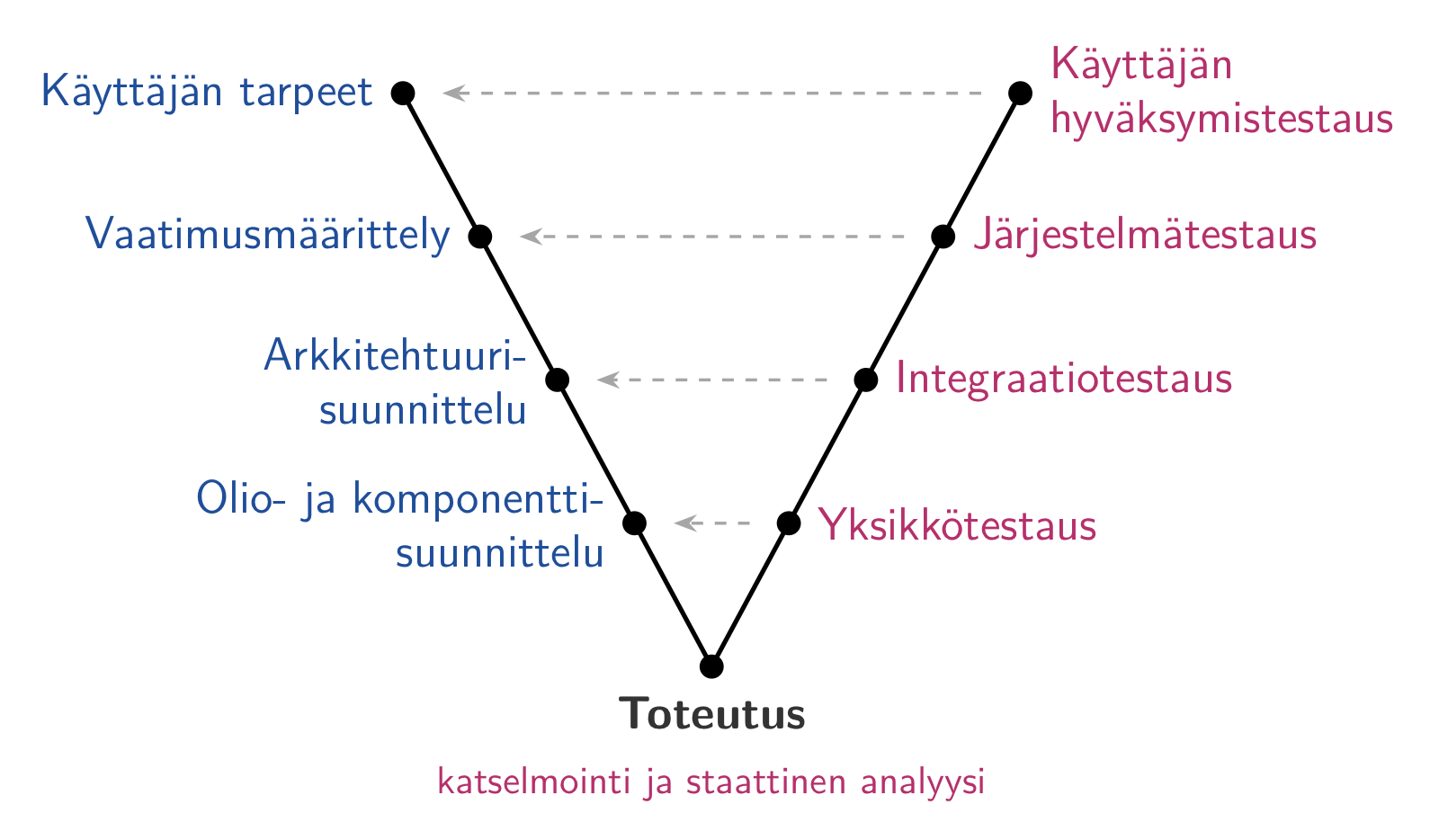
At the lowest level is unit testing, which examines the operation of individual classes, methods and modules, usually in isolation from the rest of the system. Unit testing is done by the developers.
Integration testing, in turn, covers testing the functionality of larger units composed of individual components. Integration testing is also handled by the developers.
System testing ensures that the software as a whole works as recorded in the requirements. The software is tested through the same interface that the end users use. Traditionally, system testing has been the responsibility of separate testers or a quality assurance team in the development organisation. The ideal of agile software development, on the other hand, is that testing belongs to the whole team: the team is cross-functional, and system-level tests are automated and written as part of implementing each feature. In practice, the situation is often somewhere in between. Many organisations still have separate testers or QA teams who do, for example, exploratory testing, test automation development or testing required by regulators, either as members of the team or outside it.
Testing done by the organisation that ordered or uses the software is called user acceptance testing, and its purpose is to make sure that the developed software really meets expectations and works in real use. User acceptance testing often takes place in normal production use by the organisation that ordered the software or by the end users, for example by beta testing the application with a small group of users. User acceptance testing thus does not focus on whether the software works exactly as the requirements specification says; after all, the requirements specification does not necessarily describe the user’s real need exactly.
System testing
The purpose of system testing is thus to ensure that the software works as recorded in the requirements specification. The application is usually tested through the same interface through which it is used, so testing can take place, for example, through a graphical user interface.
System testing is done without knowledge of the system’s internal structure; this kind of testing is called black box testing.
System tests typically examine the application’s functionality at all its levels, from the user interface to the application logic and the database. This is why system tests are often called end-to-end tests.
System testing is usually based on the application’s potential usage scenarios. If the requirements have been expressed as user stories, it is fairly easy to formulate tests from the stories’ acceptance criteria to ensure that the software meets the requirements described by the stories and handles typical error scenarios.
In addition to system testing that covers the application’s functionality (sometimes called functional testing), there are many other forms of system testing, such as
- usability testing
- performance testing
- security testing
- accessibility testing
System testing is mainly done by the development organisation. In some cases, for example security or accessibility testing may be given to parties specialised in them.
Choosing test cases
Completely exhaustive testing is impossible, and testing is laborious in any case. It is therefore important to find a reasonably sized set of test cases that can still reveal as many defects as possible.
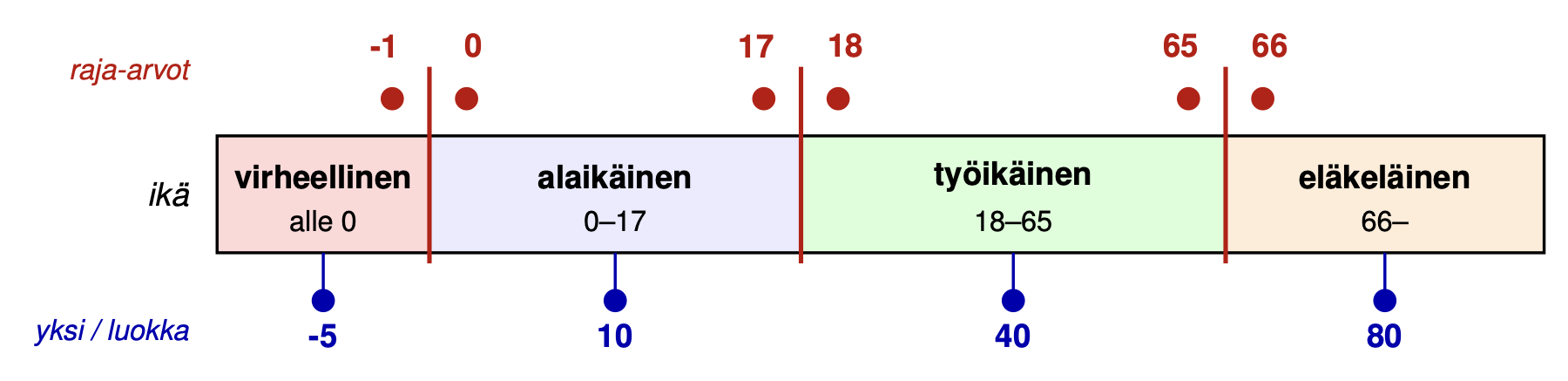
A single test case tests the system’s functionality with one input value, or with a combination of values if the functionality requires several inputs. Many inputs are equivalent from the point of view of how the system works. For example, if a system handling personal data stores a person’s age, the system most likely behaves no differently whether the age is 20 or 30, but if the age is 17, the system’s functionality may differ from when the age is at least 18.
In tests, you should therefore try to divide the inputs into equivalence classes, that is, groups of inputs for which the program behaves essentially in the same way. Usually you should write only one or two test cases for each equivalence class, or for each combination of input equivalence classes. As representatives of the equivalence classes, it is especially worth choosing their boundary values, because bugs in code are very often related to the extreme values of the conditions in loops and conditional statements.
For example, in a system handling personal data, the equivalence classes for age might be minor 0–17 years, working age 18–65 years and pensioner 66 years and over. Defining sensible boundary values for the equivalence classes requires knowledge of the system’s functionality. It would probably not be possible to make a clear division between the working-age and pensioners based on age alone. Assuming that the equivalence classes above were sensible, suitable age boundary values for test cases would be 17, 18, 65 and 66 years, so a separate test case could be written for each of them. Invalid inputs, such as negative numbers, also form their own equivalence class, whose boundary values are -1 and 0.
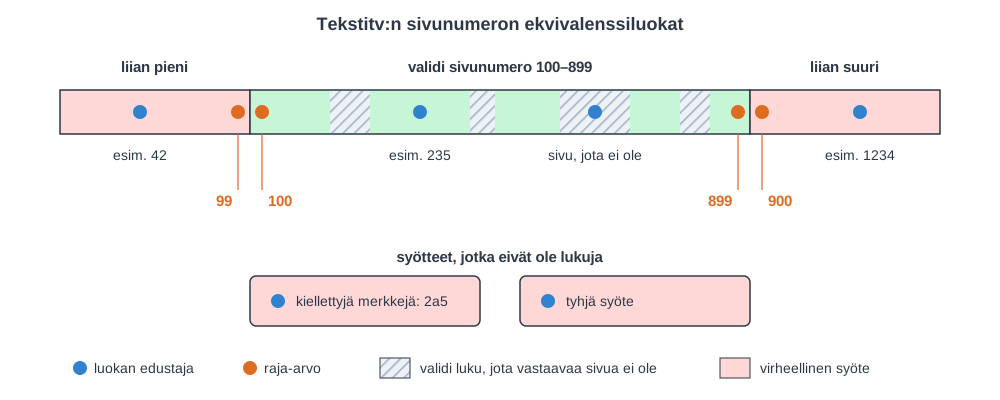
As a second example, let us consider the browser version of Teletext.

Which test cases should we choose when testing the page selection box of Teletext?
A Teletext page corresponds to a number between 100 and 899. However, for some of the numbers in this range, no corresponding page exists.
The equivalence classes of the input would include at least the following:
- numbers corresponding to an existing page
- valid numbers that do not correspond to any page
- numbers that are too small and too large
- inputs containing forbidden characters (for example letters)
- empty input
If we want the tests to be comprehensive, we should choose at least one input value to test from each equivalence class.
The boundary cases of the equivalence class corresponding to an existing page, that is, the numbers 100 and 899, might be worth choosing as test inputs, as well as the numbers 99 and 900, which are boundary cases of their own equivalence class.
The figure below illustrates the equivalence classes of the input and the test inputs chosen from them:
Unit testing
Unit testing targets individual methods and classes. Unit testing is done by the programmers. It is often assumed that unit tests are written for new code at the same time as the code is written. The testing that is the programmers’ responsibility, that is, unit and integration testing, is often called developer testing.
When writing unit tests, the structure of the code under test may be taken into account, for example what kind of conditional statements the code uses. If the tests take the internal structure of the system under test into account, we often speak of white box testing.
Unit testing does not directly test whether the software meets the requirements set by the user; rather, the goal is to control the program’s internal quality. Internal quality refers to the goodness of the code’s internal structure: is the code easy to develop further, is it easy to trace and fix defects, and can the correctness of the code’s functionality be ensured when changes are made.
Internal quality is primarily of interest to developers: if the internal quality of the code is poor, working with it is unpleasant and slow. If the internal quality of the code starts to deteriorate, the pace of development slows down, and the software will likely start accumulating more and more bugs that are also visible to the end user.
So unit testing is not merely a control mechanism for internal quality. Comprehensive unit tests also improve the program’s external quality, that is, the quality experienced by the customer. Unit tests can eliminate some defects visible to the customer that the test cases of system testing do not find.
The sooner a defect is detected after the change that caused it, the easier it usually is to locate and fix, since the change is still fresh in memory and there are few suspicious places. Unit tests give this feedback the fastest, already during programming. However, the traditional view that fixing a defect found late is always many times more expensive has been questioned.
Because unit tests have to be run many times, running them and reporting the test results must be automated, and today’s good tooling makes automation easy. JUnit, familiar from the Java world, is still one of the most popular testing libraries; other popular ones include RSpec (Ruby) and Jest and Vitest (JavaScript). Python’s most popular testing library is pytest, which we use for running tests. On the course, tests are written with the unittest module of Python’s standard library, and pytest can run those too.
The tests written on the course Ohjelmistotekniikka are mostly unit tests.
What and how much should be tested?
What should be tested in software with unit tests? The answer is not easy. The JUnit FAQ answers the question as follows:
“Do I have to write a test for everything?” “No, just test everything that could reasonably break”
In practice, you cannot and should not test everything, so tests should be targeted especially at
- complex and error-prone logic, such as calculations and conditions
- not just normal use but also invalid inputs and edge cases
- places where bugs have been found before
If the aim is comprehensive unit testing, you should at least test the behaviour of all methods (and logical combinations of methods) with both acceptable and invalid parameter values.
The possible values of the parameters should be divided into equivalence classes, and at least one value from each class should be chosen as a test input. In particular, the boundary values of the equivalence classes should be included in the values to be tested.
Since the program code is visible when writing unit tests, the equivalence classes and boundary values of the test parameters can usually be deduced from the code.
As an example, let us look at the method ota_varastosta of Ohtuvarasto, familiar from the first week’s exercises. What test cases should be generated for the tests to be comprehensive?
class Varasto:
    def __init__(self, tilavuus, alku_saldo = 0):
        self.tilavuus = max(tilavuus, 10)
        self.saldo = min(tilavuus, max(alku_saldo, 0))

    def ota_varastosta(self, maara):
        if maara < 0:
            return 0.0

        if maara > self.saldo:
            kaikki_mita_voidaan = self.saldo
            self.saldo = 0.0

            return kaikki_mita_voidaan

        self.saldo = self.saldo - maara

        return maara
When testing the method ota_varastosta, a test case must take into account not only the parameter maara but also the state of the warehouse. The state of the warehouse has three “equivalence classes”:
- empty (e.g. balance 0, capacity 10)
- neither empty nor full (e.g. balance 5, capacity 10)
- full (balance 10, capacity 10).
For each of these, the method’s parameter maara has its own equivalence classes. If the warehouse is “half full”, that is, the balance is 5, the values of maara could be chosen as -1, 0, 5, 6. If the warehouse is full, suitable values for maara would be -1, 0, 10, 11. If the warehouse is empty, the values of maara can be chosen as -1, 0, 1.
It is hardly worth testing taking zero or a negative amount separately for every warehouse state. This could be a risk if the internal implementation of the warehouse were changed completely.
So we notice that comprehensively testing a single method of a ridiculously small class already requires a large number of test cases. In most cases, however, it is not realistic to assume that tests are written with similar coverage; the time/benefit ratio is simply too poor. Most of the nasty bugs in software are out of reach of unit testing anyway.
Property-based testing
There is also an alternative to choosing test cases by hand: property-based testing. In it, the tester does not choose individual inputs, but describes a property that must hold for all inputs. The testing library generates hundreds of inputs and looks for ones that break the property.
For example, for the method ota_varastosta it always holds that the balance does not become negative and that the amount taken from the warehouse plus the new balance equals the old balance. With Python’s Hypothesis library, this is expressed as follows:
from hypothesis import given, strategies as st

@given(st.integers(min_value=0, max_value=100), st.integers(min_value=-10, max_value=200))
def test_ottaminen_ei_hukkaa_tavaraa(alku_saldo, maara):
    varasto = Varasto(100, alku_saldo)
    otettu = varasto.ota_varastosta(maara)

    assert varasto.saldo >= 0
    assert otettu + varasto.saldo == alku_saldo
The test method looks like an ordinary test that has parameters. The parameter values come from the decorator @given, which is told with strategies what kind of values to generate for each parameter. Here the first parameter alku_saldo gets integer values between 0 and 100 and the second parameter maara between -10 and 200, so negative amounts and amounts larger than the warehouse balance are also included. By default, Hypothesis runs the test with a hundred different input combinations. It does not pick the inputs completely at random, but deliberately also tries typical edge cases, such as zero and the extremes of the range.
Property-based testing easily finds defects that the tester would not have thought of. Let us try whether the balance of a warehouse created by the constructor always stays between zero and the capacity when the constructor’s parameters can be any integers:
@given(st.integers(), st.integers())
def test_saldo_pysyy_rajoissa(tilavuus, alku_saldo):
    varasto = Varasto(tilavuus, alku_saldo)

    assert 0 <= varasto.saldo <= varasto.tilavuus
The test does not pass:
E       assert 0 <= -1
E           tilavuus=-1,
E           alku_saldo=0,
The constructor corrects a negative capacity, but still calculates the balance based on the original capacity, so the balance becomes negative. Among the inputs that caused the failure, Hypothesis automatically looks for the simplest possible one (shrinking), which makes the defect easier to trace.
Property-based testing does not replace example-based tests, since coming up with suitable properties that hold for all inputs is not always easy. It is, however, a good complement especially when the input space is large.
Test coverage
The goodness of unit tests (and of course other kinds of tests too) can to some extent be measured with the concept of test coverage. There are a few different types of test coverage.
Line coverage means the percentage of the program’s lines of code that are executed when the test cases are run. Even if line coverage is 100%, this of course does not mean that all essential functionality has been examined.
Branch coverage means the percentage of the branches of the conditional statements in the method/class under test that the tests have gone through.
Many tools, such as Coverage that we use in the exercises, measure test coverage while running the tests. There are other types of coverage too, such as condition coverage and path coverage, but many tools do not support them.
Below is an example of line and branch coverage measured with Coverage:
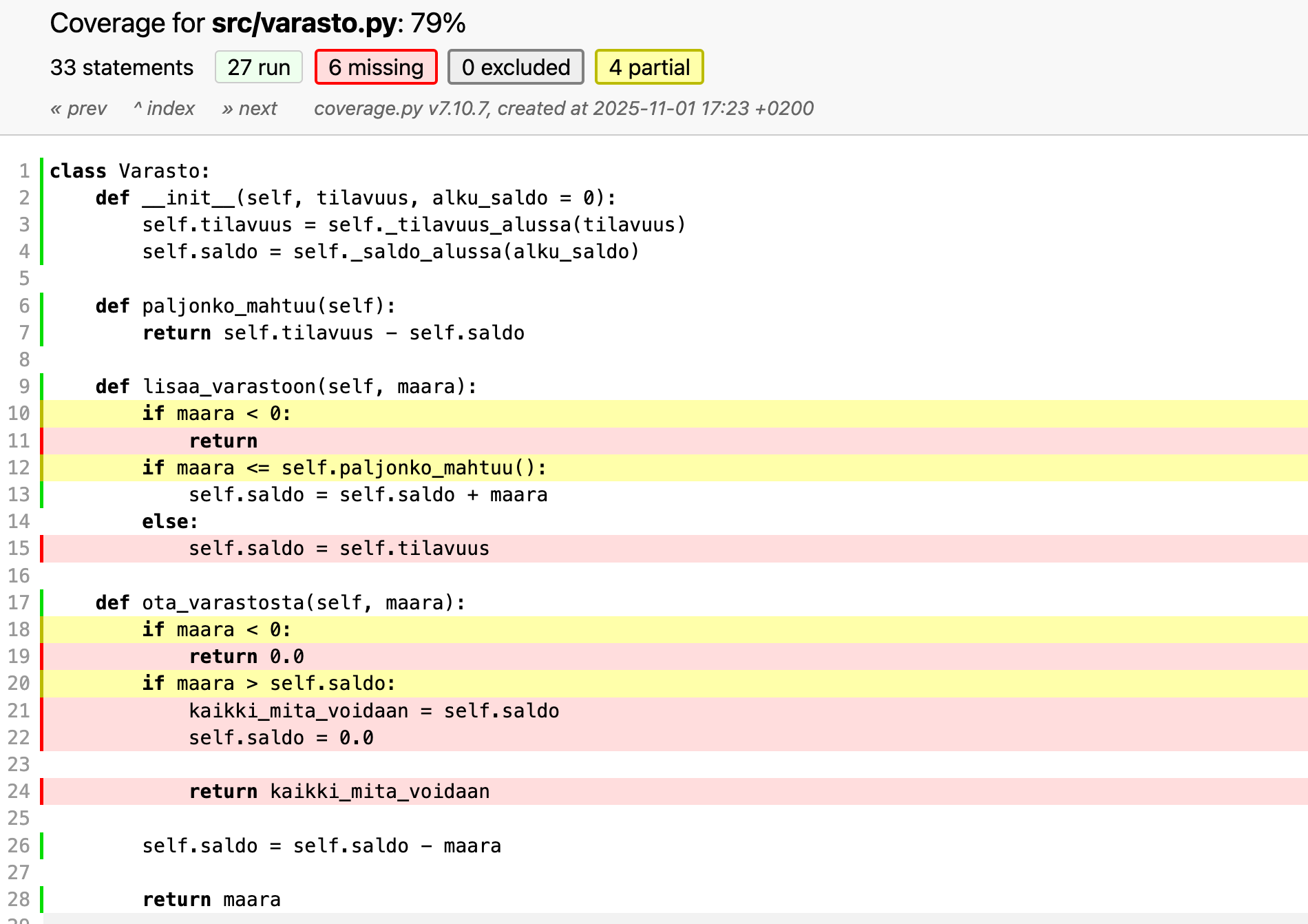
Coverage reports branch coverage (branches). An insufficiently tested branching point, for example an if, is shown in yellow, and the lines not covered by the tests are red.
Above all, test coverage tells you what in the code has not been tested: if some branch of the code is not executed in any test, its defects cannot be revealed by the tests. High coverage, on the other hand, does not yet mean that the tests are good, since executing a line of code does not tell whether the test checks the result at all. For example, in the study by Inozemtseva and Holmes (2014), coverage correlated only weakly with how well the tests find defects when the effect of the number of tests was taken into account.
Coverage should therefore not be set as a goal as such. If a team is required to reach, say, 90 percent coverage, it easily ends up with tests that execute code but check hardly anything. This is Goodhart’s law transferred to the world of testing. Coverage is nevertheless a useful aid for finding untested parts, and it is worth following, for example, during code review. For example, Google’s guidelines consider 60 percent coverage acceptable and 90 percent exemplary, but avoid top-down coverage targets and emphasise that reviews should look specifically at untested code.
Mutation testing
As stated above, coverage does not yet tell how good the tests are. Good tests are such that if a bug gets into the program, the tests notice the defect. Besides the test inputs, the goodness of tests depends essentially on what kind of checks the tests perform with assert statements.
The idea of mutation testing is precisely to test the goodness of the test cases by systematically generating mutants, that is, small “bugs”, into the code and seeing whether the tests detect the bugs introduced into the code.
There are many types of mutants generated into the code in mutation testing, for example
- manipulating a condition: if ( x<0 ) is changed to if (x <= 0) or if ( True )
- changing an operator: x += 1 is changed to x -= 1
- hard-coding a return value: return x is changed to return True
- replacing a constructor call: olio = Olio() is changed to olio = None
If the tests notice the mutant, that is, some test fails, the mutant is killed. If the tests pass despite the mutant, the mutant survives, and something essential is missing from the tests. In the example below, the function has two tests that execute all lines of code, so line coverage is 100 %. Still, the mutant that changes the condition ika < 18 to ika <= 18 survives, since no test tries the boundary value 18. Mutation testing thus reveals a missing boundary value test that coverage does not reveal:
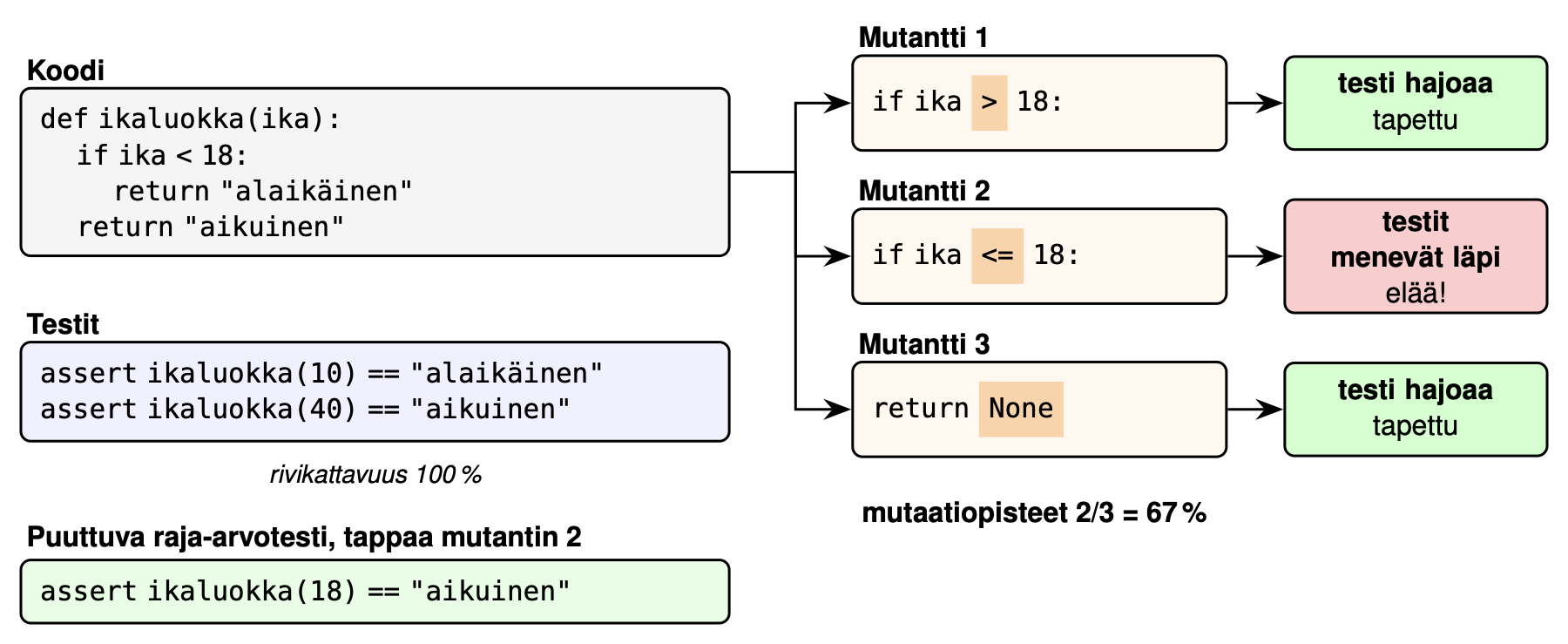
The challenges of mutation testing are the large number of mutations and the so-called equivalent mutants, because of which the results of mutation testing always require human interpretation.
An equivalent mutant is a change made to the code that nevertheless does not change the program’s functionality. No test can detect adding such a mutant to the code. Determining algorithmically that a mutant is equivalent is impossible.
There are ready-made tools for mutation testing, for example mutmut for Python, PIT for Java and Stryker for JavaScript. Since mutating the whole codebase is heavy, in practice mutation testing is often targeted only at changed code. For example, at Google, mutants are generated for the lines of the change under review, and the mutants not detected by the tests are shown during the review, so that the developer can improve their tests.
The principle of mutation testing is especially useful when evaluating tests written by an AI agent, since the agent’s tests often have high coverage but do not necessarily check anything essential. This topic is discussed in more detail in the AI material.
More information on mutation testing can be found, for example, on Wikipedia.
Integration testing
The individual classes of the system, unit tested in isolation, must be integrated into a working whole. During or after integration, integration testing is carried out, focusing on examining whether the interfaces between the program’s components work and on ensuring the correctness of the functionality the components produce together.
Integrating the system can proceed either based on the system’s structure or according to the features the system implements.
Structure-based integration focuses on integrating the individual structural components of the application one at a time. For example, when implementing an online store, the architectural components or layers, that is, the application logic classes, the user interface implementation and the database interface, would first be integrated as their own units. After this, the layers would be integrated into a complete application.
Feature-based integration, on the other hand, combines the subcomponents that implement the logical functionality of the system. In an online store, for example, all the code related to the feature add product to shopping cart could be integrated at once, proceeding one feature at a time until the whole application is ready.
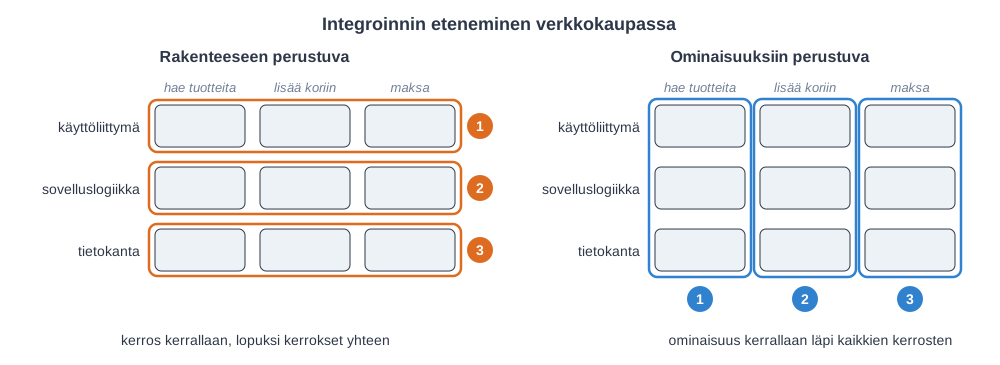
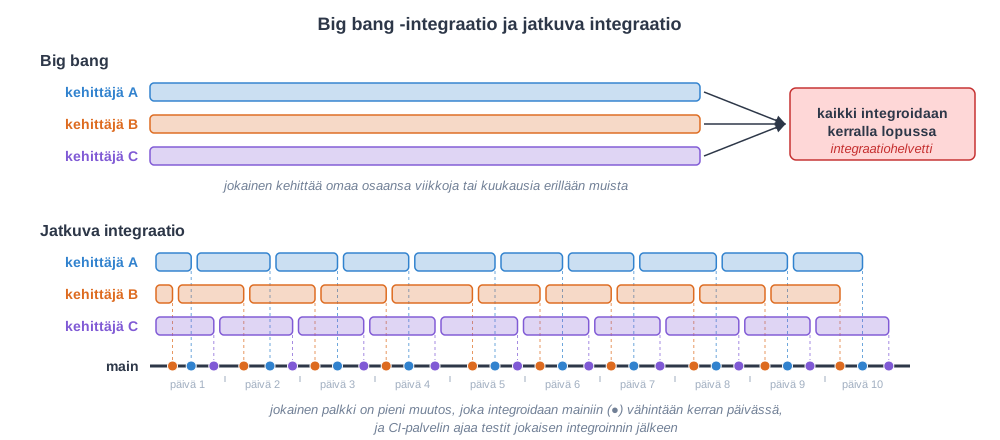
In the golden age of the waterfall model, in old-school software development, the way of working was that all the individual components of the program were programmed and unit tested separately. Finally, the components were integrated (usually based on structure) all at once.
This technique, common in the world of the waterfall model and known as big bang integration, has proven to be very risky and is no longer recommended.
The problem with big bang integration becomes clear when you look at when the application has its first working functionality. In structure-based integration, nothing works end to end until all the layers have been integrated together, and integration problems are revealed only at the end of the project. In feature-based integration, the first working functionality is ready already after the first sprint:
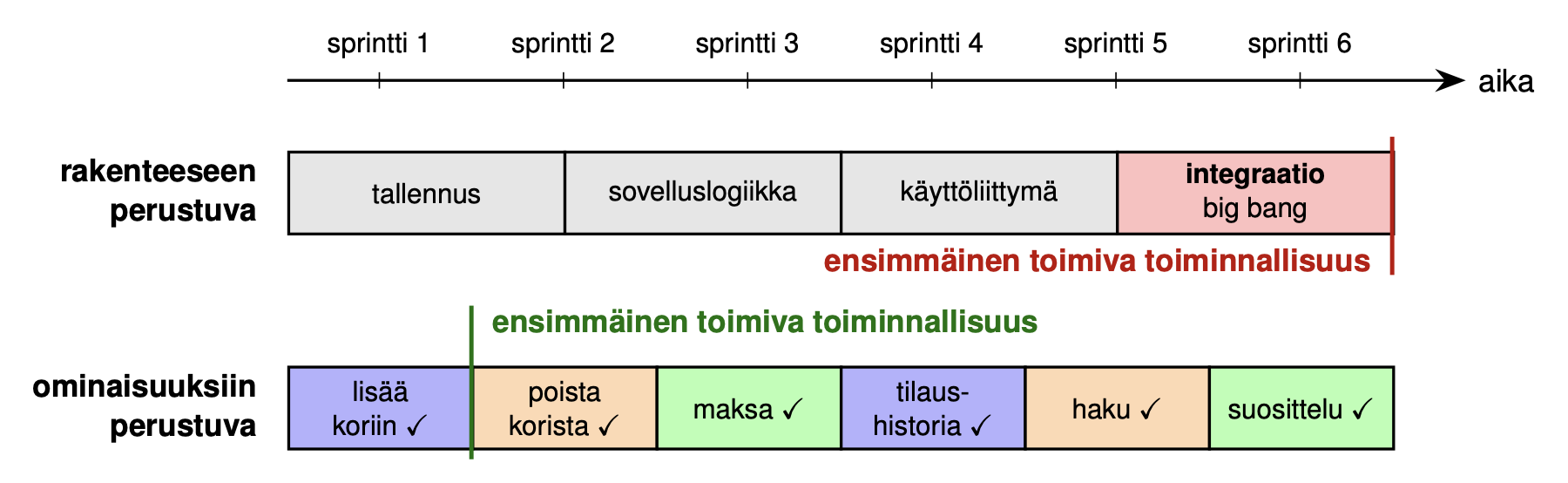
Modern software development favours continuous integration, which is feature-based integration done at a very frequent pace. We will return to this topic in more detail soon.
In fact, the whole term integration testing is a rather vague concept, and it is sometimes hard to draw a clear line between unit and integration testing. Most often, the target of unit tests is thought to be a single method, class or program module. But what if the class/module under test contains several other classes behind its interface: is it still a unit test, or is it already an integration test covering a larger whole?
Tests that can be classified as integration testing include at least the following kinds of tests, which clearly test larger subsystems
- ensuring that the application logic and the database work together
- ensuring the correct functionality of the HTTP interface provided by the application’s server, that is, the backend
Integration tests often need a real database or another external service. In the past, tests often used a lightweight substitute database such as SQLite, in which case the tests could pass even if the code would not work with the production database. Today, a typical solution is to start a real database in a Docker container for the duration of the tests, for example with the Testcontainers library.
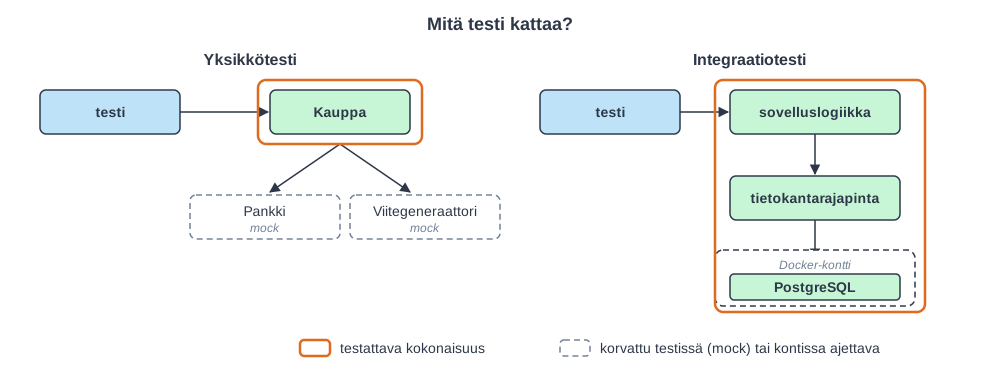
When an application consists of several separately developed services, starting all the services at the same time for testing is heavy. In that case, contract testing can be used: the consumer of a service records what kind of requests it makes and what kind of responses it expects, and the provider of the service tests separately that it fulfils this contract. A well-known tool for this is Pact.
As with unit testing, code integration and often also integration testing are nowadays considered to be the developers’ responsibility, that is, integration testing falls under the concept of developer testing.
Regression testing
In iterative and agile software development, each iteration produces new features into the software. At the same time, we must make sure that the additions do not break parts of the program that already work.
The tests must therefore be run again whenever changes are made to the software. This practice is called regression testing. To be as confident as possible that the software stays free of defects, the set of regression tests should consist of unit, integration and system tests.
Usually all the tests written during development are used as regression tests. There are also situations where this does not make sense, for example because of the time it takes to run the tests, and a suitable subset of all the tests can give enough confidence that the application remains free of defects.
Testing is very laborious, and the need for regression testing makes it even more laborious. This is why it is very important to automate tests as much as possible.
Automated tests are only useful if their results can be trusted. Particularly harmful are flaky tests, which sometimes pass and sometimes do not, even though the code has not changed. The cause is often timing, the order in which tests are run, external services or shared state between tests. If tests turn red at random, developers learn to ignore failures, and then real defects also go unnoticed. For example, at Google, about 16 % of tests are flaky to some degree. Martin Fowler recommends moving a flaky test immediately into quarantine, out of the main test suite, and fixing it quickly.
Automated unit testing is a familiar topic to some from earlier courses. We will cover a few methods for automating system testing in the following sections.
Testing practices of agile methods
The role of testing in agile methods differs considerably from waterfall-style software development. The features implemented during an iteration/sprint are integrated into the rest of the code and tested at the unit, integration and system levels. The cycle from specifying a feature to it being done and tested is very short, from a week to a month.
Testing is thus done from the “first day” of the sprint, and testing is integrated into design and implementation; in the agile view, it is no longer a separate phase of its own.
The nature of agile development requires that tests can be run often and with as little effort as possible, so automated regression testing plays a key role.
As mentioned in connection with Scrum, agile development teams should be cross-functional, that is, contain all the know-how required to develop the system and make it ready for production use. For this reason, testers are ideally placed in the development teams instead of a separate QA team that monitors quality. Programmers also take part in writing tests.
The tester’s role changes from finding defects to preventing them: the tester helps the team write automated tests that aim to prevent bugs from getting into the code. One of the central themes of agile quality assurance is to “build quality into the products”, the principle build quality in familiar from the Lean world. This means that quality assurance is not treated as the responsibility of a separate organisation (e.g. a QA team); instead, the starting point of development is that bugs should not arise, and if they do, they should preferably be detected already during programming.
In this section, we go through a set of testing practices favoured by agile methods.
Test driven development, or TDD, is a development method where tests are written before the code. Despite its name, it is more of a design and implementation level technique that produces, as a by-product, a comprehensive set of automatically executed tests.
Automated testing at the level of user stories is called acceptance test driven development and behavior driven development.
Continuous integration and continuous delivery are ways of working that replace the traditional integration and integration testing phase, with the aim of integrating, and even deploying to the production environment, every change made to the application.
All of the above practices result in a large set of automated tests at different levels (i.e. unit, integration and system), and the regression testing done with them makes it possible to continue developing the software with confidence that things that already work will not break.
However thoroughly testing is done, it is very typical that certain problems only appear in real use. In many organisations, quality assurance of new features continues even when some real users have already started using them. Testing in production is a method that requires great discipline, highly developed automation and sophisticated monitoring of the software.
Despite the strong trend towards automation, manual testing still has its place. Exploratory testing is a mainly manual system testing technique where testing takes place without a detailed test plan made in advance. The tester creates new tests on the fly based on the feedback from the previous tests. Exploratory testing is often used to test completely new features of the software.
Test driven development
Test driven development, or TDD (test-driven development), is one of the practices of eXtreme Programming, in which the tests are meant to be written before the acual code.
TDD as defined by authorities in the field, such as Kent Beck and Uncle Bob Martin, proceeds as follows
- Write just enough of a test that the test does not pass. So you do not create all the needed tests at once, but proceed one test at a time.
- Write just enough code to make the test pass. Do not try to write the final code right away either.
- If you notice that the structure of the code has become bad (for example, the code has a lot of repetition or functions that are too long), refactor the code into a better structure, continuously making sure that the tests still pass. Refactoring means changing the internal structure of the code so that its interface and functionality remain unchanged.
- Continue from step 1.
The progress of TDD is often called red-green-refactor: you write a test that is red, write code so that the tests turn green again, and refactor if needed. The following figure illustrates how the cycle proceeds:
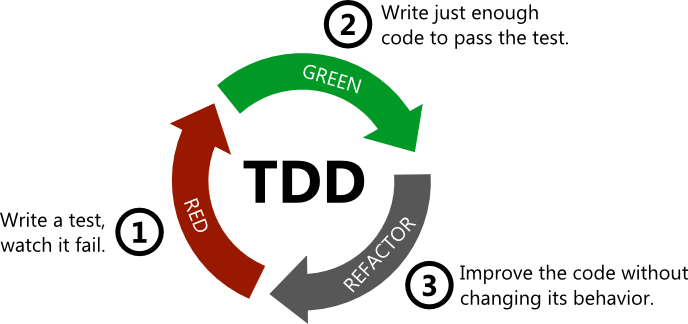
In TDD, the component being implemented is usually not designed exhaustively in advance. Tests are written primarily with the use of the component in mind, that is, the focus is on the component’s interface and how easy the interface is to use, rather than on the component’s internal implementation. The internal structure of the component takes shape through refactoring.
In TDD, you can think of the traditional design-implementation-testing cycle as having been turned completely around: the detailed design of the component only happens during refactoring.
Good sides of TDD
When applying TDD, the simplicity of the result is usually emphasised. The idea is to implement only as much functionality as is required for the tests to pass. So you do not implement extra functionality “just in case”, since it will most likely not be needed. This practice of aiming for simple solutions is often called “You ain’t gonna need it”, YAGNI. The same principle is written into the Agile Manifesto in the form Simplicity – the art of maximizing the amount of work not done – is essential.
It is hard to make code easily testable if it does not consist of modular and loosely coupled components with clear interfaces. According to Kent Beck, the developer of TDD, writing the tests first forces you to design the code to be testable, which makes it modular and free of unnecessary dependencies from the start. Modular and loosely coupled code has been found to be less error-prone and easier to maintain. So one argument for TDD has been precisely the quality of code it produces, which is favourable for extensibility and further development.
The evidence that TDD really produces such code is, however, contradictory. For example, in the experiments of Janzen and Saiedian (2008), programmers who wrote the tests first produced smaller, simpler and more thoroughly tested units, but the claim of better cohesion and looser coupling could not be confirmed.
Other good sides of TDD mentioned are that it encourages taking small steps at a time and thus working in a focused way, and that well-written tests serve as documentation of the interface of the implemented component.
TDD has been studied academically to a reasonable extent. Not much evidence of its benefits has been found. For example, according to a meta-analysis, TDD improves quality slightly, but its effect on productivity is unclear. An interesting finding is that the benefits seem to come above all from proceeding in small steps and testing frequently, rather than from whether the test is written before or right after the code. The study setups have, however, not been very convincing or representative of realistic use, and they have hardly addressed the possible long-term benefits that highly maintainable code may produce.
TDD has gained new significance with AI agents, since tests are a precise way of telling the agent what you want the code to do. This is discussed in more detail in the AI material.
TDD also has its downsides
When using TDD, a lot of test code is produced, often roughly as much as acual code. If and when the application changes, the tests must also be maintained, since many larger structural changes often break some of the tests.
TDD is harder to apply to code that handles, for example, the user interface, database connections or communication over the network. It is not impossible, though. Extending existing code with TDD can be very challenging, especially if the code being extended is old-school spaghetti code.
Managing dependencies in tests
When testing, you have to decide how to deal with the dependencies of the classes under test, that is, the components that the code under test uses.
The dependency injection design pattern, familiar from the exercises, improves the testability of code, since it makes it possible to set the code’s dependencies from the test.
One option is to create, for the tests, stub components that replace the dependencies; these are generally called test doubles. This was done, for example, in exercise 16 of week 1. The results of method calls can, for example, be hard-coded into the test doubles in advance. The tests can also ask the test double with which values the method under test called it, and thus make sure that the code under test has communicated with its dependencies in the expected way.
Depending on their properties, test doubles are called either stubs or mock objects; Martin Fowler’s article clarifies the matter and the terminology. Usually, a stub is a test double that only returns hard-coded return values of method calls. Mock objects, on the other hand, are smarter and can, among other things, check whether the methods they define have been called with the right parameters and the desired number of times.
There are several libraries that make it easier to create mock objects; in the exercises, we will get to know the unittest-mock library.
Let us look a bit at how unittest-mock works, using the online store exercise of the week 4 exercises as an example. An object of the class Kauppa has Pankki and Viitegeneraattori objects as its dependencies.
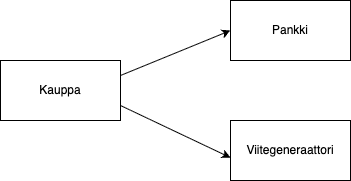
When a purchase is made, the online store should charge the price of the purchases from the customer’s account by calling the bank’s method veloita_tilia. The code for the purchase looks like this:
my_net_bank = Pankki()
viitteet = Viitegeneraattori()
kauppa = Kauppa(my_net_bank, viitteet)

# buy the products with ids 5 and 7 from the store
kauppa.aloita_ostokset()
kauppa.lisaa_ostos(5)
kauppa.lisaa_ostos(7)

# pay for the purchases
kauppa.maksa("FI1111-2222")
So we should test that the method call kauppa.maksa("FI1111-2222") makes a transfer of the total amount of the purchases from the bank account “FI1111-2222” to the store’s account.
How do we make sure that the method of the Pankki object that performs the transfer has been called with the right parameters?
With the unittest-mock library, this can be done as follows. In the test, we create mock objects for the store’s dependencies:
def test_kutsutaan_pankkia_oikealla_tilinumerolla_ja_summalla(self):
    # create the mock objects
    pankki_mock = Mock()
    viitegeneraattori_mock = Mock(wraps=Viitegeneraattori())

    # inject the mocks into the store
    kauppa = Kauppa(pankki_mock, viitegeneraattori_mock)

    kauppa.aloita_ostokset()
    kauppa.lisaa_ostos(5)
    kauppa.lisaa_ostos(7)
    kauppa.maksa("FI1111-2222")

    # check that the values of the first and second parameter are correct
    pankki_mock.veloita_tilia.assert_called_with("FI1111-2222", 55, ANY)
    # assume that the total price of products 5 and 7 is 55 euros
The method call assert_called_with sets a requirement on the mock object representing the bank, which ensures that the bank’s method veloita_tilia has been called with suitable parameters during the test. If this requirement is not met, the test does not pass.
You will get to practise using mock libraries in the week 4 exercises.
Testing user stories
In connection with the definition of a user story, it was mentioned that the concept of a user story includes acceptance criteria, in Mike Cohn’s words:
tests that convey and document details and that will be used to determine that the story is complete
For example, the acceptance criteria of the user story a customer can add a product to the shopping cart could be
- when in the product listing and selecting a product that is in stock, the product goes into the shopping cart and the price of the shopping cart and the number of products in the cart are updated correctly
- when in the product listing and selecting a product that is not in stock, the state of the shopping cart remains unchanged
In an optimal situation, most of the software’s system-level functional tests, that is, the tests that ensure the application’s functionality from the user’s point of view, can be formed from the acceptance criteria of the user stories.
It is sensible to write a story’s acceptance criteria right at the beginning of the sprint in which the story is implemented, preferably in collaboration between the development team and the Product Owner or some other customer representative. A common practice is to express the acceptance criteria in the customer’s language, like user stories, without technical jargon. At best, the process of writing acceptance criteria increases communication between the customer and the team.
Automating system testing, ATDD and BDD
Ideally, the acceptance criteria of stories are made automatically executable.
There are many tools for automated acceptance testing. One of the popular ones, especially in Finland, is the Finnish Python-based Robot framework.
Automated acceptance testing is sometimes called Acceptance Test Driven Development (ATDD) or Behavior Driven Development (BDD), especially if the tests are implemented already early in the iteration, before the code implementing the story is ready.
ATDD and BDD are almost the same thing with slightly different emphases. BDD pays closer attention to the terminology used; for example, BDD does not talk about tests at all, but instead describes the acceptance criteria through example behaviors.
In BDD, acceptance criteria are often written in the Given–When–Then form: Given describes the initial situation, When the action and Then the expected outcome. The form does not bend very naturally into Finnish, so Given–When–Then criteria are usually written in English. For example:
Given user kalle is registered with password kalle123
When the user logs in with username kalle and password kalle123
Then the user sees the front page
The form is used, for example, by the Gherkin language of the Cucumber tool, and it can also be used in Robot Framework.
The concept of ATDD always covers only acceptance-level testing. With BDD, you can also write tests other than acceptance-level ones. RSpec, originally developed for Ruby, calls itself a BDD library; in addition to acceptance tests, RSpec is also well suited for unit testing. Many BDD-style libraries that work like RSpec have been made for other languages, such as Mocha and Jest in the JavaScript world.
Robot Framework
As with most acceptance-level testing tools, when using Robot Framework, tests are written in the customer’s language.
As an example, let us look at a service that provides creating a user account and logging in.
The user stories defining the requirements of the service are
- a new user account can be created if a proper unused username and a proper password are given
- user can log in with a valid username/password-combination
The acceptance criteria of the user story user can log in with a valid username/password-combination would be expressed in Robot as follows:
Login With Correct Credentials
    Setup Application
    Set Username  kalle
    Set Password  kalle123
    Submit Credentials
    Login Should Succeed

Login With Incorrect Password
    Setup Application
    Set Username  kalle
    Set Password  kalle456
    Submit Credentials
    Login Should Fail With Message  Invalid username or password

Login With Nonexistent Username
    Setup Application
    Set Username  palle
    Set Password  kalle456
    Submit Credentials
    Login Should Fail With Message  Invalid username or password
The steps of the test cases consist of keywords and the parameters given to them.
The term keyword is somewhat misleading in the sense that in Robot Framework, keyword names often consist of several parts; for example, Submit Credentials is a single keyword (even though it consists of several English words).
The keywords in the example include Setup Application, Set Username, Submit Credentials, and Login Should Succeed. The meaning of the keywords must be defined, either with simpler keywords or as code.
The keyword definitions look like this
Setup Application
    Reset Application
    Create User  kalle  kalle123
    Go To  ${LOGIN URL}

Set Username
    [Arguments]  ${username}
    Fill Text  id=username  ${username}

Submit Credentials
    Click  button >> text=Login

Login Should Fail With Message
    [Arguments]  ${message}
    Get Title  ==  Login
    Get Text  body  *=  ${message}
Almost all of the keywords appearing in the definitions, such as Fill Text, Click and Get Text, are predefined keywords of the Browser library, which is meant for testing web applications with Robot Framework. They work as such without needing any further definitions.
The Browser library is based on Microsoft’s Playwright tool, which is also widely used on its own for end-to-end testing of browser applications, for example with JavaScript or Python.
Implementing the keywords Reset Application and Create User requires a bit of code. The definitions have been written in the class AppLibrary:
class AppLibrary:
    def __init__(self):
        self._base_url = "http://localhost:5001"

    # reset the application's database by making an HTTP request
    def reset_application(self):
        requests.post(f"{self._base_url}/tests/reset")

    # create a user in the database with an HTTP request
    def create_user(self, username, password):
        data = {
            "username": username,
            "password": password,
            "password_confirmation": password
        }

        requests.post(f"{self._base_url}/register", data=data)
We will look at Robot Framework in more detail in the week 3 exercises and in the mini project.
Software integration
In the waterfall model, that is, in a linearly proceeding software development process, the implementation phase ends with an integration phase. In this phase, the separately tested components are combined into a working whole. At the same time, integration testing is carried out to make sure that the components work seamlessly together.
It is precisely the integration phase that has traditionally brought up a large number of problems: despite careful up-front design, the components implemented by separate teams have been incompatible with each other, integration has taken unexpectedly long, and the problems found may have required changes even to the design or the requirements. The term integration hell was coined to describe this phase.
Daily build and smoke test
In the 1990s, it was noticed that integration should be done more often than just at the end of the project. Compiling the code of the whole project every day, the daily build, became an established practice, combined with running a smoke test. These practices became well known especially thanks to Microsoft’s Excel and Windows 95 teams.
A smoke test is a simple system-level test that goes through all the layers of the architecture (user interface, application logic, database) and detects whether the application has broken in some fundamental way. This way, compatibility problems between components are noticed within a day.
Continuous integration
An integration phase taking place once a day was found to be a good practice. In the late 1990s, the Extreme programming community took the idea even further and made the integration cycle even more frequent. This is how continuous integration (CI) was born.
When continuous integration is followed, the program code, the configurations of the libraries used by the program, the automated tests and the definitions that handle building and testing the software (such as the pyproject.toml file) are kept in a central version control repository.
An environment that corresponds as closely as possible to the production environment is reserved as the CI server. In the past, it was typically a separate server. Today, CI services such as GitHub Actions usually run each build in a clean, disposable virtual machine or container, so traces of previous runs do not affect the result. When the code in the central repository changes, the CI server fetches the software’s code, builds it and runs the tests on it. If the code does not compile or the tests do not pass, the CI server notifies the development team of the problems, and the problems are meant to be addressed immediately.
A developer’s work when using continuous integration proceeds as follows.
When starting to implement a new feature, the developer fetches the up-to-date version of the code from version control. The developer implements the feature being worked on, writes automated tests for it and integrates it with the rest of the code. When everything is ready and the tests pass locally, the developer pushes the code to version control.
The CI server notices the changes, fetches the code and runs the tests. This minimises the risk that the added code only works on the developer’s own machine, for example because of configuration differences.
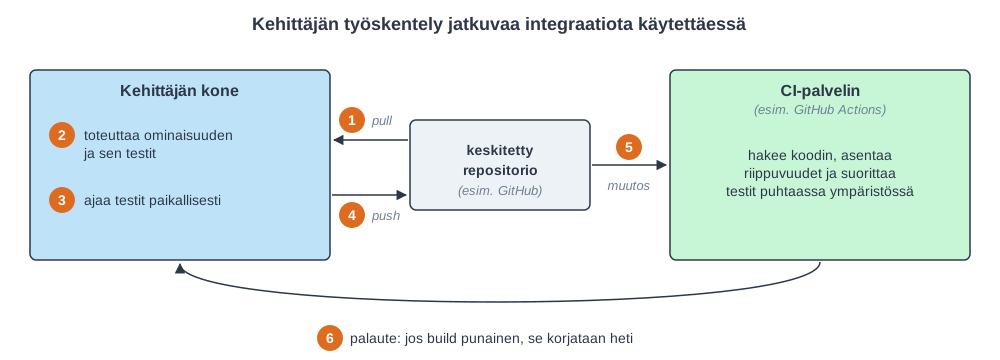
The point of continuous integration is thus that every developer integrates their work with the rest of the code as often as possible, at least once a day. CI therefore encourages splitting work into small pieces that can be made “done” together with their tests within one working day. Applying continuous integration requires great discipline.
In complete contrast to the integration hell of the waterfall world, continuous integration aims to make integrating the software as effortless an operation as possible, which guarantees that an up-to-date, fully integrated and tested version of the software is available at all times.
For the CI process to work smoothly enough, running the tests must happen relatively quickly. Ten minutes is often considered the magic limit. However, end-to-end tests run through the user interface in particular can be surprisingly time-consuming. If the test run time starts to grow too much, the tests can be configured to run in two stages. Passing the first stage of the tests, often called the commit build, gives the developer enough confidence to push the new code to version control. The CI server then also runs a secondary build that contains the slower tests.
In more complex situations, testing can be divided into even more stages. For example, tests that measure how the application tolerates a heavy load may be run, and running them can take several hours. It is by no means sensible to run such tests with every code change made to version control (that is, every commit), but rather, for example, once a day.
GitHub Actions, used in the first week’s exercises, is currently the most popular CI solution offered as SaaS, that is, as a cloud service. Other popular options include GitLab CI/CD and CircleCI. One of the big advantages of CI solutions offered as SaaS is that there is no need to install and maintain your own CI server.
Jenkins, which is older than GitHub Actions and CircleCI, is still widely used, especially in companies’ own environments. Jenkins is usually installed on your own server.
Definition of continuous integration
Let us return once more to what continuous integration acually means according to the pioneers of the method. To do continuous integration, it is not enough that someone has configured a CI server for the team. For a team to be said to do continuous integration, the developers must really synchronise their code with the code in the shared central repository as often as possible (at least daily). This in turn means that, for example, at the start of every morning, all developers should have the same code as the starting point for their day’s work. As everyone who has done software development in a team knows, synchronising code daily is not always easy, but requires systematic and disciplined work.
The practice, common in many places nowadays, of using feature branches that are several days or even weeks old, that is, separate version control branches for each new feature, acually means from the outset that the team does not practise continuous integration. We will return to this later in this part.
Continuous deployment and delivery
Continuous integration has been taken further. Nowadays, the integration process typically also includes automatic “deployment”, in which the built and tested code is automatically moved to run on a so-called staging server, that is, a test server.
A staging server is an environment that is as close as possible to the acual production environment in terms of configuration and the data handled by the application (in practice, the contents of the database). Personal data from production must not, however, be copied as such into test environments, since that conflicts with the EU General Data Protection Regulation (GDPR). Instead, test data is created, for example, by anonymising production data or by generating realistic synthetic data. Once a new version of the software has been deployed to the staging server, acceptance testing is performed on it. These tests are mainly system-level tests that ensure that the application works the way the user wants in an environment as similar to production as possible.
After acceptance testing, the new version can be moved to the production server, that is, made available to the end users. At best, the acceptance tests done in the staging environment are also automated. In that case, the software goes through the whole deployment pipeline automatically: first from the developer’s machine to the CI server, from there to the staging environment and finally to production. The term deployment pipeline refers to the stages of building, testing and other quality assurance that the program is required to go through before it can be moved to the production environment for end users.
Every commit made by a developer goes through the deployment pipeline, a conceptual “conveyor belt”
- the CI server runs static analysis (e.g. using Pylint) and a set of tests on the commit
- in the next stage, the new version of the application produced by the commit moves to the staging environment
- in the staging environment, more tests are run on the new version of the application
- finally, the commit moves to the production environment
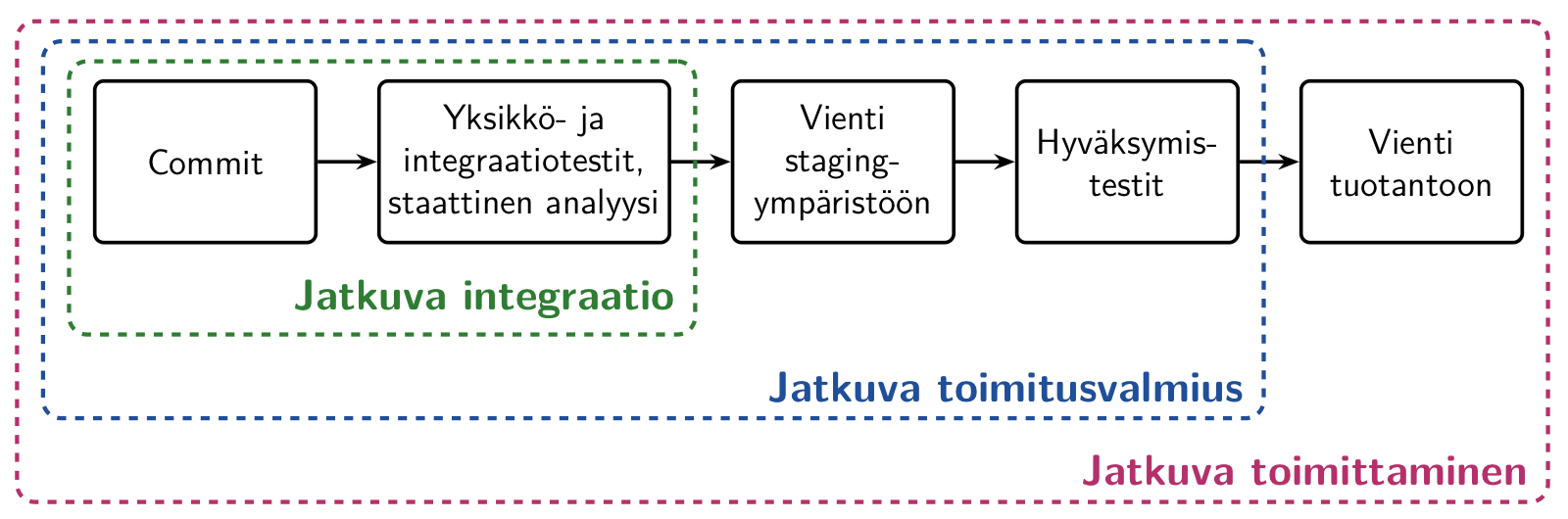
The practice in which every commit of the software that passes CI, that is, every version pushed to version control, is automatically deployed to the staging server and, after automated acceptance testing there, to production, is called continuous deployment.
There are situations where you do not want to deploy every commit to production automatically. If the last stage, that is, deploying to production, only happens by a human pressing a button or running a script, we speak of continuous delivery.
Especially in large-scale web services (e.g. Google, Amazon, Netflix, Meta), a style in which a new version of the software is released to production even tens or hundreds of times a day has long been popular. In the DORA research, the best performing organisations deploy changes to production on demand, often several times a day. In Finland, this practice is followed, for example, by Smartly, which also employs many computer science students from the University of Helsinki.
Exploratory testing
To make a system so free of defects that it can be put into production, testing must be done very thoroughly. The traditional way of doing system testing has been based on a thorough test plan drawn up before testing. The test inputs and the expected result have been recorded for each test. The test results have been checked by comparing the system’s behaviour with the expected result recorded in the test case.
The nature of automated acceptance tests is exactly the same: the inputs and expected results of each test are fixed precisely in advance. If testing is done only with tests thought out in advance, no matter how carefully they have been considered, not all surprising situations can be anticipated.
Good testers have always done unofficial “ad hoc” testing in addition to the “official” documented testing. Since then, “ad hoc” testing has gained an official status, and its structured form is called exploratory testing.
The concept was launched by Cem Kaner in the 1980s, and its use has later been developed especially by James Bach, who defines the term as follows
exploratory testing is simultaneous learning, test design and test execution
The idea is that the tester guides their actions based on how the software reacts to the tests they run. Test cases are not planned comprehensively in advance; instead, the tester tries to find defects in the system based on their experience and on the tests and experiments they carry out.
Exploratory testing does not, however, proceed completely at random: each test session is given some kind of goal, that is, which part or functionality of the application is to be explored and what kind of defects are to be looked for.
In agile software development, the goal may well be structured around the functionality defined by one or more user stories. In an online store, for example, adding and removing purchases from the shopping cart could be tested.
What is central in exploratory testing is observing everything that happens in the software under test. In normal tests defined in advance, you only observe whether the system reacts in the expected, predefined way. In exploratory testing, attention is also paid to things outside the acual functionality being tested.
For example, if the URL https://kauppa.example.com/ostoskori?id=10 was noticed in the browser’s address bar, you could try changing the shopping cart id by hand and try to bring the system into an unstable state.
Exploratory testing is particularly well suited for security testing. Automatic vulnerability scanners find known types of problems, but for example access to another user’s data in a way like changing the id as described above, abuse of the application logic, or various injection attacks (e.g. SQL and JavaScript injections) are often found only when a tester explores the system through the eyes of an attacker. Penetration testing done by security testers is indeed largely exploratory testing.
Another good example is testing accessibility. Automatic tools such as axe or the browsers’ Lighthouse find only some of the accessibility problems, for example missing text alternatives for images or too weak colour contrasts. On the other hand, for example whether the application can be used sensibly with the keyboard alone or with a screen reader cannot be found out except by trying.
The defects found through exploratory testing should be prevented from recurring by adding suitable automated regression tests to the program. Exploratory testing should therefore not be used as a regression testing method; instead, it should primarily be used to test new features implemented during the sprint.
Exploratory testing is thus by no means an alternative to normal, precisely predefined and automated tests, but a form of testing that complements them.
Testing and quality assurance in production
Traditionally, it has been thought that testing related to software quality assurance should be done before the software or its new features are taken into use, that is, deployed to the production environment. Especially in web application development, part of quality assurance nowadays happens by monitoring the software in production.
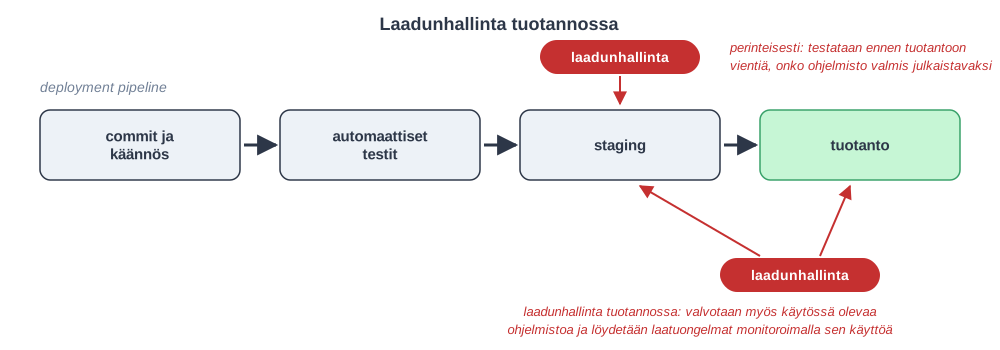
Blue-green-deployment
One technique of testing in production is blue-green-deployment, where the principle is to maintain two production environments (or servers) side by side, often called blue and green.
Only one of the production environments is in active use by the software’s users. A component between the users and the production servers, for example a so-called reverse proxy, directs the users’ traffic to the active environment.
When a new feature is implemented in the system, it is first deployed to the passive environment.
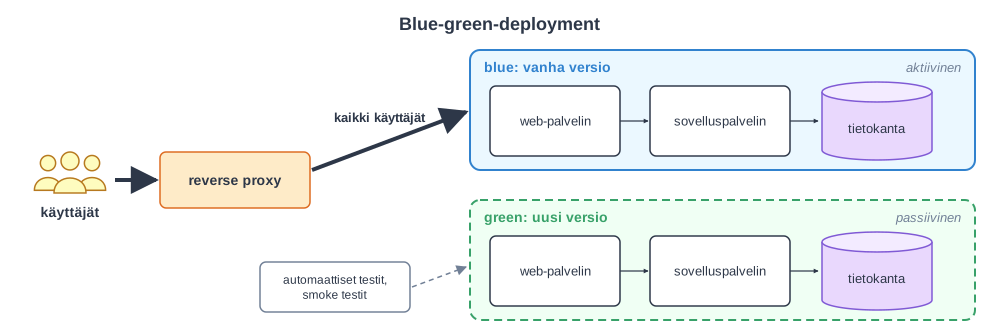
Various tests, such as smoke tests and other automated system-level tests, can then be run on the passive environment containing the new feature before the users’ traffic is directed there. The new version can also be tried with a real load by copying some of the users’ requests to it so that the users still get their responses from the old version. This is called dark launching.
When the passive environment containing the new feature is found to work without problems, the roles of the servers can be switched, and the server containing the new feature becomes the new active production environment. The active production environment is switched by configuring the reverse proxy to direct traffic to the new server.
If some problems are detected in the version containing the new feature after activation, it is possible to perform a rollback operation very quickly, that is, to make the old version active again.
It is sensible for all tests related to blue-green-deployment, verifying their results, switching the production environment and a possible rollback to happen automatically.
Canary release
In a slightly more advanced version of blue-green-deployment, the canary release, a part of the system’s users, e.g. 5%, is directed to the environment containing the new feature:
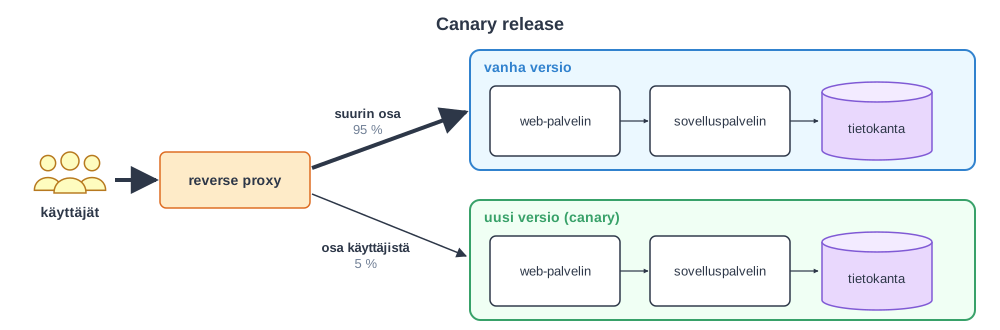
The version containing the new feature is actively monitored, and if no problems arise, all traffic is gradually directed to the new version. As in the case of blue-green-deployment, in problem situations the users are returned to the earlier version that was found to work.
Ensuring that the new version works is thus based on monitoring the system. If it were, for example, a social media service, monitoring could look at, for example:
- the service’s memory and processor time consumption and the amount of network traffic
- the response times of the application’s different pages, that is, the time it takes to load them
- the number of logged-in users
- the number of messages read and sent per user
- the time a logged-in user spends in the application
In addition to the general functioning of the server, monitoring should follow business level metrics. If differences from before are noticed in them, for example logged-in users do not on average send the same number of messages as before, it can be assumed that there may be some problem in the new version of the application. In such a situation, a rollback to the old version may be done and the fault analysed in more detail.
Merely following predefined metrics tells you that something is wrong, but not necessarily why. That is why people nowadays often talk about observability: the application produces logs, metrics and traces describing how requests flow through the services, so that even the causes of unforeseen problems can be found. The open standard OpenTelemetry has become established for producing these.
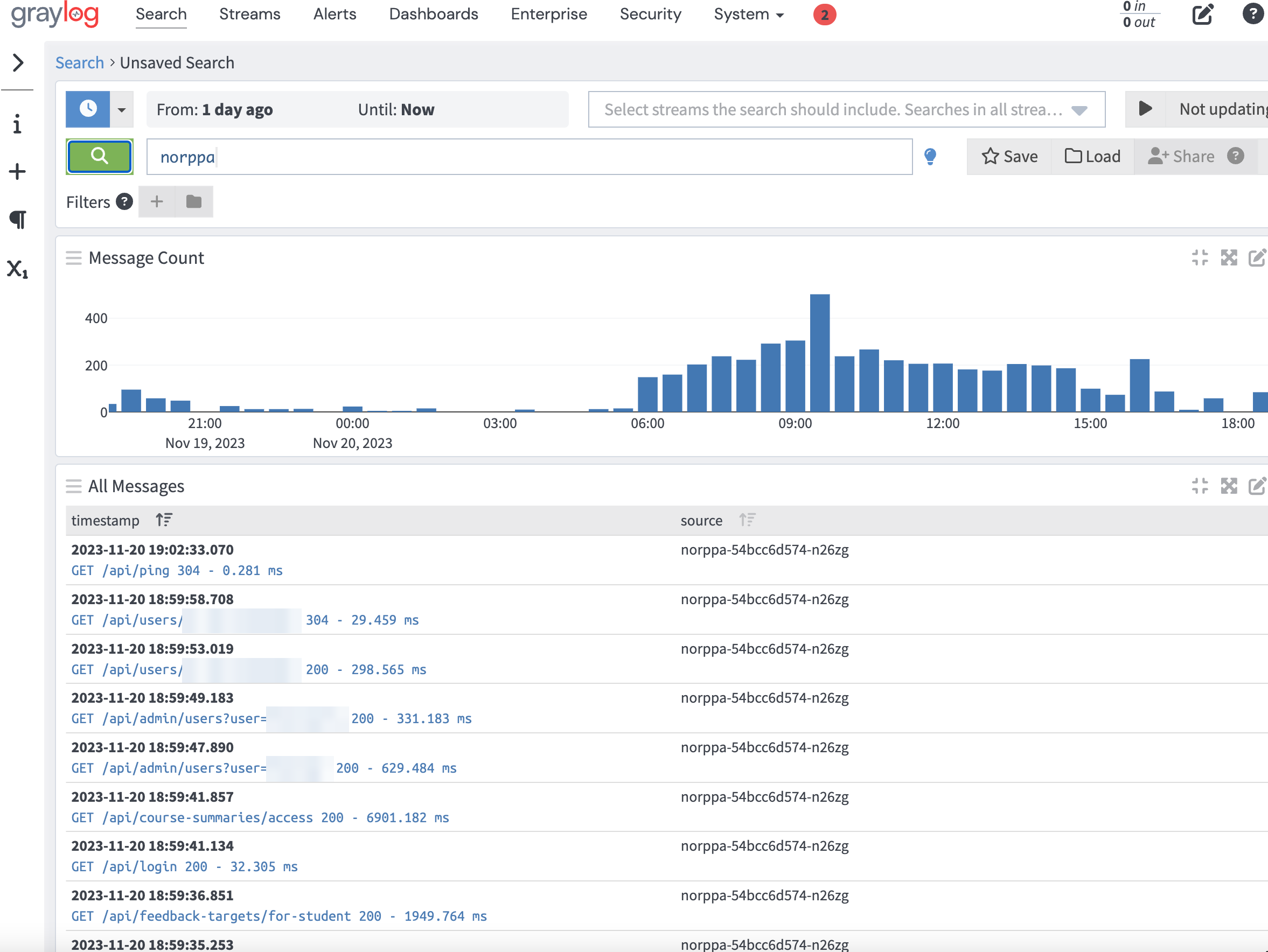
As an example, let us look at a few tools used to monitor the operation of Norppa, the University of Helsinki’s course feedback system, in production. The application’s logs are collected in a central place where they are easy to search and examine. Norppa’s logs go to Graylog, which shows, for example, the requests made to the application and their response times:
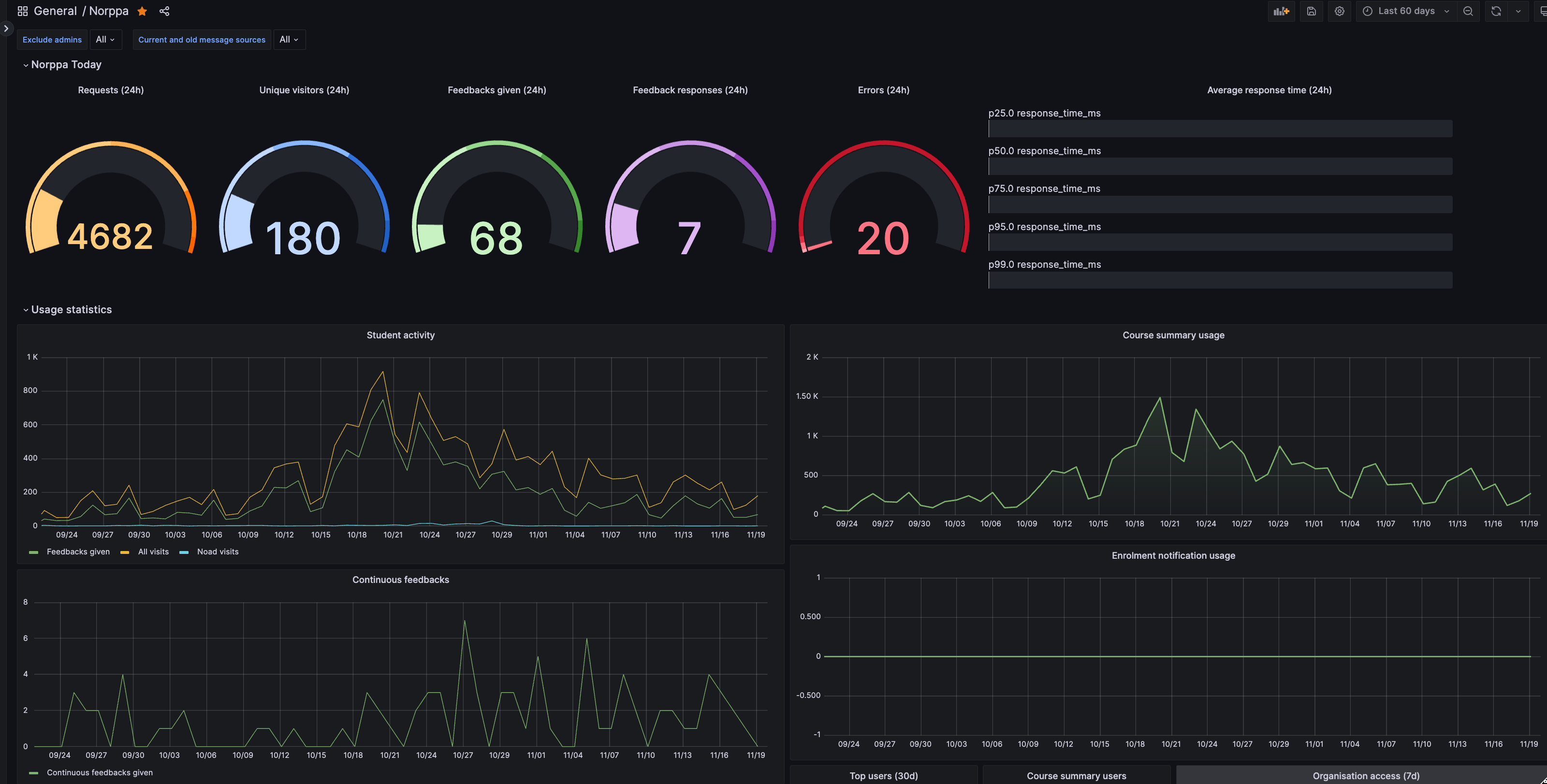
Logs and metrics can be combined into dashboards that show the state of the system at a glance. Grafana is often used for this. In addition to figures describing the server’s operation, such as the number of requests and errors and the response times, Norppa’s dashboard also has business level metrics, for example the number of feedback responses given:
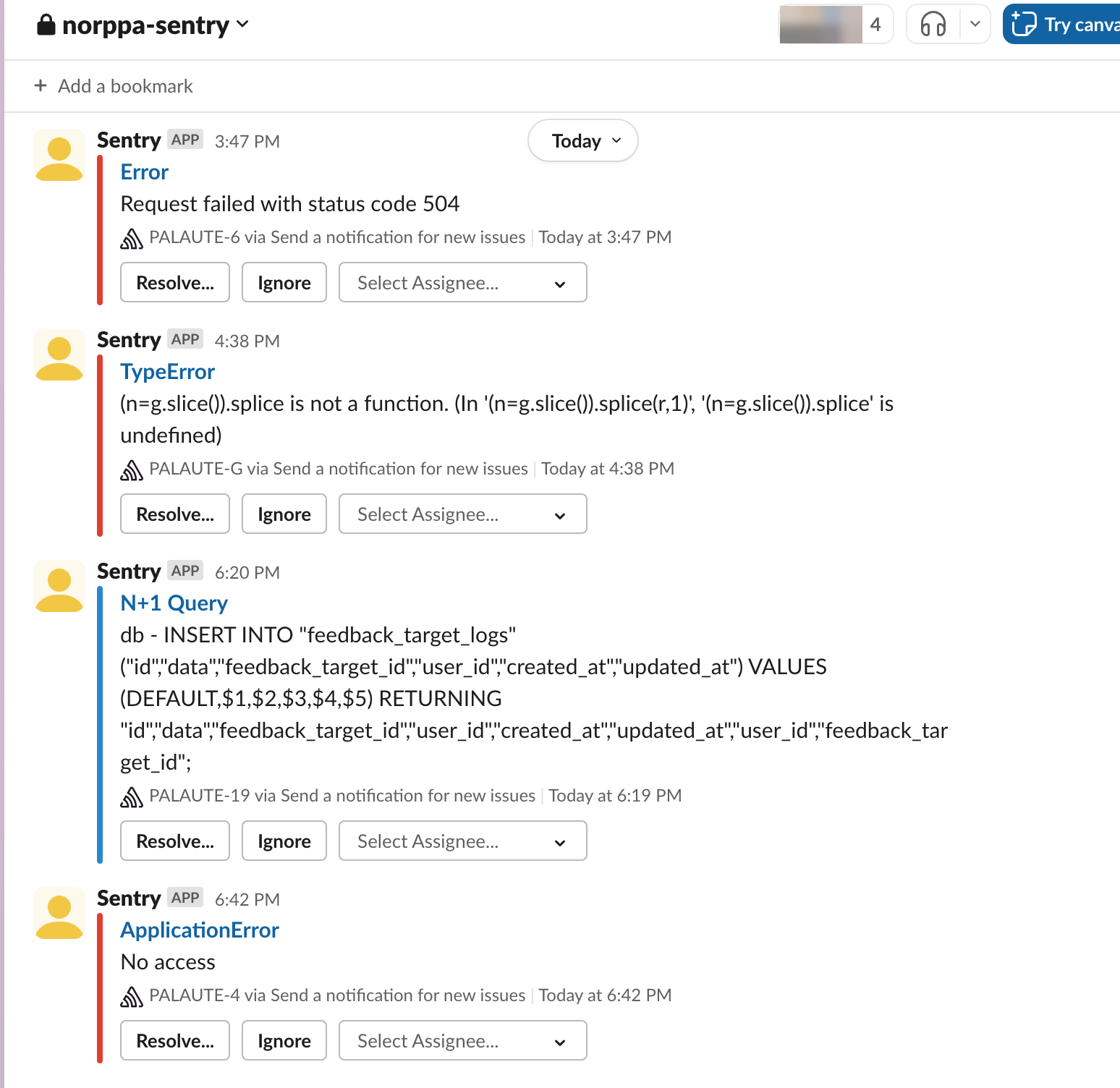
Errors occurring in the application should be collected automatically, since users only rarely report the errors they encounter. Sentry collects errors in one place, groups repeated occurrences of the same error and sends an alert about new errors, in Norppa’s case to the development team’s Slack channel:
For an individual error, you can see the stack trace and information about the situation in which the error occurred, such as the user, the browser and the version of the application in use. The cause of the error can thus often be found without having to try to reproduce it yourself:
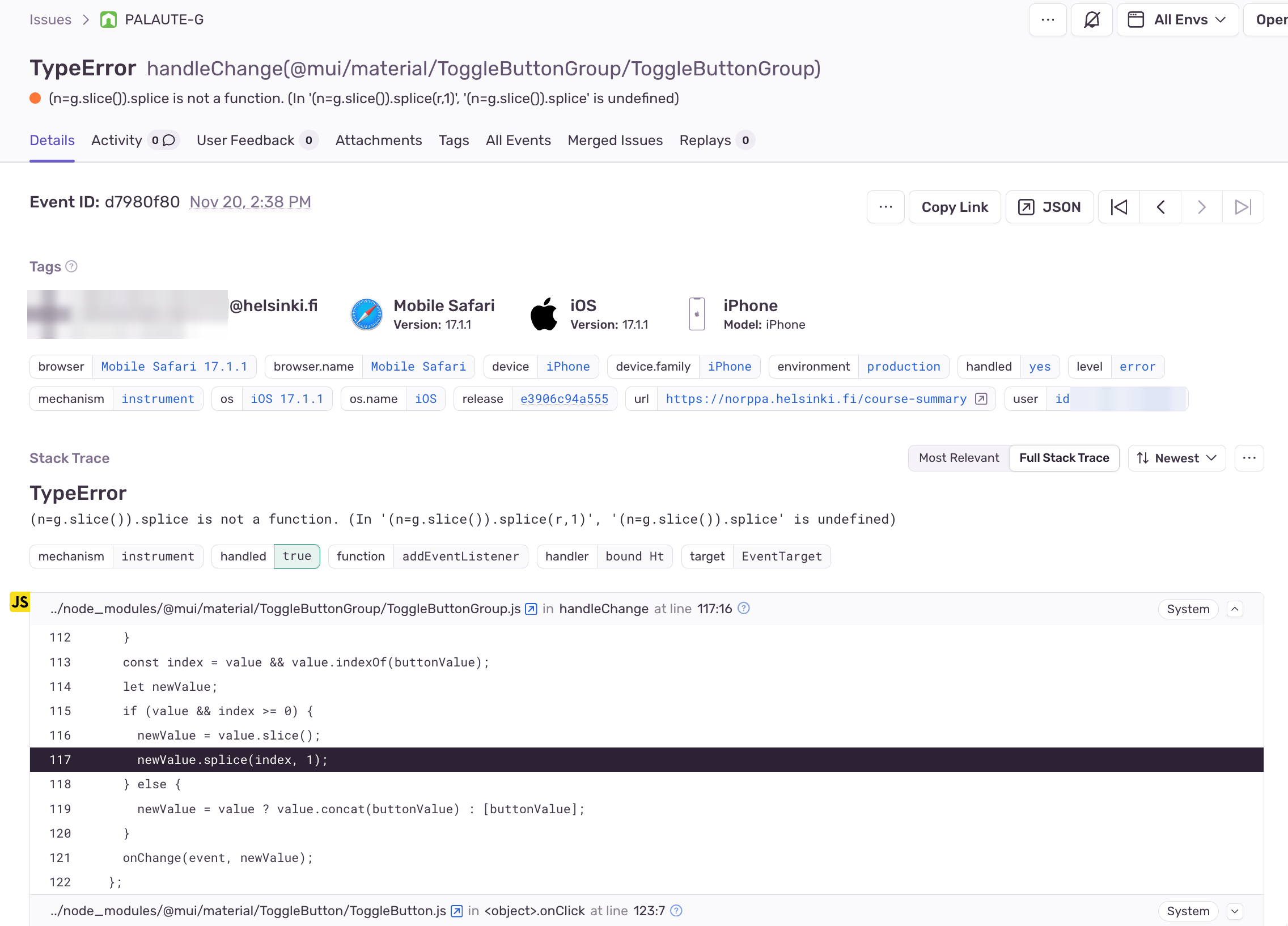
The goals of monitoring should be defined in advance. In the Site Reliability Engineering model developed by Google, service level objectives (SLO) are set for a service, for example “99.9 % of requests succeed and 95 % are answered in under 300 milliseconds”. In a canary release, the new version can be rolled back automatically if it starts to violate these objectives.
The SLO is also used to define an error budget. If the goal is that 99.9 % of requests succeed, 0.1 % of requests are allowed to fail. As long as there is budget left, the team can deploy new features to production normally. If the budget runs out, the focus is shifted, as agreed, from new features to improving reliability. The error budget thus makes visible the balance between speed and stability, and it is agreed on jointly between the developers and the business.
When a serious incident occurs in production, a postmortem is usually done afterwards. It examines what happened, why, and how something similar can be prevented in the future. What matters is that the analysis is blameless: mistakes are seen as problems of the system and processes rather than as failures of individual people. If mistakes are punished, people start hiding them, and the organisation does not learn from them. The thinking is the same as in the performance-oriented (generative) organisational culture presented at the end of this part and in psychological safety, discussed in part 1.
In canary releases too, testing and everything related to deployment to production should happen automatically.
The name canary release comes from the miners’ practice of using canaries to find out whether there are poisonous gases in a mine: if the bird taken into the mine does not die, the air is safe.
Testing in production and the database
In the previous figures, the old and new versions of the system were shown with separate databases.
This is usually not the case, and especially with canary releases, both versions of the system usually use the same database:
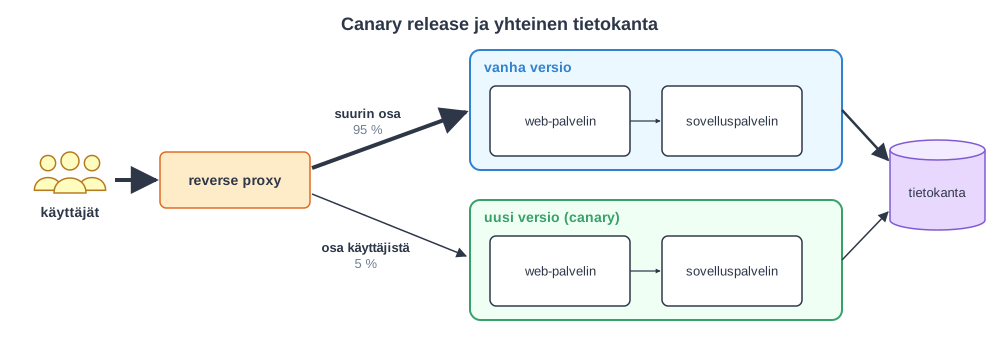
This in turn poses challenges if the new features implemented in the system require changes to the database schema, since with canary releases both the new and the old version of the database are often needed at the same time.
A common solution is to make the schema change in stages with the so-called expand/contract method (also called parallel change). If, for example, the column nimi (name) is to be split into the columns etunimi (first name) and sukunimi (last name), the new columns are first added alongside the old one (expand), and the application writes the data to both. When all versions of the application in use use the new columns, the old column is removed (contract). This way, both the old and the new version work at every stage, and the change can be reverted if necessary.
If the new and old versions of the system for some reason have to use different databases, the state of the databases must be synchronised so that switching between the systems works seamlessly. The updates the application makes to one database must therefore, one way or another, also be made to the other database, whose schema may already have changed.
Feature flag
In the figure illustrating the canary release, the new and old versions of the system were shown as separate servers. The same can also be implemented with a single server by using so-called feature flags. The same thing also goes by the names feature toggle, conditional feature and config flag. Feature flag is the most common name nowadays, used for example by the open OpenFeature standard.
The principle of feature flags is very simple. Conditional statements are added to the code, and they are used to direct part of the traffic to the new implementation under quality assurance instead of the old implementation.
For example, in a social media service, a feature flag could be placed on the list of news shown to the user, so that users selected on certain grounds would be shown a list of news generated by a new algorithm:
def recommended_news_generator(user):
    if is_in_canary_release(user):
        return experimental_recommendation_algorithm(user)
    else:
        return recommendation_algorithm(user)
A/B testing, mentioned in part 2 in connection with the Lean startup method, is usually implemented with feature flags.
With a feature flag, a new feature can also be released in stages. For normal users, the feature flag returns the old version, but developers and testers can choose which version it returns. When the feature is ready to be tested by a wider group, it can be released with the feature flag, for example first for the developer company’s internal use and then to some of the users as a canary release. Finally, the feature flag and the old implementation can be removed from the code.
Large internet services such as Meta, Netflix, Google and GitHub widely apply a development model based on canary releases and feature flags. For example, GitHub says that it releases almost all new features behind feature flags.
Trunk based development
A common way to develop new features is feature branches. This is a practice in which new features, for example the functionality required by a user story, are first implemented in their own version control branch, and when the feature is complete, the branch is merged into the main development branch (e.g. the main branch).
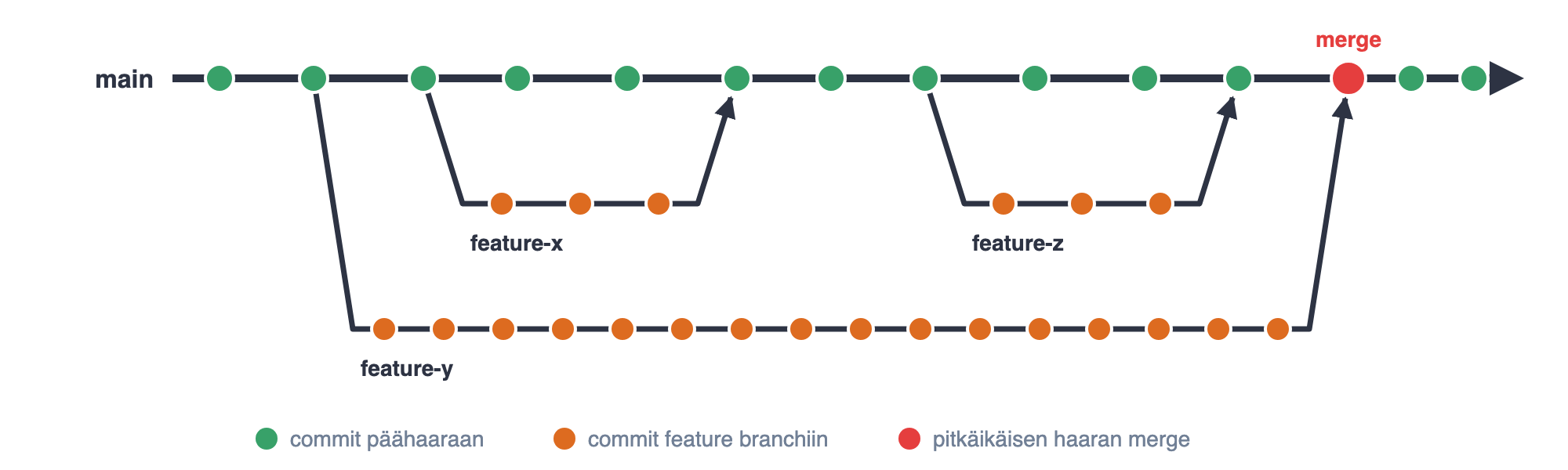
Feature branches are a common practice, but when they are long-lived they easily lead to nasty merge conflicts.
The result is a small-scale integration hell, merge hell, and a normal day for the development team, especially at the end of the sprint, starts to look like this

The longer a branch lives apart from the main branch, the more changes made by others accumulate in the main branch, and the more laborious the merge eventually is. If, on the other hand, branches are short-lived and are merged into the main branch several times a day, each merge is small and any conflicts are easy to fix:
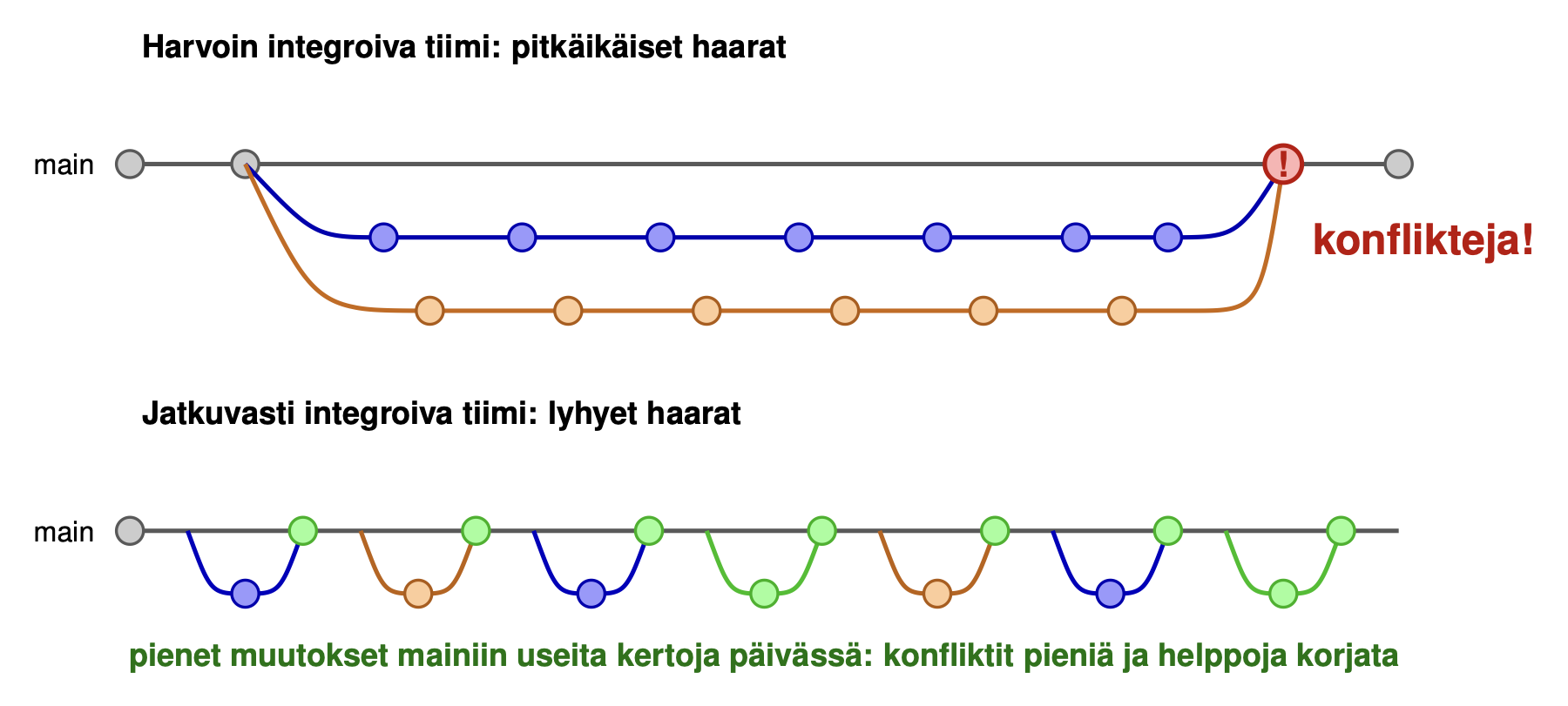
The alternative is trunk based development, in which long-lived feature branches are not used at all.
All changes are made directly to the main development branch, which is called the trunk. The name comes from the trunk of a tree, from which the branches grow. The term originates from older version control systems such as Subversion, where the main branch was usually named trunk. In Git, the main development branch can be main or some other separate branch depending on the conventions. If needed, a separate release branch may be created for each released version of the software. No new functionality is developed in a release branch. If a defect is found in a released version, the fix is first made in the trunk and then picked from there into the release branch (cherry-pick), after which the fixed version can be released.
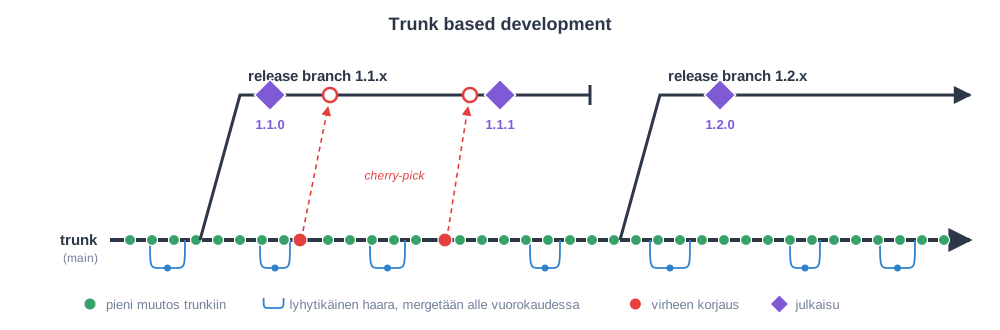
Trunk-based development forces developers to make small changes that are quickly merged into the main branch. It is often combined with feature flags: instead of implementing a new feature in its own branch and merging it into the main development branch only when it is complete, it is made directly in the main development branch but hidden from users with a feature flag. This way, even half-finished features can be deployed to the production environment without disturbing the application’s existing functionality.
Trunk-based development does not necessarily mean that every commit is made directly to the main development branch. A common practice is to use short-lived branches: the change is made in its own branch, a pull request is opened from it for review, and the branch is merged into the main branch within a day at the latest. This way, the review offered by pull requests and continuous integration fit together. According to DORA research, better delivery performance is associated with merging branches into the main branch at least once a day. This requires that work is split into small changes and that reviews happen quickly.
The trunk-based development model requires special discipline and systematic work from developers. Working with feature branches is indeed a safer way of working with beginners or less disciplined developers, despite all its problems. Reckless use of feature flags can lead to feature flag hell, so planning and systematic work are truly needed.
The trunk-based development model is followed by many of the world’s largest internet services, such as Google, Meta and Netflix.
DevOps
Applying continuous delivery, continuous deployment and testing in production is usually not at all straightforward.
Traditionally, companies have had a strict separation between developers (dev) and the system administrators responsible for server environments (operations, ops). It is very common that developers cannot even log in to the production servers, and deploying applications to production as well as, for example, schema updates to the production database are done only by the administrators.
In such an environment, practising for example continuous deployment is almost impossible, and the situation easily drifts into one where new versions can be deployed to the production server only rarely, for example only 4 times a year.
More flexible ways of deploying new features to production therefore require a completely different culture, one in which developers (dev) and operations (ops) work in close collaboration. For example, developers must be given the necessary access to the production server, or people who take care of server maintenance and operations must be placed in the Scrum team. A way of working in which developers and system administrators, that is, dev and ops people, work closely together is called DevOps.
DevOps is a term that is widely visible nowadays. For example, job ads may value DevOps skills or look for someone for a DevOps team. All kinds of DevOps tools are also on sale. It is, however, somewhat unclear what each person means by the term DevOps.
Most (sensible) definitions mean by DevOps specifically a shared way of working and communicating between developers and system administration, with the aim of making the deployment of the results of development as smooth as possible. This is why it is good to talk about DevOps culture.
There is a set of conceptual and technical tools that are often associated with DevOps-style work, for example
- automated testing
- continuous deployment
- virtualisation of computing and storage capacity
- containerisation (docker)
- infrastructure as code
- servers and application environments provided as cloud services (PaaS, IaaS, SaaS)
Many of the above matured during the 2010s and have made applying DevOps easier.
One of the most important enablers of DevOps has been the increasing shift from physical servers to virtual servers running in the cloud. Gradually, even “server hardware” has started to be defined through configuration files processed with code. This phenomenon is called infrastructure as code.
Automated, programmatic management of servers, storage capacity and network configurations has thus become more and more common. Server configurations can be stored in version control and even tested. Development and operations have started to resemble each other more than in the old (bad) days. This trend has led to developers gradually being required to have skills that used to be clearly the responsibility of system administrators.
Adopting tools is not enough, however; applying DevOps is fundamentally about cultural factors, team structures and allowing things.
Alongside DevOps, people often talk about Site Reliability Engineering (SRE), developed by Google. According to Google’s definition, in SRE, operations are done by means of software engineering: repetitive manual work (toil) is automated, and at most half of an SRE team’s working time may be spent on operations, the rest being used for development work that improves the system’s reliability. The central practices of SRE, service level objectives, the error budget and blameless postmortems, were already introduced in connection with the canary release. SRE can be seen as one concrete way of implementing DevOps thinking; Google itself describes the relationship in programmer’s terms: class SRE implements interface DevOps.
One of the most important principles of Scrum and agile methods is to make development teams cross-functional, that is, such that they contain all the know-how needed to get user stories done at the quality level defined by the Definition of Done. DevOps is one way of taking agility a step further, making it possible for agile teams to be truly cross-functional and to effortlessly take the new functionality they have implemented all the way to the production environment, and even to test and operate it in production.
One of the best definitions of DevOps is by Daniel Stori:
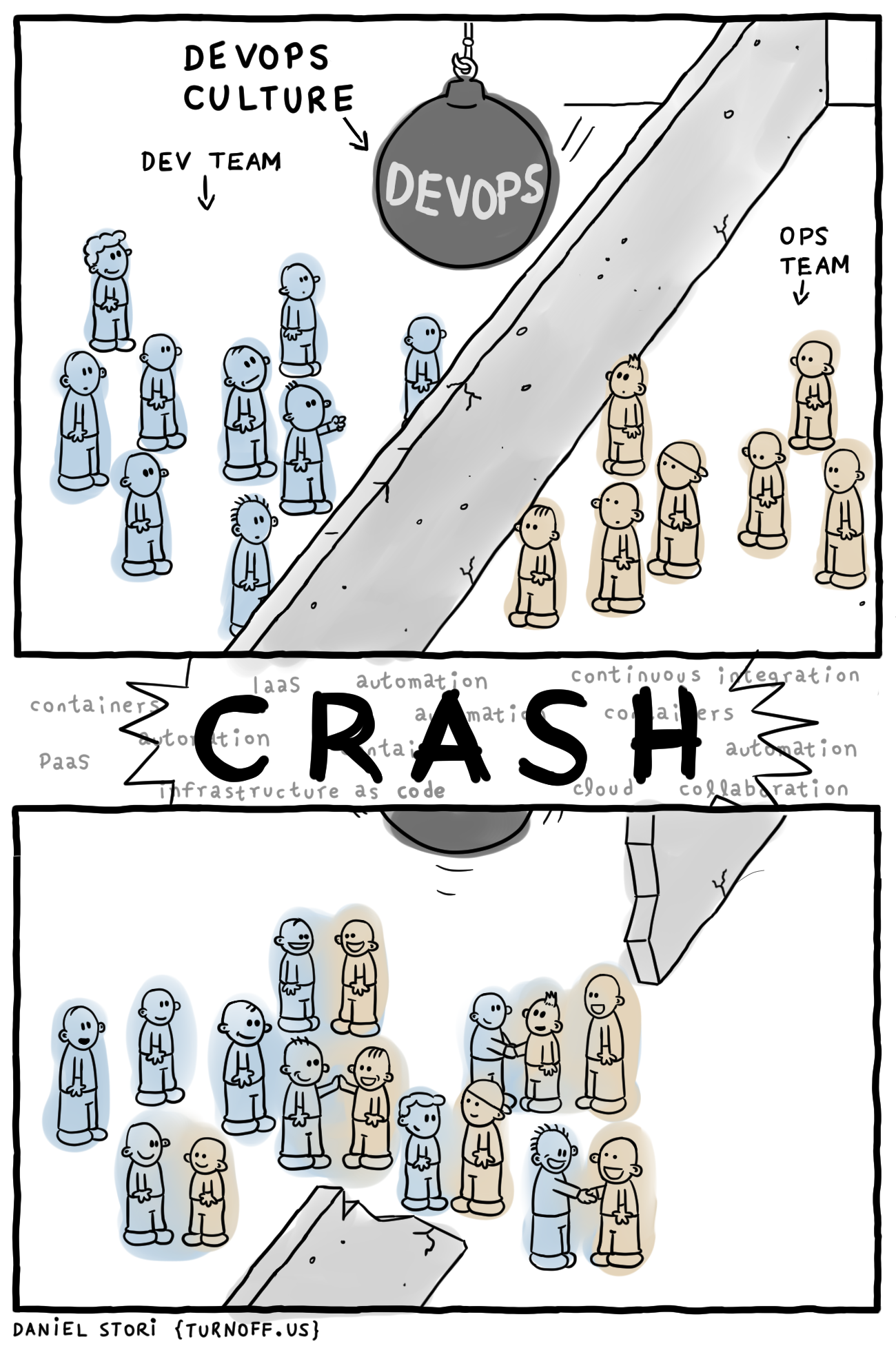
Summary - the agile testing quadrants
The field of agile testing can be structured with the so-called agile testing quadrants. The diagram was originally presented by Brian Marick in 2003, and it was made well known by Lisa Crispin and Janet Gregory in their books Agile Testing and More Agile Testing (2014). The following figure is an updated version for today, which follows Crispin and Gregory’s newer structuring and whose examples have been chosen from the topics covered on this course.
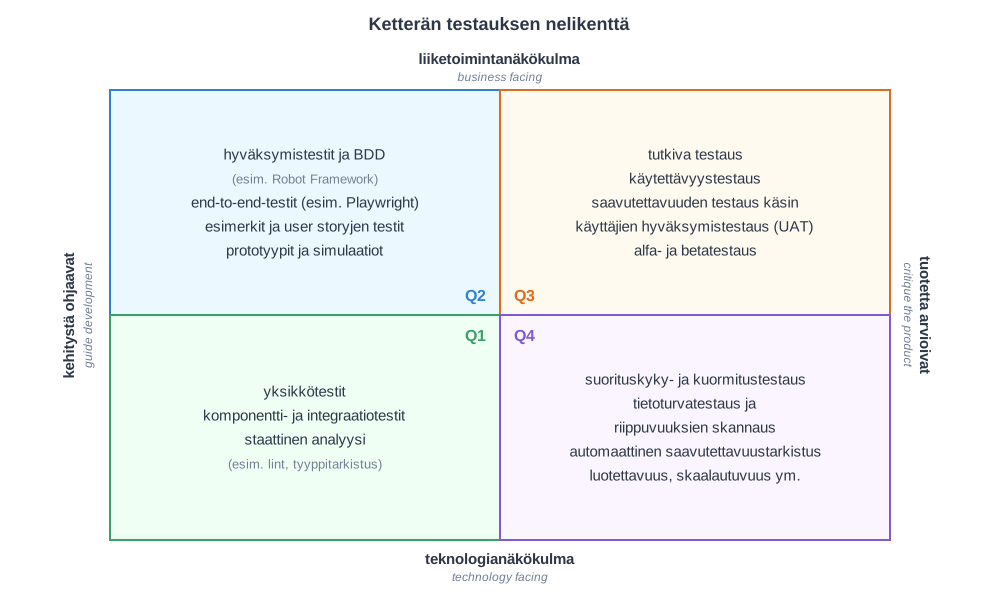
The testing methods are divided into four classes (Q1…Q4) along two dimensions:
- business facing vs. technology facing: does the testing target the functionality experienced by the user or the details of the software’s internal operation
- guide development vs. critique the product: do the tests support developers during programming, or do they evaluate a finished or nearly finished product
The quadrants correspond to the sections of this part:
- Q1: unit testing, integration testing and static analysis
- Q2: testing user stories, e.g. Robot Framework
- Q3: exploratory testing and validating requirements with users
- Q4: testing non-functional requirements, e.g. performance, security and accessibility
The tests of Q1 and Q2 can mostly be automated, and they are run as part of continuous integration. Q3 by its nature requires manual work, and Q4 usually needs specialised tools. The division is not sharp, however: for example, accessibility can partly be checked automatically, but some problems can only be found by trying.
All quadrants have their own role and place in agile software development, and it depends largely on the context in what proportion the resources available for testing and quality assurance should be allocated to each quadrant.
The quadrants do not, however, say anything about when testing is done, and they do not cover testing in production. Janet Gregory and Lisa Crispin’s newer Holistic Testing model tries to address this: in it, testing is part of the whole continuous development loop, from ideation and planning to implementation, deployment to production, observing the application in production and learning from it. The quadrants are still a useful tool for structuring what kind of testing is needed, whereas Holistic Testing structures at which stage of development testing is done.
Scientific evidence
There is plenty of anecdotal evidence that the continuous deployment and quality assurance practices presented above work, and many areas have also been studied academically. The fact that highly successful organisations such as Google, Netflix, Amazon and Meta rely on these practices, and have in places even developed them, also speaks in their favour.
The broadest and best documented view is offered by the DORA research programme (DevOps Research and Assessment), already mentioned several times in this part. The results of its first years, 2013–2017, survey research based on more than 20,000 responses, are reported in the book by Nicole Forsgren, Jez Humble and Gene Kim published in 2018, Accelerate: The Science of Lean Software and DevOps: Building and Scaling High Performing Technology Organizations.
Research results have also been published in peer-reviewed publications. Results relevant to this part are discussed, for example, in Forsgren and Humble’s article The Role of Continuous Delivery in IT and Organizational Performance (2016).
The following diagram summarises the results of the study:
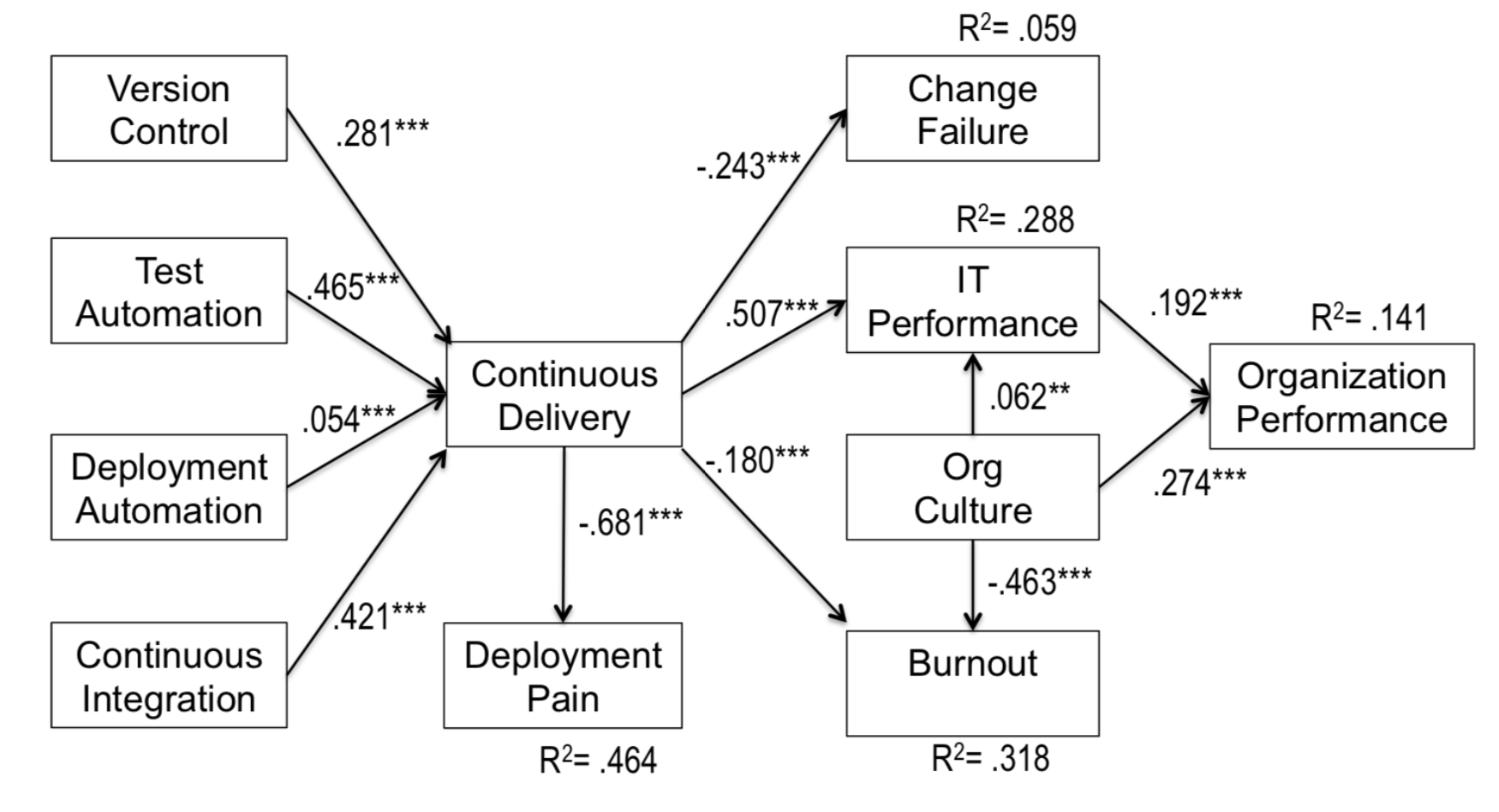
At the core of the study is finding out which factors contribute to a company’s effective operation, organizational performance in the figure. It was measured by asking the respondents to assess on a scale of 1–7 how the organisation had performed against its goals during the previous year in terms of, among other things, profitability, market share, productivity, growth in the number of customers and the quality of its applications.
On the left side of the figure are practices followed by the companies: version control, test automation, continuous integration and deployment automation, that is, the “DevOps” practices that form the core of continuous delivery. Their use in the respondent organisations was also measured in the survey on a scale of 1-7.
The arrows in the figure show which factors were statistically associated with each other in the study. The number next to an arrow (the path coefficient) tells the strength of the association: the larger the absolute value of the number, the stronger the association. A negative number means an inverse association, that is, when one grows, the other decreases. The stars tell the statistical significance of the result (*** means that p < 0.001). The R² value tells how large a share of the variation in a factor is explained by the arrows pointing to it.
For example, the following observations can be read from the figure:
- Test automation (0.465) and continuous integration (0.421) are most strongly associated with the extent to which an organisation is able to practise continuous delivery. The association of deployment automation (0.054) is surprisingly weak in this model.
- Continuous delivery is strongly associated with IT performance (0.507), that is, how quickly and reliably changes can be deployed to production. IT performance, in turn, is associated with the success of the whole organisation (0.192). The association with the company’s success is thus indirect.
- Continuous delivery reduces deployment pain (−0.681), which is the strongest association in the figure. It also reduces the number of failed changes (change failure, −0.243) and employee burnout (−0.180).
- Organisational culture is associated with the organisation’s success (0.274) even more strongly than IT performance, and it is also the strongest factor reducing burnout (−0.463).
Technical practices are thus not merely tools for developers; they are associated both with the organisation’s success and with the well-being of employees. It is worth noting, however, that the model explains only about 14 % of the variation in organisational success (R² = 0.141). A company’s success is naturally affected by many other things besides software development practices.
The figure above is from an article published in 2016. At this stage, the research of Forsgren and her colleagues focused on how technical DevOps practices affect a company’s effectiveness.
Since then, the focus of the research has been extended to the company’s management practices as well; most of these are related to the Lean philosophy, which is our topic in part 5.
More practices related to the effectiveness of organisations have also been identified, such as trunk based development and monitoring the application in production. DORA maintains a catalogue of the practices and capabilities identified in the research, describing the effects and adoption of each.
Below is a figure borrowed from the book Accelerate, which brings together the research results on how different practices contribute to a company’s effectiveness:
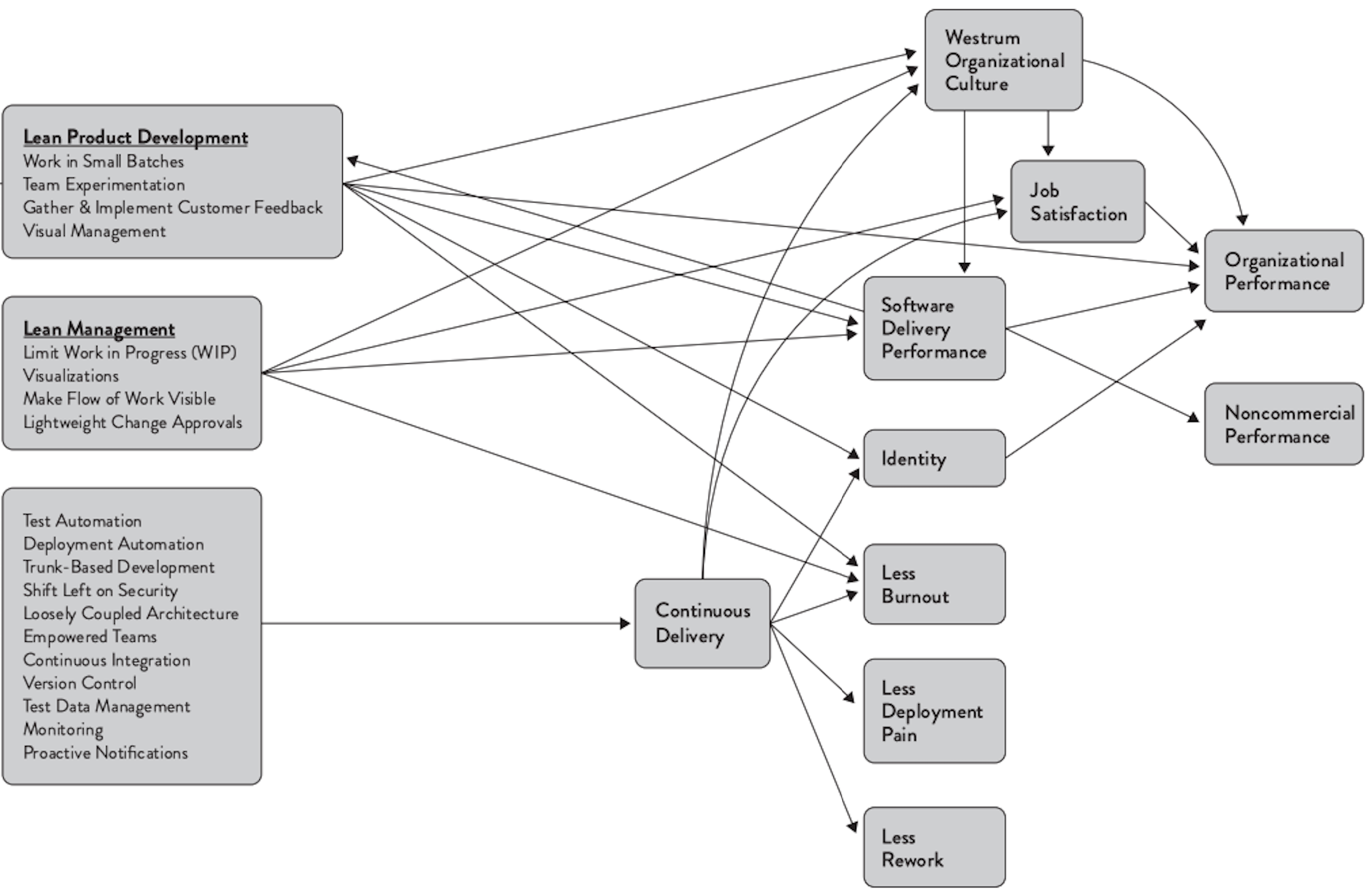
An arrow in the figure means that a factor predicts the factor at the tip of the arrow: a statistically significant association was observed in the research data, with a direction consistent with the authors’ model. For example, the arrow from continuous delivery to less burnout means that in organisations where continuous delivery was practised more, there was less burnout. This is not an experimentally proven cause-and-effect relationship, but a statistical model based on survey data. Unlike in the earlier figure, the arrows have no numbers indicating the strength of the association.
The figure is read from left to right. On the left are the practices: lean product development (e.g. working in small batches and making use of customer feedback), lean management (e.g. limiting work in progress and lightweight change approval practices), and at the bottom the technical practices covered in this part, such as test automation, continuous integration and trunk based development. The technical practices predict continuous delivery, which in turn predicts less burnout, less painful deployments and less rework, as well as a better organisational culture and job satisfaction. On the right are the outcomes: software delivery performance predicts both the organisation’s financial success (organizational performance) and noncommercial goals (noncommercial performance), such as customer satisfaction and the quality of operations.
There is also one arrow pointing backwards in the figure: software delivery performance predicts lean product development. The effect thus goes both ways: when changes can be deployed to production quickly, it is easier to work in small batches and experiment with customers, which in turn improves delivery performance.
In the upper right corner of the figure there is also organisational culture. In the research, culture was measured with the model of sociologist Ron Westrum, which divides organisations into three types according to how they treat information and failures:
- In a power-oriented (pathological) culture, fear prevails. Information is withheld or distorted to protect one’s own position, messengers bringing bad news are punished, and after a failure, a scapegoat is sought.
- In a rule-oriented (bureaucratic) culture, departments protect their own turf and act according to their own rules. Bad news is not punished, but it is not cared about either, and failures are handled according to the rules.
- In a performance-oriented (generative) culture, everything focuses on the shared goal. Information flows openly, risks are shared, and failure leads to investigating its causes.
In the research, it was specifically the performance-oriented culture that predicted both better delivery performance and job satisfaction. It is also interesting that, according to the figure, lean practices and continuous delivery in turn predict a better culture.
The research has been continued annually, nowadays as reports by the DORA group, which operates in connection with Google. Software delivery performance is measured with the so-called DORA metrics. Originally there were four metrics, and a fifth was added in 2024.
Throughput is described by
- deployment frequency
- the lead time of a change from version control to production (change lead time)
- the time to recover from a failed deployment (failed deployment recovery time)
Instability is described by
- the share of deployments that require an immediate fix (change fail rate)
- the share of unplanned deployments made because of problems in production (deployment rework rate)
A central finding of the research is that speed and stability are not opposites: the best performing organisations are good at both.
The 2025 report State of AI-assisted Software Development focused on the effects of AI. It abandoned the earlier division of organisations into four performance levels (elite, high, medium, low), and teams are instead described as seven team types, formed by taking into account not only delivery performance but also, among other things, friction in work and burnout. The central conclusion of the report is that AI acts as an amplifier: it magnifies an organisation’s existing strengths and weaknesses. The effects of AI are discussed in more detail in the material AI and the software development process.
DORA metrics describe software delivery performance, but not directly how productive developers are. Developer productivity has often been measured with single numbers, such as the number of commits or lines of code, which is easily misleading. The SPACE framework (2021) by Forsgren and researchers at Microsoft emphasises that productivity cannot be measured with a single metric. It divides productivity into five dimensions:
- satisfaction and well-being
- performance, that is, the outcomes of the work
- activity
- communication and collaboration
- efficiency and flow
When assessing productivity, it is recommended to use several dimensions at the same time and to combine the measurement data with the developers’ own assessments.
Researchers among the authors of the SPACE framework later condensed the factors affecting developer productivity into developer experience (DevEx) (2023). Its three dimensions are
- feedback loops: how quickly a developer gets feedback, e.g. from tests, the CI server and reviews
- cognitive load: how much extra thinking the work requires, for example because of poorly documented code or complex tools
- flow state: how well a developer can concentrate on their work without interruptions
The idea is that by improving these things that developers experience, productivity is improved at the same time. Many practices in this part, such as fast CI and automated testing, directly affect feedback loops.
When interpreting the results, it is good to remember that they are based on the respondents’ own assessments, and the associations observed are statistical dependencies rather than directly proven cause-and-effect relationships. For example, successful organisations may otherwise have better prerequisites for adopting good practices.
Final thoughts on testing and quality assurance
The things presented in this section are partly my own opinions on quality assurance, formed on the basis of experience and literature.
In agile methods, the central theme is producing value for the customer, and this should also be used as a guideline when assessing what and how much should be tested in a project. Testing has no intrinsic value, but a lack of testing soon starts to weaken the quality of the product and radically slow down the pace of development. In any case, testing and quality assurance have to be done a lot and repeatedly, which is why automating testing is usually worthwhile in the longer term.
Test automation is neither cheap nor easy. Automated tests done wrong, at the wrong time or at the wrong “level” can produce more harm and costs than benefits; the risk is especially great with tests done through the user interface.
If the software has components that may be removed or replaced soon, it is usually most sensible not to automate their tests. For example, the MVP, or Minimum Viable Product, presented in part 2, is a stripped-down implementation intended to quickly find out whether some feature is valuable to users at all. If the feature implemented by the MVP turns out to be unnecessary, it is removed from the system. It is therefore usually wise to build a feature made on the MVP principle without automating its tests.
The problem, however, is often that a component intended to be disposable can remain in the system for a long time, sometimes even permanently, because there is “no time” to implement it properly.
When developing completely new software or a new component, it usually makes sense to let the structure of the program stabilise first and to write more comprehensive tests only later. The testability of the components should, however, be kept in mind all the time, even if tests are not written for them right away.
Textbook TDD is applied fairly rarely. Sometimes, however, TDD is a useful tool, for example when developing interfaces for which the components using them do not exist yet. Writing tests takes the same effort as writing a “main program” that uses the code.
It is not worth writing comprehensive unit tests for all classes of a program; often an alternative is to write integration-level tests against the interfaces of the program’s larger components. Such tests are more likely to remain valid when the internal structure of the components changes. Unit testing is at its most useful in testing classes that contain complex logic.
Although system-level tests done through the user interface are risky because of possible changes to the user interface, they are often the most useful form of tests, since unlike, for example, unit tests, they test the application as a whole (that is, end to end).
It is worth writing as many automated tests as possible, especially for the interfaces of those system components that are modified often. Tests run through the user interface that are written too early in a project may cause an unreasonable amount of maintenance work, since the tests break easily even with small changes made to the user interface. So you should be careful about when to start automated testing through the user interface.
Test cases should resemble the real usage scenarios of the component under test as much as possible. There is no point in writing tests that merely increase test coverage.
Test cases should use data that is as realistic as possible, especially in system-level tests. Something in the code almost always breaks when real data is used, no matter how well the testing has been done. It is best if the staging environment uses data that is as similar to production data as possible. Production data containing personal data must then be anonymised, since copying it as such into a test environment conflicts with the GDPR.
My own view of testing is somewhat different from, and even to some extent opposite to, the so-called test pyramid, that is, Mike Cohn’s idea that most tests should be unit tests, since they are easy to write and fast to run. End-to-end tests that test the system as a whole, on the other hand, are slow, hard to write and prone to breaking from small changes, so their number should be as small as possible:
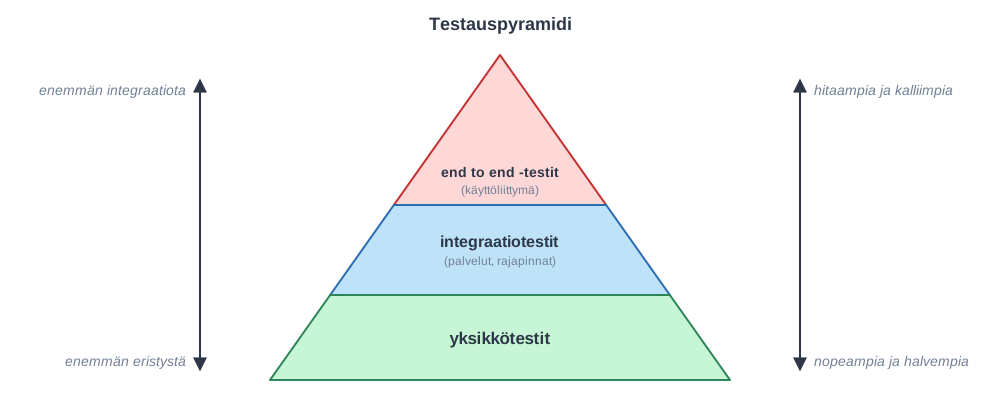
Cohn’s pyramid idea is already quite old, and far from everyone agrees with it. Opinions vary widely. The best-known alternatives are Kent C. Dodds’s testing trophy and Spotify’s testing honeycomb, in which the emphasis is on integration tests instead of unit tests.
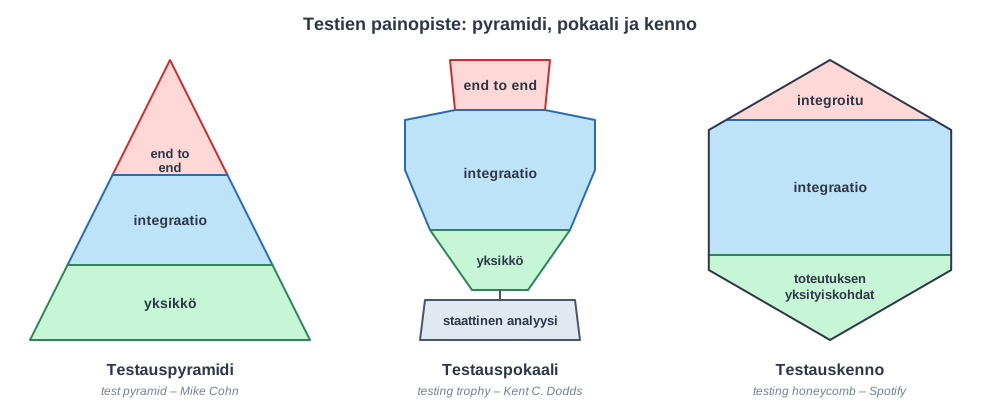
In the figures, the width of each layer describes how many tests of that level should be written. In addition, the base of the trophy is static analysis, for example linting and type checking, which find some of the defects without running tests. At the bottom of the honeycomb are tests that test the details of the code’s implementation, which should be written only sparingly, since they break easily when the structure of the code is changed. The “integrated” layer of the honeycomb means tests whose outcome depends on the operation of some other system.
There is certainly no single truth on the matter. As I already stated earlier, automated tests done at the wrong “level” at the wrong time are a great risk, and since writing system-level tests is really laborious, there is always a danger of a wasted investment in them.
By far the most important thing for the application’s quality assurance is deploying to production as often as possible. That in turn requires a well-built deployment pipeline and sufficiently comprehensive test automation, and it becomes substantially easier if the trunk based development principle is used instead of feature branches. I warmly recommend deploying to production as often as possible, even several times a day. This usually guarantees that no bad integration problems arise, and that regressions in the application are detected and can be fixed as quickly as possible.
AI-assisted programming changes the picture in many ways. It was stated above that test automation is neither cheap nor easy. This no longer holds in the same way, since coding agents write tests quickly and effortlessly. When writing tests is cheap, it is worth writing a lot of them, at all levels from unit tests to end-to-end tests. A comprehensive test suite also acts as a safety net for the coding agent: when the agent changes the code, the tests immediately reveal if it breaks something that already worked, and regressions cannot creep in. The quality of the tests written by agents must, however, be kept an eye on. For example, an agent may write tests that do not really test anything essential, or change a failing test so that it passes instead of fixing the code.
With AI, it is also possible to create completely new kinds of tests that would have been too laborious to write by hand. For example, a script run from time to time could systematically compare the state of the database with what is visible through the user interface and report any inconsistencies found.
You may not always have time to review AI-written code line by line, and it may not even always be sensible. In that case, however, confidence that the code works must be achieved by other means, above all by strengthening automated testing.
AI is also a great help in code review, and it is worth asking it for reviews often. In the prompt, you should say what kinds of things the review should pay attention to, for example security. I believe we will soon be in a situation where releasing code that has not been reviewed by AI is too great a risk.
Even in the age of AI, the human role in quality assurance largely remains the “common sense” checks done through exploratory testing: does the application work as a whole as it should, and is it what the users acually need in the first place.