This English version of the course material has been machine translated from the Finnish original and may contain errors. If something is unclear, check the Finnish version of this page.
Week 4
The deadline for the exercises below is Monday 23.11. at 23:59
You can get help with the exercises on the course Discord channel and on campus in the help sessions (paja) in BK107:
- Mon 16–19
- Tue 13–16
- Thu 16–19
- Fri 13–16
You can join the course Discord channel with the command /join course TKT20006 - Ohjelmistotuotanto - ohtu
Also remember this week’s multiple choice quizzes, whose deadline is Sunday 22.11. at 23:59:00.
In exercises 1-3 and 5 you will get to know “mocking” dependencies in unit tests. In exercise 4 you will clean up test code with the help of an AI agent, and in exercise 6 you will practise test-driven development, i.e. TDD, together with an agent. Exercise 7 introduces Git tags. At the end of the week there is also an optional extra exercise on mutation testing.
Typos or unclear instructions in the exercises?
Suggest a fix by editing this file on GitHub.
Course feedback
In addition to the usual feedback collected at the end, the course uses so-called continuous feedback: you can give anonymous feedback to the course staff at any time at https://norppa.helsinki.fi/targets/112400522/feedback
Problems with uv?
Some instructions can be found here
Submitting the exercises
The exercises are submitted to GitHub, and you mark the completed exercises in the submission app https://study.cs.helsinki.fi/stats/courses/ohtu-2026 on the “my submission” tab.
All of this week’s exercises are submitted to the submission repository you used in the previous weeks, inside the directory viikko4.
See more detailed instructions about the submission repository here.
The ticks in the exercise checkboxes are saved in your browser’s local storage.
GitHub Education
Weeks 2–7 have [AI] exercises that you can do either with GitHub Copilot or with OpenCode. Choosing the tool and the reasons for the choice are covered in exercise 9 of week 2.
You can do most of the exercises with the free Copilot Free version, but its monthly quota is limited. When done with Copilot, the week 5 exercises require Copilot Student, a version that is free for students and that you get by activating a GitHub Education membership. If you plan to use Copilot, apply for the membership now. According to the internet, it can take up to a week for the application to be approved.
OpenCode uses the language models of the university’s CurreChat, so it does not require a GitHub Education membership.
1. Unit testing and dependencies: the mock library, part 1
Most classes have dependencies on other classes. For example, in the NHL statistics exercise of week 1, the class StatisticsService depends on the class PlayerReader. With dependency injection we were nicely able to remove the direct dependencies between the classes.
Even if classes have no direct dependencies on other classes, the objects of a class still use the services of objects of some other classes. This sometimes makes unit testing difficult. How, for example, should the class StatisticsService be tested? Should the tests include working versions of all its dependencies?
In the NHL statistics exercise, the problem was solved by programming a “stub component” PlayerReaderStub that replaces the dependency:
import unittest
from statistics_service import StatisticsService
from player import Player

class PlayerReaderStub:
    def get_players(self):
        return [
            Player("Semenko", "EDM", 4, 12),
            Player("Lemieux", "PIT", 45, 54),
            Player("Kurri",   "EDM", 37, 53),
            Player("Yzerman", "DET", 42, 56),
            Player("Gretzky", "EDM", 35, 89)
        ]

class TestStatisticsService(unittest.TestCase):
    def setUp(self):
        # give the StatisticsService object an object of the "stub" class
        self.stats = StatisticsService(
            PlayerReaderStub()
        )

    # ...
For Python, as for all other languages, there are also ready-made libraries for creating stub components, also known as mock objects.
As we will soon see, mock objects are not just “stub objects”: with mocks you can also verify that the method or function under test calls the methods of objects in the appropriate way.
We will now get to know the mock library of the unittest module. From the library we can import the class Mock.
Start a Python terminal with the command python3:
>>> from unittest.mock import Mock
>>> mock = Mock()
>>> mock
<Mock id='4568521696'>
Type the same inputs into the terminal one at a time as in the example above. Pressing Enter executes the given input.
So the variable mock contains an object of the Mock class. Objects of the Mock class have the interesting property that all possible attributes and methods have been implemented for them. What does this mean?
Let us try:
>>> mock.foo
<Mock name='mock.foo' id='4568521648'>
>>> mock.foo.bar()
<Mock name='mock.foo.bar()' id='4570560112'>
Again, do the steps yourself too!
So all the given operations return a new Mock object. We can give the object’s methods desired return values with the return_value attribute:
>>> mock.foo.bar.return_value = "Foobar"
>>> mock.foo.bar()
'Foobar'
Again, do the steps yourself too!
We can also give methods desired implementations with the side_effect attribute:
>>> mock.foo.bar.side_effect = lambda name: f"{name}: Foobar"
>>> mock.foo.bar("Kalle")
'Kalle: Foobar'
Do it!
The value of the attribute side_effect must be callable, like a function, a method or a lambda. Note that a Mock object can also be used like a function:
>>> get_name_mock = Mock(return_value = "Matti")
>>> get_name_mock()
'Matti'
In addition to implementations, assertions can be defined for mocks. We can for example assert that a Mock object has been called:
>>> mock.foo.bar.assert_called()
>>> mock.foo.doo.assert_called()
Traceback (most recent call last):
  File "<stdin>", line 1, in <module>
  File "/opt/homebrew/Cellar/python@3.11/3.11.6_1/Frameworks/Python.framework/Versions/3.11/lib/python3.12/unittest/mock.py", line 908, in assert_called
AssertionError: Expected 'doo' to have been called.
Try the above as well
So we can call the method assert_called on the method we are examining. Note that the method mock.foo.bar has been called, but the method mock.foo.doo has not. We can also check that a method has been called with the right arguments by using the method assert_called_with.
Once you are familiar with Mock objects, you can close the terminal with the command exit().
Next, fetch the project in the directory viikko4/mock-demo of the course repository.
No code is written in this exercise, so you do not necessarily need to submit the project. If you want, you can copy the project to your submission repository, inside the directory viikko4.
The project is a simple online store whose application logic is implemented by the class Kauppa (store). The class depends on the objects Pankki (bank) and Viitegeneraattori (reference number generator).
The store works in a simple way:
my_net_bank = Pankki()
viitteet = Viitegeneraattori()
kauppa = Kauppa(my_net_bank, viitteet)

kauppa.aloita_ostokset()
kauppa.lisaa_ostos(5)
kauppa.lisaa_ostos(7)
kauppa.maksa("1111")
Shopping is started by calling the method aloita_ostokset. After this, products are added to the “shopping cart”, and the price of each product is given as the parameter of the method lisaa_ostos. Shopping is ended by calling the method maksa, which gets as its parameter the account number to be charged.
The store makes the charge using the object of the class Pankki that it knows. The reference number used is a number generated by the class Viitegeneraattori. So the structure of the application looks like this:

Six tests that use the Mock class have been written for the project. The tests verify that the store charges for the purchases correctly, i.e. that it calls the method maksa of the Pankki class with the right parameters, and that a reference number has been requested from the method uusi of the Viitegeneraattori class for each charge. So the tests do not target the state of the store object, but the correctness of its interaction with other objects. In the tests, the dependencies of the store (Pankki and Viitegeneraattori) are defined as Mock objects.
Here is a test that checks that the store calls the bank’s method with the right account number and sum:
def test_kutsutaan_pankkia_oikealla_tilinumerolla_ja_summalla(self):
    pankki_mock = Mock()
    viitegeneraattori_mock = Mock(wraps=Viitegeneraattori())

    kauppa = Kauppa(pankki_mock, viitegeneraattori_mock)

    kauppa.aloita_ostokset()
    kauppa.lisaa_ostos(5)
    kauppa.lisaa_ostos(5)
    kauppa.maksa("1111")

    # verify that the values of the first and second parameter are correct
    pankki_mock.maksa.assert_called_with("1111", 10, ANY)
So the test starts by creating mock objects for the dependencies of the store:
pankki_mock = Mock()
viitegeneraattori_mock = Mock(wraps=Viitegeneraattori())

kauppa = Kauppa(pankki_mock, viitegeneraattori_mock)
With the wraps parameter of the constructor of the Mock class, we can use the methods of an existing object through the mock object. This means that we do not need to define an implementation for e.g. the method uusi, but can use its real implementation.
So now the reference number generator is an object whose method uusi returns the values 1, 2, 3…
The test checks that the method calls made to the store cause the method maksa of the bank’s Mock object to be called with the right parameters. The third parameter, i.e. the reference number, is ignored:
pankki_mock.maksa.assert_called_with("1111", 10, ANY)
As the previous examples show, return values can be defined for method calls of Mock objects. The following test specifies that the reference number generator returns the value 55 when its method uusi is called:
def test_kaytetaan_maksussa_palautettua_viitetta(self):
    pankki_mock = Mock()
    viitegeneraattori_mock = Mock()

    # always return the value 55
    viitegeneraattori_mock.uusi.return_value = 55

    kauppa = Kauppa(pankki_mock, viitegeneraattori_mock)

    kauppa.aloita_ostokset()
    kauppa.lisaa_ostos(5)
    kauppa.lisaa_ostos(5)
    kauppa.maksa("1111")

    # check that the value of the third parameter is correct
    pankki_mock.maksa.assert_called_with(ANY, ANY, 55)
At the end of the test we verify that the bank’s Mock object has been called with the right parameter values, i.e. that the third parameter is the value returned by the reference number generator.
Get to know the project and all its tests:
Install the project’s dependencies with the command uv sync and then run the tests in the virtual environment with the command pytest
Break some test, for example one of those mentioned above, by changing its expectation e.g. as follows:
pankki_mock.maksa.assert_called_with(ANY, ANY, 1000)
Make sure that the tests do not pass. Look at what the error message looks like.
You can learn more about the topic by reading the documentation of the mock library.
2. Unit testing and dependencies: the mock library, part 2
Fetch the project in the directory viikko4/maksukortti-mock of the course repository.
Copy the project to your submission repository, inside the directory viikko4.
The purpose of this exercise is to test and complete the class Kassapaate (cash register), a slightly more advanced version of which may be familiar to at least some of you from the course Ohjelmoinnin jatkokurssi (Advanced Course in Programming).
You must not touch the code of the payment card (Maksukortti) at all in this exercise! The tests are also not meant to create concrete instances of the payment card; the cards needed by the tests must be created with the mock library.
The project has two ready-made tests:
import unittest
from unittest.mock import Mock, ANY
from kassapaate import Kassapaate, HINTA
from maksukortti import Maksukortti

class TestKassapaate(unittest.TestCase):
    def setUp(self):
        self.kassa = Kassapaate()

    def test_kortilta_velotetaan_hinta_jos_rahaa_on(self):
        maksukortti_mock = Mock()
        maksukortti_mock.saldo.return_value = 10

        self.kassa.osta_lounas(maksukortti_mock)

        maksukortti_mock.osta.assert_called_with(HINTA)

    def test_kortilta_ei_veloteta_jos_raha_ei_riita(self):
        maksukortti_mock = Mock()
        maksukortti_mock.saldo.return_value = 4

        self.kassa.osta_lounas(maksukortti_mock)

        maksukortti_mock.osta.assert_not_called()
The first test verifies that if there is enough money on the card, calling the cash register’s method osta_lounas charges the sum from the card, i.e. calls the card’s method osta.
So the test only concerns how the cash register calls the methods of the payment card. The balance of the payment card is not checked separately, since the assumption is that the payment card’s own tests verify how the card works.
The second test verifies that if there is not enough money on the card, calling the cash register’s method osta_lounas does not charge money from the card, i.e. that the card’s method osta has not been called.
The tests do not pass. Fix the cash register’s method osta_lounas.
Reminder You must not touch the code of the payment card at all in this exercise! The tests are also not meant to examine the state of the payment card directly. Since the payment card is a mock, looking at the values of its attributes is not even possible/meaningful.
After this, write the following tests following the same principle:
Calling the cash register’s method lataa adds the amount of money to be loaded to the payment card using the card’s method lataa, if the amount to be loaded is positive
Calling the cash register’s method lataa does nothing to the payment card if the amount to be loaded is negative
Note:
- The tests are not meant to create concrete instances of the payment card; the cards needed by the tests must be created with the mock library.
- The tests also do not test the state of the payment card directly, only whether the payment card’s methods have been called correctly.
Fix the cash register so that the tests pass.
3. Unit testing and dependencies: the mock library, part 3
The directory viikko4/verkkokauppa of the course repository contains a slightly extended version of the online store of exercise 1.
Copy the project to your submission repository, inside the directory viikko4.
The program now contains a few more classes, and the functionality is more complex. Kauppa manages each shopping transaction as an object of the class Ostoskori (shopping cart). Tuote (product) objects, which represent the products on sale, are put in the shopping cart. Varasto (warehouse) manages the store’s product range. As in the simpler example, the store also has a Pankki that handles payments and a Viitegeneraattori. The structure of the program as a class diagram:

Get to know the code.
Draw a sequence diagram that describes how the main program in the file src/index.py works (for the first shopping transaction). You do not need to submit the diagram
The objects Pankki, Viitelaskuri and Varasto are injected into the class Kauppa in its constructor. In the tests, mocked versions of these have been made with the Mock library.
The program has a ready-made test that checks that the bank’s method tilisiirto (bank transfer) has been called after a shopping transaction:
import unittest
from unittest.mock import Mock, ANY
from kauppa import Kauppa
from viitegeneraattori import Viitegeneraattori
from varasto import Varasto
from tuote import Tuote

class TestKauppa(unittest.TestCase):
    def test_maksettaessa_ostos_pankin_metodia_tilisiirto_kutsutaan(self):
        pankki_mock = Mock()
        viitegeneraattori_mock = Mock()

        # always return the value 42
        viitegeneraattori_mock.uusi.return_value = 42

        varasto_mock = Mock()

        # make an implementation for the saldo method
        def varasto_saldo(tuote_id):
            if tuote_id == 1:
                return 10

        # make an implementation for the hae_tuote method
        def varasto_hae_tuote(tuote_id):
            if tuote_id == 1:
                return Tuote(1, "maito", 5)

        # take the implementations into use
        varasto_mock.saldo.side_effect = varasto_saldo
        varasto_mock.hae_tuote.side_effect = varasto_hae_tuote

        # initialise the store
        kauppa = Kauppa(varasto_mock, pankki_mock, viitegeneraattori_mock)

        # do the shopping
        kauppa.aloita_asiointi()
        # add the product with id 1 to the shopping cart
        kauppa.lisaa_koriin(1)
        kauppa.tilimaksu("pekka", "12345")

        # verify that the method tilisiirto has been called
        pankki_mock.tilisiirto.assert_called()
        # for now, the arguments of the call are ignored
Make sure that the test runs successfully.
After this, write the following tests:
Shopping is started, a product that is in stock is added to the cart and the purchase is made, i.e. the store’s method tilimaksu is called; verify that the bank’s method tilisiirto is called with the right customer, account numbers and sum
This is otherwise a copy-paste of the example above, but the method assert_called_with must be used so that you can check that the parameters have the right values
Shopping is started, two different products that are in stock are added to the cart and the purchase is made; verify that the bank’s method tilisiirto is called with the right customer, account number and sum
Shopping is started, two of the same product, of which there is enough in stock, are added to the cart and the purchase is made; verify that the bank’s method tilisiirto is called with the right customer, account number and sum
Shopping is started, a product of which there is enough in stock and a product that is out of stock are added to the cart and the purchase is made; verify that the bank’s method tilisiirto is called with the right customer, account number and sum
4. Cleaning up test code with an agent [AI]
Note: if you run out of CurreChat tokens, you can get more by sending a message to matti.luukkainen@helsinki.fi or to the user mluukkai on Discord.
By default, OpenCode runs commands and edits files without asking for permission. Before you start, make sure that command approval is enabled, i.e. that the file opencode.json containing the setting is either in the project directory or in one of its parent directories, e.g. in the root of your submission repository
Before doing the exercise, read the section Evaluating tests written by an agent of the material AI in software engineering.
The tests of exercise 3 have probably accumulated a lot of repetition, since every test creates the same mocks and defines the same implementations for them. Initialisation common to all tests can be done in the setUp method, which is run before each test:
class TestKauppa(unittest.TestCase):
    def setUp(self):
        self.pankki_mock = Mock()
        # ...
Ask Copilot’s Agent modeOpenCode’s Build agent to clean up the test code by removing the repetition from it, moving the common initialisation to the setUp method. The functionality of the tests must not change
Read the changes made by the agent (git diff) and make sure that the tests still pass.
If you want, improve what the agent produced, either yourself or by asking the agent for changes.
Write a short reflection on your experiences in the file setup_ai.md in the directory viikko4
In the reflection, tell
- In your opinion, did the agent remove the repetition sensibly? Is the test code now easier to read?
- Did the agent change the functionality of the tests, e.g. did it remove or weaken checks (
assert_called_withvs.assert_called)? - Did you have to fix the agent’s changes yourself or ask it for changes? What and why?
5. Unit testing and dependencies: the mock library, part 4
Let us continue testing the code of exercise 3
Verify that calling the method aloita_asiointi resets the data of the previous purchase (i.e. the price of the previous purchase does not show up in the price of the new purchase)
If needed, look for help in the tests of the mock-demo project of exercise 1, which use the mock attribute call_args_list. It contains a list of all calls made to the mock, along with their parameters.
Verify that the store requests a new reference number for each payment transaction. Again, help can be found in the mock-demo tests if needed.
Use coverage, used in weeks 1 and 2, to check the test coverage of the class Kauppa.
Something seems to be missing.
Add a test that raises the coverage to about one hundred percent! If bugs come up, fix them.
On using mock objects
Mock objects may have felt a bit complicated in the previous exercises. Mocks do have their place, though. If an object that the object under test depends on is complex, such as the class Pankki in the online store example, the object under test should definitely be tested without using the real dependency in the test. A fake object can of course also be made “by hand”, but in certain situations mocks made with mock libraries are handier than hand-made fake objects, especially if there is reason to examine the method calls the object under test makes to its dependencies.
6. TDD with an agent [AI]
Note: if you run out of CurreChat tokens, you can get more by sending a message to matti.luukkainen@helsinki.fi or to the user mluukkai on Discord.
By default, OpenCode runs commands and edits files without asking for permission. Before you start, make sure that command approval is enabled, i.e. that the file opencode.json containing the setting is either in the project directory or in one of its parent directories, e.g. in the root of your submission repository
Before doing the exercise, read the week 4 part Tests and version control as guardrails for the agent of the material AI in software engineering.
In this exercise you will program the shopping cart of an online store test-driven, so that the work is divided between a human and an agent.
Fetch the project in the directory viikko4/tdd-ostoskori of the course repository and copy it to your submission repository inside the directory viikko4
In this exercise the logic of some classes is slightly different in principle from the online store we dealt with in the previous exercises. The exercise focuses on three classes, Ostoskori (shopping cart), Ostos (purchase) and Tuote (product), whose relationship is the following:
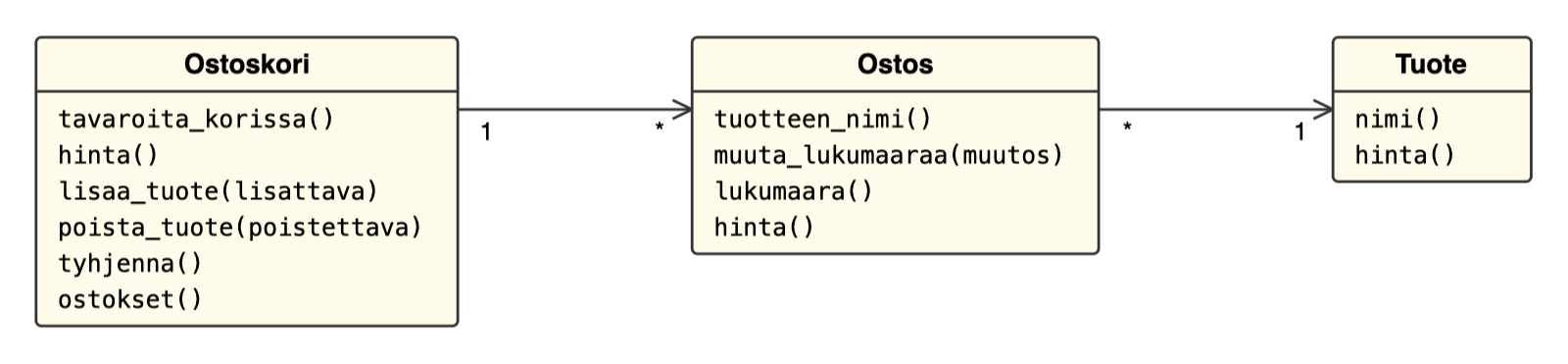
So the shopping cart contains purchases, each of which corresponds to one specific product.
The class Tuote is very straightforward. A product has a name, a price and a stock balance (which is not used for anything, though):
class Tuote:
  def __init__(self, nimi: str, hinta: int):
      self._nimi = nimi
      self._hinta = hinta
      self._saldo = 0

  def hinta(self):
    return self._hinta

  def nimi(self):
    return self._nimi

  def __repr__(self):
      return f"{self._nimi} hinta {self._hinta} euroa"
So a product describes the data of one product, e.g. Valion Plusmaito (name, price and stock balance; a product could also have e.g. a description and other fields characterising it).
Products are not put in the shopping cart; purchases (Ostos) are. A purchase refers to a product and tells how many items of the product there are. So if you buy e.g. 24 cartons of milk, the shopping cart gets an Ostos object that refers to the milk product object and tells that there are 24 items of the product in the cart. The code of the Ostos class:
from tuote import Tuote

class Ostos:
    def __init__(self, tuote: Tuote):
        self.tuote = tuote
        self._lukumaara = 1

    def tuotteen_nimi(self):
        return self.tuote.nimi()

    def muuta_lukumaaraa(self, muutos: int):
        self._lukumaara += muutos
        if self._lukumaara < 0:
            self._lukumaara = 0

    def lukumaara(self):
        return self._lukumaara

    def hinta(self):
        return self._lukumaara * self.tuote.hinta()
Your task is now to program the class Ostoskori.
The API, i.e. the method interface, of the shopping cart is the following (the method bodies contain pass statements so that the Python interpreter does not complain about syntax errors):
from tuote import Tuote
from ostos import Ostos

class Ostoskori:
    def __init__(self):
        pass
        # the shopping cart stores Ostos objects, one per Tuote in the cart

    def tavaroita_korissa(self):
        pass
        # tells the number of items in the cart
        # if 2 items of the product "maito" have been added to the cart,
        #   the method should return 2
        # if the cart has 1 item of the product "maito" and 1 item of the product "juusto",
        #   the method should return 2

    def hinta(self):
        return 0
        # tells the total price of the purchases in the cart

    def lisaa_tuote(self, lisattava: Tuote):
        # adds the product
        pass

    def poista_tuote(self, poistettava: Tuote):
        # removes the product
        pass

    def tyhjenna(self):
        pass
        # empties the shopping cart

    def ostokset(self):
        pass
        # returns a list of the Ostos objects in the cart
        # so each Ostos object tells which product it is about
        #   AND how many items of that product are in the cart
If several items of the same product are put in the shopping cart, the corresponding Ostos object, which remembers the quantity of that product, is updated.
The shopping cart is programmed with the Test Driven Development technique. Proper TDD proceeds as follows:
- Write just enough of a test so that the test does not pass. So do not create all tests of the class or method right away, but proceed one test at a time.
- Write just enough code to make the test pass. Do not even try to write the “final” code right away.
- If you notice that the structure of the code has gone bad (i.e. you notice e.g. repetition or overly long methods in the code), refactor the structure of the code to be better, and make sure all the time that the tests still pass. Refactoring means changing the internal structure of the code so that its interface and functionality stay unchanged.
- Continue from step 1
Instructing the agent
Open the directory in VS Code as its own workspaceStart OpenCode in the project directory and create an instructions file for the project in the same way as in exercise 8 of week 3
Add at least the following rules to the instructions file:
- Tests executed with
uv run pytest - Code of
ostos.pyandtuote.pyshould not be changed - Tests should not be edited unless explicitly asked
- Always implement absolutely minimal code that makes the tests pass
Commit the instructions file
Part A: you write the tests, the agent codes
Steps 1-7 are done so that on each step
- you write the test of the step yourself
- you make sure that the test does not pass
- you ask the agent to implement code that makes the test pass
- you read the change made by the agent (
git diff) and make sure that the agent did not touch the tests - you commit the change
Keep all tests working all the time, i.e. if some change breaks the tests, do not move on to the next step until all tests pass again. If the agent does more at once than the test requires, e.g. already implements the functionality of future steps, ask it to stick to the minimal implementation.
1. The price and the number of items of a newly created shopping cart are 0.
The exercise template has one ready-made test
class TestOstoskori(unittest.TestCase):
    def setUp(self):
        self.kori = Ostoskori()

    # step 1
    def test_ostoskorin_hinta_ja_tavaroiden_maara_alussa(self):
        self.assertEqual(self.kori.hinta(), 0)
Extend the test so that it also tests the number of items (the return value of the method tavaroita_korissa).
After implementing the first step, check particularly carefully whether the agent followed the rule of the instructions file about minimal implementation. The agent easily implements more than the test requires, e.g. based on the comments in the code. You can also ask the agent itself about it:

If the agent did too much, make the rule in the instructions file stricter, undo the agent’s implementation (git restore src/ostoskori.py, which keeps your own test) and ask for the implementation again. Repeat this until you get the agent under control, and only then move on to the next step
2. After adding one product, the shopping cart has 1 item.
Note: so you have to create a product in your test that you add to the cart:
class TestOstoskori(unittest.TestCase):
    def setUp(self):
        self.kori = Ostoskori()

    # step 1
    def test_ostoskorin_hinta_ja_tuotteiden_maara_alussa(self):
        self.assertEqual(self.kori.hinta(), 0)
        # ...

    # step 2
    def test_yhden_tuotteen_lisaamisen_jalkeen_korissa_yksi_tavara(self):
        maito = Tuote("Maito", 3)
        self.kori.lisaa_tuote(maito)

        # ...
3. After adding one product, the price of the shopping cart is the same as the price of the product.
4. After adding two different products, the shopping cart has 2 items
5. After adding two different products, the price of the shopping cart is the sum of the prices of the products
6. After adding two of the same product, the shopping cart has 2 items
7. After adding two of the same product, the price of the shopping cart is 2 times the price of the product
Part B: the agent writes the tests
Steps 8-12 are done so that you ask the agent to do the step with the TDD technique, i.e. to first write the test and then the implementation. Give the agent the description of the step from the exercise. After each step, go through the test written by the agent: does it test what the description of the step requires? Commit after each step.
8. After adding one product, the shopping cart contains one purchase
This tests the shopping cart’s method ostokset; the test should check that the length of the list returned by the method is 1.
9. After adding one product, the shopping cart contains a purchase with the same name as the product and quantity 1
So the test must again examine the list returned by the cart’s method ostokset and verify that the first purchase in the list is as desired.
10. After adding two different products, the shopping cart contains two purchases
11. After adding two of the same product, the shopping cart contains exactly one purchase
12. After adding two of the same product, the shopping cart contains exactly one purchase with the same name as the product and quantity 2
Part C: the remaining steps
Do steps 13-15 in whichever way you like, either by writing the tests yourself or with the agent. Still, keep proceeding one test at a time according to TDD and commit after each step.
13. If the cart has two of the same product and one of them is removed, the cart is left with a purchase with 1 item of the product
14. If a product has been added to the cart and the same product is removed, the cart is empty after this
An empty cart presumably means that there are no products, the price of the cart is zero and the length of the list of purchases is zero
15. The method tyhjenna empties the cart
Refactoring
Refactoring is part of the TDD cycle, and it is easily skipped when writing minimal implementations.
Read through the final code and tests and assess whether there is something to improve. E.g. the methods poista_tuote and lisaa_tuote may have been left with duplication, the methods may have grown long, or the tests may have repetitive initialisation code
If you find something to improve, ask the agent to refactor the code. Tell the agent what you want improved, and do not let it change the functionality
Read the change made by the agent, make sure that the tests still pass, and commit
Write a report of your experiences in the file tdd_ai.md in the directory viikko4
In the report, tell
- Did the agent end up with a good implementation and high-quality tests?
- In part A, did the agent stick to the minimal implementation, and did it leave the tests alone?
- Did the agent at any point try to “cheat”, e.g. by hard-coding the value expected by the test?
- Which division of work, A or B, felt better, and why?
7. git: tags [version control]
In this exercise we get to know Git tags:
Git has the ability to tag specific points in history as being important. Typically people use this functionality to mark release points (v1.0, and so on)
First read http://git-scm.com/book/en/v2/Git-Basics-Tagging (you can skip the parts ‘signed tags’ and ‘verifying tags’).
Do the following in the same repository where you submit your exercises:
Create a tag named v1.0.0 (a lightweight tag is enough)
Make three commits (i.e. 3 times change + add + commit)
Create a tag named v1.1.0
Look at what your history looks like with the gitk command
Go back to the time of the tag v.1.0.0, i.e. give the command git checkout v1.0.0
Make sure that the changes after the tag are not visible
Return to the present. This can be done with the command git checkout main
Add a tag to the previous commit
- This can be done with the command
git tag v1.0.1 HEAD^, i.e. HEAD^ refers to the commit before the current “head”, i.e. the current position in history - On some Windows systems the form
HEAD^does not work; you can use the formHEAD~instead - Or by looking up the commit’s identifier (a long string of characters) either with the command
git logor with gitk
Look at what the history looks like with the command gitk
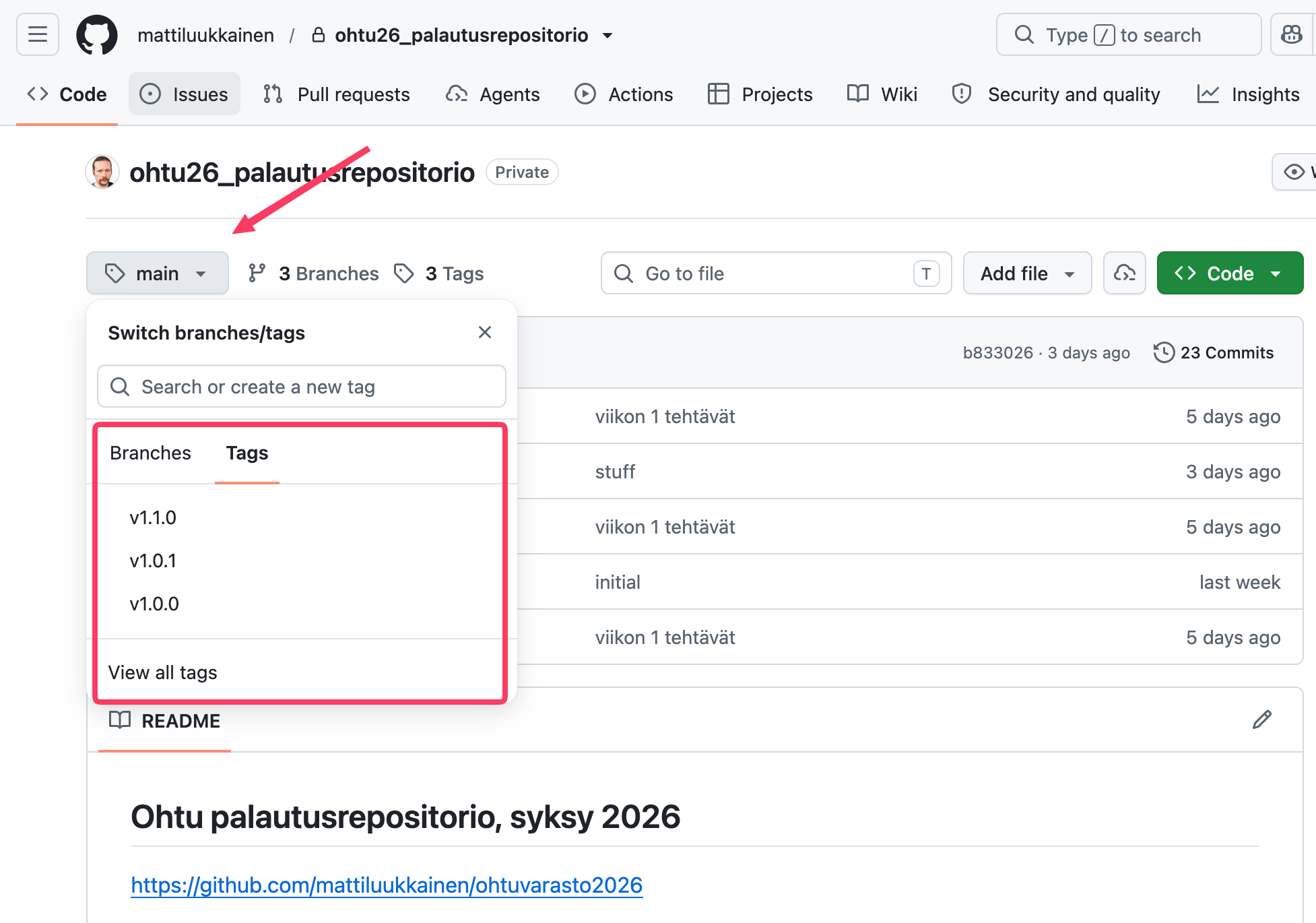
Tags are not automatically transferred to remote repositories. Push your code to GitHub so that the tags are transferred too. See the instructions here.
Make sure that the tags are transferred to GitHub:
What are tags good for? When we look at the list of commits with the command git log, we notice that Git identifies commits with identifiers that are hard for humans:
commit 26c50e603aca79f02d478ca36a3d307f7ea10e14
Author: Matti Luukkainen <mluukkai@iki.fi>
Date:   Mon Oct 30 16:35:04 2025 +0200

    do not destroy answers if dl extended

commit 8026bd3ac416a7b1e6957d54d9296156e97571e6
Author: iPegii <51372604+iPegii@users.noreply.github.com>
Date:   Sun Oct 29 14:25:31 2025 +0200

    Show "Evaluation TDK" -special group in admin view

commit 0834035d0c113c7c46161c6fe8d655a9a90b2548
Merge: e5c09ae6 4dfcbf54
Author: iPegii <51372604+iPegii@users.noreply.github.com>
Date:   Sun Oct 29 14:03:13 2025 +0200

    Merge branch 'master' of github.com:UniversityOfHelsinkiCS/lomake

commit e5c09ae692ebf46cd0acfa15552ca3e85d7348fa
Author: iPegii <51372604+iPegii@users.noreply.github.com>
Date:   Sun Oct 29 14:02:52 2025 +0200

    update eslintignore to stop eslint hanging
With tags, commits can be marked in a form that is clearer to humans. It is typical to use tags to mark released versions of software. If a bug appears in a released program, this makes it easy to go back to the released version in the code.
Submitting the exercises
Push all the exercises you have done (except those that say the exercise is not submitted anywhere) to your submission repository on GitHub, and mark the exercises you have done in the submission app https://study.cs.helsinki.fi/stats/courses/ohtu-2026
Optional extra exercise: mutation testing
How good are the shopping cart tests of exercise 6? You can assess the quality of tests by deliberately planting bugs in the code and seeing whether the tests notice them. The same principle is mentioned in the section Evaluating tests written by an agent of the material AI in software engineering as a way to assess the quality of tests written by an agent. This idea is automated in mutation testing: a tool systematically makes small changes, i.e. mutants, to the code (e.g. replaces a == comparison with != or the number -1 with -2) and runs the tests for each mutant. If the tests pass despite the mutant, the mutant survives, and the tests are probably missing something. Let us try Python’s mutmut tool on the shopping cart.
Note: mutmut does not work directly on Windows; Windows users should use WSL.
Install mutmut as a development dependency of the project with the command uv add --dev mutmut
Add the following configuration to the end of the file pyproject.toml; it limits the mutations to the class Ostoskori:
[tool.mutmut]
source_paths = ["src/"]
do_not_mutate = ["src/tests/*", "src/tuote.py", "src/ostos.py", "src/index.py"]
Add the directory mutants created by mutmut to the file .gitignore
Mutmut copies the whole project, tests included, to the directory mutants. So that plain uv run pytest does not also try to run the tests copied there (which causes the error import file mismatch), we limit pytest to look for tests only in the directory src:
Also add the following to the file pyproject.toml:
[tool.pytest.ini_options]
testpaths = ["src"]
Mutation testing the shopping cart
Run mutation testing with the command uv run mutmut run
During the run, mutmut shows a summary where 🎉 means killed mutants (the tests noticed the change), 🙁 surviving mutants (the tests passed despite the change) and 🫥 mutants for which the executed code is not tested at all. E.g. here all 16 mutants were killed:
⠙ 16/16 🎉 16 🫥 0 ⏰ 0 🤔 0 🙁 0 🔇 0 🧙 0
If the tests of steps 1-15 of exercise 6 are in order, all shopping cart mutants probably die. That is a good sign, but it does not yet tell much about how mutation testing helps. So let us weaken the tests on purpose.
Note: mutmut does not notice changes made only to tests; it uses the results of the previous run instead. When you have changed only tests, delete the directory mutants before a new run:
rm -rf mutants && uv run mutmut run
Comment out the test of step 13, which tests removing a product, and run mutation testing again
Restore the test of step 13, comment out the test of step 14 and run mutation testing again
In both cases some mutant of the method poista_tuote probably survives, since the remaining test does not notice all errors related to removing.
You can try the same with other tests too. You will probably notice that not all tests are equally important: some tests can be removed without a single mutant surviving, because other tests cover the same thing.
You can see the results of mutation testing with the command uv run mutmut results, which lists the surviving (survived) and untested (no tests) mutants. You can see the change made by an individual mutant with the command uv run mutmut show <name of the mutant>, e.g.
$ uv run mutmut show "ostoskori.xǁOstoskoriǁpoista_tuote__mutmut_4"
--- src/ostoskori.py
+++ src/ostoskori.py
@@ -1,7 +1,7 @@
 def poista_tuote(self, poistettava: Tuote):
     for o in self._ostokset:
         if o.tuotteen_nimi() == poistettava.nimi():
-            o.muuta_lukumaaraa(-1)
+            o.muuta_lukumaaraa(-2)
             if o.lukumaara() == 0:
                 self._ostokset.remove(o)
             return
The names and numbers of the mutants depend on your implementation, so your own results will look slightly different.
Examine the changes made by the surviving mutants. Which of the removed tests would have killed them?
Restore the tests and make sure that all mutants die again
Mutation testing the class Ostos
Let us also extend the mutations to the class Ostos, which the shopping cart tests test indirectly.
Remove "src/ostos.py" from the do_not_mutate list of the mutmut configuration in the file pyproject.toml and run mutation testing again
Now some of the mutants probably survive. They are found in the method muuta_lukumaaraa, e.g.
$ uv run mutmut show "ostos.xǁOstosǁmuuta_lukumaaraa__mutmut_6"
--- src/ostos.py
+++ src/ostos.py
@@ -1,4 +1,4 @@
 def muuta_lukumaaraa(self, muutos: int):
     self._lukumaara += muutos
     if self._lukumaara<0:
-        self._lukumaara = 0
+        self._lukumaara = 1
Examine the surviving mutants and consider for each of them:
- Is the mutant equivalent, i.e. does it change the behaviour of the program at all?
An example of an equivalent mutant:
$ uv run mutmut show "ostos.xǁOstosǁmuuta_lukumaaraa__mutmut_3"
--- src/ostos.py
+++ src/ostos.py
@@ -1,4 +1,4 @@
 def muuta_lukumaaraa(self, muutos: int):
     self._lukumaara += muutos
-    if self._lukumaara<0:
+    if self._lukumaara <= 0:
         self._lukumaara = 0
The mutant changes the condition < 0 to <= 0. The difference shows only when the quantity is exactly 0: in the original code the condition is not true and the quantity stays at 0; in the mutant the condition is true and the quantity is set to 0. The end result is the same in both, so no test can distinguish the mutant from the original code. So a mutant like this cannot be killed, and there is no need to try. You can read more about equivalent mutants and the challenges they cause e.g. on Wikipedia.
Otherwise, equivalent mutants always remain on the list of survivors and easily bury the mutants that really reveal shortcomings in the tests. You can tell mutmut not to mutate a certain line by adding the comment # pragma: no mutate to the end of the line:
    def muuta_lukumaaraa(self, muutos: int):
        self._lukumaara += muutos
        if self._lukumaara<0:  # pragma: no mutate
            self._lukumaara = 0
The pragma prevents all mutations of the line, not only the equivalent ones. So you should use it only on lines whose mutants have all been found to be equivalent; otherwise the pragma also hides real shortcomings in the tests. In this case both mutants of the line (<= 0 and < 1) are equivalent.
Mark the equivalent mutants with the pragma and run mutation testing again
Kill the mutants worth killing by writing tests for the class Ostos. You can use the agent to help, but make sure that the added tests really test something meaningful and are not just tuned to kill mutants
So it is not necessarily worthwhile or even possible to kill all mutants. The results of mutation testing therefore always require human interpretation.
You do not need to submit this exercise, and it does not give course points.